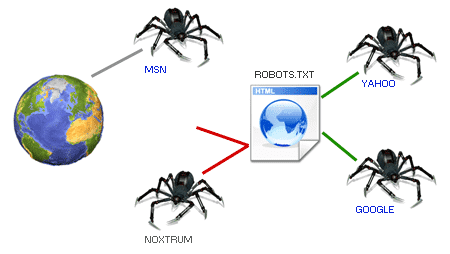
Today our daily lives revolve around questions; every day we ask dozens of questions to search engines like Google, where magically, as if a robot had everything ready, it shows us a search result based on what we asked. However, have you stopped to wonder how this is possible, where these results magically appearing on our screen come from? But rarely do we stop to think about how it is possible for those results to appear so quickly and so well-organized.
The answer is that these search engines like Google are always looking for new sites and analyzing existing ones, always in search of data, and one of the pioneer files when it comes to working with search engines so they index our web are robots.txt.
One of the most important files for communicating with them from our website is robots.txt, a small, simple file, but key for SEO and the correct indexing of a website.
How search engines work and why robots exist
What are robots, bots, spiders, or crawlers
Robots (also called bots, spiders, or crawlers) are automated programs that travel the Internet constantly. Their mission is to visit web pages, analyze their content, and decide what information deserves to be indexed in search engines.
Understanding this completely changes the way you see your website: you are not just writing for people, but also for robots.
How Google and other search engines “read” a website
When a robot arrives at a website, it doesn't just start crawling. Before doing anything, it looks for a very specific file in the root of the domain: robots.txt. That file acts as an initial guide that tells it where it can and where it should not go.
The robots.txt file is nothing more than a plain text file with a .txt extension that helps prevent certain robots that analyze websites from adding unnecessary information; it even allows blocking these robots; in other words, it allows indicating guidelines or recommendations on how to index our website for different robots.
Robots are generally search engines that access the pages that make up our site to analyze them; these are also called bots, spiders, crawlers, etc.
We can also specify to the spiders or crawlers what they can crawl or index and what parts they cannot access or should not access; that is, these are simply recommendations, but this does not guarantee that in the end the spider won't try to enter parts we don't want.
This is a file that is directly linked to the organization of our site; in it we indicate which parts of our web are visible or not, and with this indicate how our website is organized. For this reason, it is fundamental that it is well programmed, and for that you can follow the guidelines outlined in this post.
Some well-known robots
- Googlebot: Google's search engine; with which it discovers new pages and updates existing ones.
- Mediapartners-Google: The Google robot that finds pages with AdSense.
- Bingbot: Microsoft's search engine; just as in the case of Google's search engine, with bingbot, Microsoft discovers new pages that feed Bing.
These are just to mention some of the most important ones; but there are many more.
When a robot is going to analyze a website, the first thing it does is look for the robots.txt in the root of the web to know which pages it has to index and see if there is any section of the website that it should not crawl or index.
What is robots.txt for?
If we decide to use a robots.txt on our website, we can achieve a series of benefits:
- Prohibit zones: This is one of the most common uses; it basically consists of having zones on our website that do not appear in search engines; for example, the administration section of the site, website logs, or any other content that we do not want to be located by these robots.
- Eliminate duplicate content: Search engines will give us a better ranking if we avoid duplicating content.
- Avoid overloading the server: In this way, we can prevent a robot from saturating the server with excessive requests.
- Indicate the site map (sitemap).
- Block robots: There are "bad robots" whose sole purpose is to crawl the web looking for emails to Spam, to cite one case.
If our website is not going to have "prohibited zones," nor a sitemap, nor does it have duplicate content, then we should not include robots.txt on the website; not even an empty one.
What is robots.txt NOT for?
As we have mentioned throughout the article, robots.txt establishes recommendations on how to index our site; but some robots (which we will call "bad robots") may not respect these recommendations for various reasons:
- If the website contains sensitive or delicate information and you do not want it to be located by search engines, it is advisable to use some security method to protect the information.
Simple definition of the robots.txt file
The robots.txt file is a plain text file (with a .txt extension) used to tell search engine robots which parts of a website they can crawl and which they cannot.
It is not a complex file nor does it have advanced code: precisely its strength lies in its simplicity.
Where it is located and why it is always in the root of the site
Robots.txt must always be in the root of the domain, for example:
https://yoursite.com/robots.txt
If it is not there, robots will not take it into account. That is why it is said to be one of the “pioneer” files in communication between a website and search engines.
Characteristics of robots.txt
Some of the main characteristics that robots.txt must fulfill are the following:
- This file must be unique on our website.
- Unformatted file.
- URLs are case-sensitive and no blank spaces should be left between lines.
- The file must be in the root of the website.
- It indicates the location of the sitemap or website map in XML.
How do we create the robots.txt file?
The robots.txt file must be stored in the root of our server; it is a file that anyone can access from their browser and you must create or upload a file named "robots.txt"; it's that easy; in the end your path should look like:
https://yourweb.com/robots.txt
User-agent: As its name indicates, this corresponds to the user agent; there are several types and it refers to the robots or spiders of search engines; you can see a collection of them at the following link Robots Database. Its syntax would be:User-agent: -Robot name-- Disallow: Tells the spider that we do not want it to access or crawl a URL, subdirectory, or directory of our website or application.
Disallow: -resource you want to block- - Allow: Contrary to the previous one, it indicates which URL folders or subfolders we want it to analyze and index.
Allow: -resource you want to index- Sitemap: Indicates the path of our sitemap or site map in XML.
To simplify the rules we detailed above, you can use special characters: *, ?, $; the asterisk to indicate all, the dollar sign to indicate the end of a resource (for example, to reference all PHP files /*.php$), and the question mark to indicate that it matches the end of the URL.
For example, to indicate in the robots.txt file that you want to prevent all spiders from accessing a particular directory because it is private, you can apply the following rules:
- User-agent: * Disallow: /private-folder/
You only want to exclude the Google robot:
- User-agent: Googlebot Disallow: /private-folder/
Or Bing's:
User-agent: Bingbot Disallow: /private-folder/
- The following rule serves to indicate that all folders containing
private-folderwill be private. - User-agent: * Disallow: /private-folder*/
To block a URL:
- Disallow: /android/my-blocked-page.html
Example of a robots.txt file
User-Agent: * Disallow: /private-folder*/ Disallow: /admin/ Allow: /uploads/images/ Sitemap: https://yourweb.com/sitemap.xml
In the previous example, we are telling all spiders not to index or process folders containing private-folder or the admin folder, but to process resources in /uploads/images/ and we are also telling it where our sitemap is.
If we want to indicate that the content of our images is allowed for all agents and also indicate where our Sitemap is:
Although remember that these are only recommendations made to search spiders so they don't index a folder or a particular resource.
What the robots.txt file is used for on a website
Control which parts of the web are crawled or not
One of the most common uses of robots.txt is to block areas that make no sense for search engines, such as:
- Admin panels
- Technical folders
- Temporary files
Avoid duplicate content and improve SEO
On more than one occasion, I have found websites that ranked worse simply by allowing Google to index duplicate or irrelevant URLs. Robots.txt helps focus crawling on what is truly important.
Reduce server load and optimize crawl budget
Robots consume server resources. Using robots.txt well allows avoiding unnecessary crawling and optimizing the so-called crawl budget, especially important on large sites.
Indicate the location of sitemap.xml
Another very common use is to indicate where the sitemap is located:
Sitemap: https://yoursite.com/sitemap.xmlThis makes it easier for search engines to find all relevant pages.
What robots.txt DOES NOT do (important limitations)
- Why robots.txt is not a security system
- Something that should be made very clear: robots.txt does not protect sensitive information. It is only a recommendation. Anyone can type /robots.txt on your domain and see its content.
- What happens with bots that do not respect the rules
- “Good” robots (Google, Bing, etc.) usually respect these guidelines. However, malicious bots can ignore them completely, so robots.txt should never be used as a security measure.
Robots.txt and artificial intelligence: what you should know today
- AI bots vs traditional search engine bots
- In recent years, AI bots have appeared whose objective is not just to index content, but to collect data to train models. These bots generate many more requests and do not always behave the same as classic crawlers.
- Can AI access be blocked with robots.txt?
- Yes, specific rules can be added for certain AI user-agents, indicating that they should not access the content. But, as with other bots, it is not an absolute guarantee.
- Real limitations when preventing AI model training
- Here it is important to be honest: robots.txt cannot 100% prevent your content from being used for AI training. It works as a signal of intent, not as a technical barrier.
- Current best practices for controlling AI crawlers
- Identify known AI bots and create specific rules
- Combine robots.txt with server measures (firewalls, rate limiting)
- Do not rely solely on robots.txt to protect strategic content
Main directives of the robots.txt file
User-agent: which robot the rules apply to
Indicates which robot the instructions affect:
User-agent: GooglebotOr to all:
User-agent: *Disallow: block files, folders, or URLs
Used to indicate what should not be crawled:
Disallow: /admin/Allow: allow exceptions
Allows authorizing sub-paths within blocked folders:
Allow: /private/documents/Sitemap: indicate the site map
Facilitates crawling:
Sitemap: https://yoursite.com/sitemap.xmlCrawl-delay: when to use it and when not
Indicates a waiting time between requests. Note: Google does not respect it, although other search engines do.
Practical examples of robots.txt
Block a private folder
User-agent: * Disallow: /private-folder/Block only Google or only Bing
User-agent: Googlebot Disallow: /private/Block files by extension
User-agent: * Disallow: /*.pdf$Full example of a well-configured robots.txt
User-agent: * Disallow: /admin/ Disallow: /private-folder*/ Allow: /uploads/images/ Sitemap: https://yoursite.com/sitemap.xmlCommon errors when configuring robots.txt
- Blocking the whole site by mistake
- A simple Disallow: / can make your website disappear from Google.
- Using robots.txt when noindex should be used
- For pages already indexed, noindex is usually more effective.
- Relying on robots.txt to protect sensitive information
- It is never a real security solution.
How to check if your robots.txt is working correctly
- Verification with Google Search Console
- Google offers a specific tool to test the robots.txt file and detect errors.
- Basic manual checks
- Simply access it from the browser at:
- https://yoursite.com/robots.txt
- and review its content.
Conclusion: when to use robots.txt and when not
The robots.txt file is a fundamental tool for organizing and communicating how your website should be crawled, improving SEO, and optimizing resources. In my case, understanding its operation marked a before and after when structuring web projects.
That said, its power should not be overrated: it is not security, it is not an order, and it is not infallible, especially in the current context of AI bots.
Used wisely, it remains a key piece of technical SEO.
Frequently asked questions about the robots.txt file
- Is it mandatory to have a robots.txt?
- No, it is only recommended if you need to control crawling.
- Does blocking in robots.txt remove pages from Google?
- Not necessarily; for that, noindex is better.
- Do AI bots respect robots.txt?
- Some do, others don't. It is only a recommendation.
Conclusions
Adding the robots.txt file to our website is recommended as it is a way to organize our website, indicating to robots which sites are not accessible, where there is duplicate content, where our website's sitemap is, among others; but we must remember that these are only recommendations; that is, it will not prevent a malicious robot from accessing the areas that have been disabled in the robots.txt; besides this, robots.txt is a public file that can be accessed and its content consulted by any entity with a web browser.