
Content Index
- 1. What is localization in Laravel and why it is important
- 2. Initial localization setup in Laravel
- 3. Creation of language files (PHP and JSON) and text strings for translation
- 4. Displaying translations in views and controllers
- 5. How to change language dynamically in your app
- 6. Advanced localization and best practices
- Middleware to verify the es/en language prefix in Laravel
- Translations in Laravel with Inertia.js
- The manual solution
- The elegant solution: bilateral integration with a package
- Installation in the backend (PHP)
- Language files configuration (Lang)
- Logic in routes and controller
- The language controller
- Consuming translations in the Vue component
- Selecting language in Laravel with Livewire
- The component and locale management
- Transition and interface reload
- Middleware to maintain language across requests
- Language files in JSON format
- 7. Conclusion: experience and practical recommendations
- ❓ Frequently asked questions
Laravel includes native support for localization, that is, the ability to adapt your application to the language and region from which it is consumed. This allows you to offer two key features: automatic detection of the user's language and translation of texts according to their preference. In this article we will cover both scenarios, from the basic configuration of app_locale to integration with Livewire and Inertia.js.
If you haven't yet seen how to handle Custom Exceptions in Laravel, I recommend taking a look at it before continuing.
Localization in Laravel is one of those features that, once you master them, allow you to take your applications to another level. In my experience, it not only improves the usability of the product, but also opens the door to new markets and international users. Throughout this guide I will explain how to configure, create, and manage translations in Laravel, relying on real examples and best practices.
1. What is localization in Laravel and why it is important
Localization (L10n) is the process of adapting your application to different languages, currencies, or regional formats. Laravel integrates it natively, facilitating both the translation of texts and the automatic detection of the user's language. It is one of the most powerful features of the framework and, surprisingly, one of the most underrated.
In one of my first multi-language projects, I discovered that a minimal configuration was enough to offer the complete interface in English and Spanish. This capability is especially useful if your application has international users or if you plan to expand outside your initial market.
Key difference between the two concepts that are often confused:
- Internationalization (i18n): preparing the app to handle multiple languages (structure, configuration, data flow).
- Localization (L10n): adapting the specific texts and configurations to each particular language or region.
2. Initial localization setup in Laravel
When creating a new Laravel project, you will notice that the /lang folder does not exist by default. In my first attempts I thought it was an error, but in reality Laravel expects you to generate it yourself with a simple Artisan command:
$ php artisan lang:publishThis command creates the /lang folder in the project root and publishes the base language files that Laravel uses internally (validations, pagination, passwords, etc.). It is the mandatory starting point before creating your own translation files.
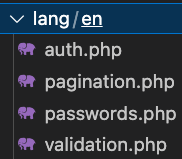
Inside config/app.php you can define the default language by modifying the locale key:
'locale' => 'es',If you work with multiple languages, it is also recommended to adjust the fallback_locale (fallback language):
'fallback_locale' => 'en',This way, if a translation in Spanish is missing, Laravel will automatically display the text in English instead of returning the raw key. This is especially useful during development, when language files may be incomplete.
3. Creation of language files (PHP and JSON) and text strings for translation
Laravel provides two formats for managing translation strings. In both cases, the files must be placed inside the base /lang folder:
PHP Format (files organized by language in subfolders):
/lang
    /en
        messages.php
    /es
        messages.php
JSON Format (one file per language in the root of /lang):
/lang
    en.json
    es.json
In this guide we will use the PHP format, as it is more scalable and allows modularizing messages by context (authentication, user messages, validations, etc.). You can create as many files as you need inside each language subfolder.
Each file returns an array of key/value pairs, where the key identifies the text and the value is the corresponding translation. For example:
lang/en/messages.php
<?php

return [
    'welcome' => 'Welcome to our application!',
];
lang/es/messages.php
<?php

return [
   'welcome' => 'Bienvenido a nuestra aplicación!',
];
4. Displaying translations in views and controllers
Once the strings are created, you can display them anywhere in your application using the __() helper function or the @lang directive in Blade:
echo __('messages.welcome')The format is file.key: first the file name (without extension) and then the key inside the array. The __() function returns the translated text corresponding to the active locale; if the key does not exist, it returns the key itself as fallback text. This scheme works in both PHP controllers and Blade views.
You can also use the Blade directive @lang('messages.welcome'), which is equivalent and particularly readable inside templates. Both options are valid; the choice is a matter of preference.
Common mistakes to avoid:
- Using an incorrect key (Laravel will return the literal key instead of the translation).
- Not having executed
php artisan lang:publishto generate the/langfolder. - Forgetting to clear the cache with
php artisan config:clearafter changing language or configuration files.
5. How to change language dynamically in your app
To change the language during navigation, you can do it manually inside a controller or, more elegantly, through a localization middleware that intercepts every request. The middleware is the recommended option because it centralizes the logic and keeps it out of your controllers.
Generate the middleware with Artisan:
$ php artisan make:middleware LocalizationAnd inside the handle method you set the locale according to the parameter received in the request:
public function handle($request, Closure $next)
{
   $locale = $request->get('lang', config('app.locale'));
   app()->setLocale($locale);
   return $next($request);
}
Thus, if the user visits /home?lang=es, the application will automatically switch to Spanish for that request.
In one of my projects, I added a language selector in the site header and saved the preference in the session to maintain the user's choice between visits:
session(['locale' => $locale]);
app()->setLocale(session('locale', 'es'));
6. Advanced localization and best practices
Once you master the basic setup, you can move forward to more complex scenarios:
- Translation of dynamic content (from the database): using packages like Spatie Translatable, which stores translations directly in JSON columns without needing additional tables per language.
- Translated routes: with packages like
mcamara/laravel-localizationyou can have user-friendly URLs per language (e.g.,/es/blogvs./en/blog). - Multi-language SEO: implementing
<link rel="alternate" hreflang="...">tags to indicate to search engines the page versions in each language.
Additionally, Laravel allows pluralization and variable substitution in translation strings directly from language files:
'notifications' => '{0} You have no notifications|{1} You have one notification|[2,*] You have :count notifications',With this structure, the framework automatically chooses the correct phrase based on the provided number. To use it, you call trans_choice('messages.notifications', $count) instead of the usual __() function. You can also include replacement variables in any string: for example, 'greeting' => 'Hello, :name!' is resolved by calling __('messages.greeting', ['name' => 'Andrés']).
Middleware to verify the es/en language prefix in Laravel
The next development consists of creating a middleware that detects the configured language in the URL through a prefix like es or en and sets the application's locale accordingly, using the translation strings we defined earlier. Furthermore, if the prefix is not valid, it will automatically redirect to the default language. To create it:
$ php artisan make:middleware LanguagePrefixMiddlewareWith the following content:
app\Http\Middleware\LanguagePrefixMiddleware.php
<?php

namespace App\Http\Middleware;

use Closure;
use Illuminate\Http\Request;
use Symfony\Component\HttpFoundation\Response;

class LanguagePrefixMiddleware
{
    /**
     * Handle an incoming request.
     *
     * @param  \Closure(\Illuminate\Http\Request): (\Symfony\Component\HttpFoundation\Response)  $next
     */
    public function handle(Request $request, Closure$next): Response
    {

        $language =$request->segment(1);

        if(!in_array($language,['es','en'])){
            return redirect('/es/blog');
        }

        app()->setLocale($language);

        return $next($request);
    }
}
The middleware is straightforward: it gets the first URL segment with $request->segment(1) and verifies if it is a valid locale (es or en). If it is not, it redirects to /es/blog as a fallback. Otherwise, it sets the locale with app()->setLocale($language) and continues with the request normally.
We register the middleware in the routes as follows:
Route::get('/{lang}/my-route', 'MyController@myMethod');In our application, we group the blog routes using a helper function and apply the middleware to both route groups (with and without locale prefix):
function routeBlog() {
    Route::get('', [BlogController::class, 'index'])->name('blog.index');
    Route::get('detail/{id}', [BlogController::class, 'show'])->name('blog.show');
}

Route::group(['prefix' => '{locale}/blog','middleware' => LanguagePrefixMiddleware::class], function () {
    routeBlog();
});

Route::group(['prefix' => 'blog','middleware' => LanguagePrefixMiddleware::class], function () {
    routeBlog();
});
We create the helper function routeBlog() to centralize the blog route definitions and reuse it in both groups. Thus, the blog is accessible with the explicit locale in the URL:
- es/blog/*
- en/blog/*
And when accessed without the locale prefix, the middleware intercepts the request and automatically redirects to Spanish:
- blog/* → redirects to /es/blog/*
Translations in Laravel with Inertia.js
Let's see how to create a multi-language application just as we would in traditional Laravel development, but adapted to the context of Inertia.js with Vue. It is worth noting that this same implementation works identically if your architecture uses React or Svelte instead of Vue.
In "pure" Laravel, accessing a translation is as simple as:
__('messages.welcome')Or also:
trans('messages.welcome')Remember that in Laravel's native scheme, we create translation files in /lang and access texts using the __() or trans() helper functions. The problem lies in the fact that, when working with Inertia.js, we are no longer in Blade files, but in .vue, .jsx, or .svelte components. When switching environments, we lose direct access to those server functions, since they execute in PHP and are not available in JavaScript.
The manual solution
Previously, the common way to address this was by creating a custom middleware that read translation files in the backend and injected them globally into the client using Inertia::share().
While this approach works (it is very similar to what we do with flash messages in Inertia), the reality is that it turns out to be quite cumbersome. Manually passing massive translation collections from PHP to JavaScript can overload the initial page size and clutter business logic with responsibilities that do not belong to the middleware.
The elegant solution: bilateral integration with a package
To save us that manual work, we are going to use a specialized package that connects the Laravel world with the frontend ecosystem (Vue/React/Svelte) in a completely transparent way: erag/laravel-lang-sync-inertia.
The implementation requires two installations: one on the server (PHP) and another on the client (Node):
Installation in the backend (PHP)
We run the Composer command to install the package in our Laravel core:
$ composer require erag/laravel-lang-sync-inertiaWe generate the language folder:
$ php artisan lang:publishWe publish the package configuration file:
$ php artisan erag:install-langAnd we install the Node package, which is the one we consume from Vue components:
$ npm install @erag/lang-sync-inertiaLanguage files configuration (Lang)
The first step is to have our translation files ready in the backend. This is done the traditional Laravel way: we create the lang/ folder in the project root (or inside resources/lang/ depending on your Laravel version) and generate subfolders for each language, such as es/ or en/, with their respective PHP files returning arrays.
Since we already covered this procedure in detail earlier, I will take it for granted; remember that it is the framework standard for indexing text strings. As a complete example, here is how the files would look for this demo:
lang\es\messages.php
<?php

return [
    'title' => 'Demo de Localización',
    'welcome' => '¡Bienvenido a nuestra aplicación!',
    'description' => 'Esta es una demostración de localización con Laravel Inertia.',
    'greeting' => '¡Hola, :name!',
    'select_language' => 'Seleccionar Idioma',
    'current_language' => 'Idioma Actual',
    'switch_to' => 'Cambiar a',
    'content' => [
        'intro' => 'Bienvenido a la página de demostración de localización.',
        'features' => 'Características',
        'feature_1' => 'Fácil gestión de traducciones',
        'feature_2' => 'Sincronización automática con el frontend',
        'feature_3' => 'Soporte para múltiples idiomas',
        'footer' => '¡Gracias por visitarnos!',
    ],
    'buttons' => [
        'submit' => 'Enviar',
        'cancel' => 'Cancelar',
        'save' => 'Guardar',
        'back' => 'Volver',
    ],
];
lang\en\messages.php
<?php

return [
    'title' => 'Localization Demo',
    'welcome' => 'Welcome to our application!',
    'description' => 'This is a demonstration of Laravel Inertia localization.',
    'greeting' => 'Hello, :name!',
    'select_language' => 'Select Language',
    'current_language' => 'Current Language',
    'switch_to' => 'Switch to',
    'content' => [
        'intro' => 'Welcome to the localization demo page.',
        'features' => 'Features',
        'feature_1' => 'Easy translation management',
        'feature_2' => 'Automatic sync with frontend',
        'feature_3' => 'Support for multiple languages',
        'footer' => 'Thank you for visiting!',
    ],
    'buttons' => [
        'submit' => 'Submit',
        'cancel' => 'Cancel',
        'save' => 'Save',
        'back' => 'Go Back',
    ],
];
Logic in routes and controller
To control dynamic language switching, I prepared two routes in routes/web.php: one responsible for rendering the main view (index) and another specifically designed to process the localization change action (changeLanguage).
The language controller
Let's see how we handle client requests in the controller:
app\Http\Controllers\LocalizationController.php
<?php

namespace App\Http\Controllers;

use Inertia\Inertia;

class LocalizationController extends Controller
{
    public function index()
    {
        $locale = session('locale', 'en');
        app()->setLocale($locale);

        syncLangFiles('messages');

        return Inertia::render('localization/Index');
    }

    public function changeLanguage(string $locale)
    {
        $availableLocales = ['en', 'es'];

        if (! in_array($locale, $availableLocales)) {$locale = 'en';
        }

        session(['locale' => $locale]);
        app()->setLocale($locale);

        return to_route('localization.index');
    }
}
routes\web.php
// LOCALIZATION
Route::prefix('localization')->group(function () {
    Route::get('/', [LocalizationController::class, 'index'])->name('localization.index');
    Route::get('/lang/{locale}', [LocalizationController::class, 'changeLanguage']);
});
Consuming translations in the Vue component
Once the package is installed and injected into the Vue instance, usage in components is extremely clean. We have access to the two classic syntaxes through the vueLang() composable, which exposes both __() and trans(); you can choose the one that best suits your style:
resources\js\pages\localization\Index.vue
<script setup>
import { ref } from 'vue';
import { router } from '@inertiajs/vue3';
import { vueLang } from '@erag/lang-sync-inertia';

const { trans, __ } = vueLang();

const currentLocale = ref('en');

const availableLocales = [
    { code: 'en', name: 'English', flag: '' },
    { code: 'es', name: 'Español', flag: '' },
];

function changeLocale(locale) {
    currentLocale.value = locale;
    router.visit(`/localization/lang/${locale}`, {
        preserveState: true,
    });
}
</script>

<template>
    <div class="min-h-screen p-8">
        <div class="mx-auto max-w-4xl">
            <div class="mb-8">
                <h1 class="mb-2 text-3xl font-bold text-gray-800">
                    {{ __('messages.title') }}
                </h1>
                <p class="text-gray-600">
                    {{ __('messages.description') }}
                </p>
            </div>

            <div class="mb-8 rounded-lg p-6 shadow">
                <h2 class="mb-4 text-lg font-semibold">
                    {{ __('messages.current_language') }}
                </h2>
                <div class="flex gap-2">
                    <button
                        v-for="locale in availableLocales"
                        :key="locale.code"
                        @click="changeLocale(locale.code)"
                        class="rounded px-4 py-2 transition-colors"
                        :class="currentLocale === locale.code ? 'bg-blue-500 text-white' : 'bg-gray-200 text-gray-700 hover:bg-gray-300'"
                    >
                        {{ locale.flag }} {{ locale.name }}
                    </button>
                </div>
            </div>

            <div class="rounded-lg bg-white p-6 shadow">
                <h2 class="mb-4 text-xl font-bold text-gray-800">
                    {{ trans('messages.welcome') }}
                </h2>
                <p class="mb-4 text-gray-600">
                    {{ __('messages.content.intro') }}
                </p>
                <div class="mb-6">
                    <h3 class="mb-3 text-lg font-semibold text-gray-700">
                        {{ __('messages.content.features') }}
                    </h3>
                    <ul class="space-y-2">
                        <li class="flex items-center gap-2">
                            <span class="text-green-500">✓</span>
                            {{ __('messages.content.feature_1') }}
                        </li>
                        <li class="flex items-center gap-2">
                            <span class="text-green-500">✓</span>
                            {{ __('messages.content.feature_2') }}
                        </li>
                        <li class="flex items-center gap-2">
                            <span class="text-green-500">✓</span>
                            {{ __('messages.content.feature_3') }}
                        </li>
                    </ul>
                </div>
                <div class="mb-6">
                    <h3 class="mb-3 text-lg font-semibold text-gray-700">
                        {{ trans('messages.greeting', { name: 'Developer' }) }}
                    </h3>
                </div>
                <div class="flex gap-4">
                    <button class="rounded bg-blue-500 px-4 py-2 text-white hover:bg-blue-600">
                        {{ __('messages.buttons.submit') }}
                    </button>
                    <button class="rounded bg-gray-200 px-4 py-2 text-gray-700 hover:bg-gray-300">
                        {{ __('messages.buttons.cancel') }}
                    </button>
                    <button class="rounded bg-green-500 px-4 py-2 text-white hover:bg-green-600">
                        {{ __('messages.buttons.save') }}
                    </button>
                </div>
                <div class="mt-8 border-t pt-4">
                    <p class="text-gray-500">
                        {{ __('messages.content.footer') }}
                    </p>
                </div>
            </div>

        </div>
    </div>
</template>
The most important part of the previous implementation is the syncLangFiles function, which is responsible for synchronizing PHP translation files to the frontend on each request:
syncLangFiles('messages');You can sync multiple files at once by passing an array:
syncLangFiles(['messages', 'auth']);And if you need to generate the JSON translations file for the frontend (useful in production builds or to pre-compile language files):
$ php artisan erag:generate-langSelecting language in Laravel with Livewire
I'll show you how you can handle language switching directly in Laravel with Livewire. In the video you can see that the interface changes to Spanish and back to English in real time, without manually refreshing the page.
The implementation is simple: we will use Livewire to manage the user's language preference. If for some reason you prefer not to use Livewire, with basic Laravel knowledge you can adapt this logic to any other approach. The truly important thing is to understand which functions to call and when, regardless of how you implement it.
The component and locale management
This is the Livewire component. Every time the user changes the language using wire:model.live, Livewire automatically invokes the render() method, where we manage the locale change:
<?php

namespace App\Livewire\User;

use Livewire\Attributes\Layout;
use Livewire\Component;

use Illuminate\Support\Facades\App;

#[Layout('layouts.store')]
class UserProfile extends Component
{

    public $language;

    public function render()
    {
        if (!isset($this->language)) {
            // When loading the component for the first time, we take the locale from the session
            // or whichever the application has configured at that moment.
            $this->language = session('locale') ?? App::getLocale();
        } else {
            // When changing the selector (wire:model.live), we save to session and apply the locale.
            session(['locale' => $this->language]);
            App::setLocale($this->language);
        }

        return view('livewire.user.user-profile');
    }
}
There are many ways to implement it; this was the one that worked best for me in practice. The important thing is that the locale reaches the component correctly. The flow is as follows:
- If
$languageis not defined, we initialize the locale with the value stored in the session (usingsession('locale')) or, if there is nothing in the session, with the current application locale viaApp::getLocale(). - When the user changes the selector,
wire:model.livetriggers the re-render and we enter theelseblock, where we store the preference in the session withsession(['locale' => $this->language]). - It is critical to call
App::setLocale($this->language)to apply the change at the framework level in that same request; without this, translations will not update even if the value is correctly saved in session.
Here you can also take advantage to persist the user's preference in the database. In another article I mentioned how to save preferences without needing to create 20 columns: the key is storing a small JSON object in a single column. It is exactly the pattern we can apply here.
Transition and interface reload
In Livewire, for the language change to reflect across the entire interface (not just inside the component), I added a small snippet of Alpine.js that waits a few milliseconds for the wire:model request to complete and then reloads the entire page:
<flux:select :label="__('Language')" id="language" wire:model.live="language" x-data @change="setTimeout(function(){window.location.reload()}, 100)" class="mt-1 block w-full rounded border-gray-300">
    <option value="es">Español</option>
    <option value="en">English</option>
</flux:select>
Alpine.js's x-data attribute initializes the element's reactive scope, while @change listens for the selector's change event. The short 100ms delay ensures that the Livewire request completes before executing window.location.reload(), avoiding race conditions between the server response and the page refresh.
Middleware to maintain language across requests
It is essential that the selected language persists across all subsequent requests. Without a middleware, navigating to another section of the app (for example, the blog), would cause the locale to revert to the default value configured in config/app.php.
To solve this, we implement a middleware that reads the locale stored in session and applies it to every incoming request:
$ php artisan make:middleware SetLocaleInside that middleware, we set the locale from the session only if a stored value exists. You can also use the second parameter of session() to define the default language directly, but in my case, I preferred using the explicit conditional for greater clarity:
<?php

namespace App\Http\Middleware;

use Closure;
use Illuminate\Support\Facades\App;

class SetLocale
{
    public function handle($request, Closure $next)
    {

        if (session('locale')) {
            App::setLocale(session('locale'));
        }

        return $next($request);
    }
}
Where to register the middleware?
You can apply it directly to specific route groups:
Route::middleware([SetLocale::class])But the cleanest approach starting from Laravel 11 onwards is registering it in the web group inside bootstrap/app.php, so that it runs automatically on every HTTP request:
bootstrap/app.php
->withMiddleware(function (Middleware $middleware) {
    $middleware->web([
        // Your custom middleware
            \App\Http\Middleware\SetLocale::class,
    ]);
})
Remember that middleware executes before the controller processes the request, making it the ideal place to set global configurations like locale. Registering it in the web group guarantees that it applies to all routes in your application without needing to add it manually to every route definition.
Language files in JSON format
Create your translation files for es and en in JSON format. The advantage of this format is that you can use the literal string as the key, which is very convenient for short, reusable texts across views without inventing descriptive key names:
resources/lang/es.json
{
    "Light": "Claro",
    "Dark": "Oscuro",
     ***
}
resources/lang/en.json
{
    "Light": "Light",
    "Dark": "Dark",
     ***
}
Then, from Blade views, you reference the text using __() with the field name as the key:
For example:
{{ __('Light') }}In this straightforward way, we have set up the language system in Laravel with Livewire. It all comes down to two key steps: saving the user's preference (in session or database) and applying the locale on every request using a middleware.
7. Conclusion: experience and practical recommendations
Localization is one of those features that sets the difference between a functional app and an app ready to scale globally.
In my experience, the most important thing is keeping a clear structure in language files, using consistent key names, and documenting new translations as a team to avoid duplicates.
If you work in a team, an extra tip is to use tools like Phrase or Linguise to sync translations between developers and prevent inconsistencies.
And remember: even though Laravel does much of the heavy lifting for you, the quality of localization depends on how organized you keep your texts and workflow. A well-structured translation system from the start will save you many headaches as the app grows.
❓ Frequently asked questions
- What is the difference between JSON and PHP translations in Laravel?
- PHP files allow grouping texts by module using nested arrays, making them more scalable in large projects. JSON files, on the other hand, use the literal string as the key, which is more practical for simple, reusable texts across views.
- How do I detect the user's language automatically?
- You can use
$request->getPreferredLanguage()to read the browser'sAccept-Languageheader, or create a middleware that detects the language from the URL prefix, as covered in this guide.
- You can use
- Can I translate dynamic content stored in the database?
- Yes, using the Spatie Translatable package you can store multi-language versions directly in JSON columns of your database, without extra tables.
- How do I change the language without reloading the entire page?
- With Livewire you can use
wire:model.liveto update thelocaleon the server without a full reload. If you need the change to affect the whole interface, combine it with a small Alpine.js script that refreshes the page after the request, as shown in this guide.
- With Livewire you can use
The next step is to learn the system for Authorization in Laravel with Gates and Policies.