Modern Web Development with PHP and Laravel: The Definitive Guide
The web development ecosystem is a living organism, in perpetual evolution. For professionals working with PHP, staying at the forefront is not an option, but a fundamental requirement to build robust, secure, and scalable applications. This pillar guide is the definitive resource for Laravel, the BEST web framework, in which we can do EVERYTHING, whose potential is ENORMOUS and is always at the forefront, inventing new disruptive things like Laravel Livewire, to communicate with the server AUTOMATICALLY using JS and have an SPA page very easily, and the same with Inertia.
Don't worry, we'll talk about Inertia and Livewire later, for now, the base framework.
This guide offers an exhaustive compilation designed to consolidate knowledge and serve as a navigation map through the complexities of modern back-end and front-end development, with a special focus on the Laravel framework.
Throughout this SUPER post, we will break down, connect, and delve into the concepts we have explored in dozens of articles. From setting up an optimal local development environment to automated deployment in production, passing through the creation of RESTful APIs, advanced database management, and industry best practices.
This is not just an article; it is a practical roadmap, written with the technical and direct tone that characterizes us, so you can build world-class applications. Let's get started.
Laravel, like CodeIgniter, is an open-source PHP framework used to develop web applications. It was created by Taylor Otwell in 2011, it is an extremely robust framework with a large number of features and is the reference when it comes to PHP frameworks, even web; thanks to all this, it has gained great popularity.
Laravel has a large community, recurring updates, and an immense number of functionalities and integrations. It is one of the few web frameworks that can connect with other technologies directly, such as Node. When creating a Laravel project, a Node project is also linked, and therefore, we can use Laravel on the server side and Node on the client side along with the immense number of plugins and technologies.
In short, Laravel is highly customizable and extensible, which means you can add custom features and functionalities to the application.
We can present Laravel in various ways, through Apache, Docker, Nginx, a local development server, among others.
Throughout this document, we'll distill the knowledge from dozens of articles and tutorials into a single resource. We'll delve into MVC architecture, the power of Eloquent for performing CRUD operations on the database, API creation, performance optimization, and testing and SEO strategies. We'll use excerpts from our more in-depth publications to ensure technical, practical, and straightforward content, true to our signature style. Get ready for a comprehensive journey that will solidify your foundation and make you a more complete and efficient Laravel developer.
Why Learn to Develop in Laravel
If you want to develop in PHP, which is the most widely used programming language for servers, you are practically obliged to learn Laravel; Laravel is an excellent option to learn as soon as you have the opportunity, it is an all-in-one framework, with an immense API, and what the framework does not provide, there are powerful packages that do not leave you in a bad position and allow you to save a lot of work programming them manually:
- Breeze: A package that we install almost as soon as we create the project and allows us to have a simple and flexible authentication system in the project, by default, it also installs Tailwind as a modern CSS framework so that we can use it throughout the entire application, also, we can choose whether we want it to use Vue, React or Blade for the creation of visual elements, that is, buttons, form fields… everything that is on the client.
- Spatie: An excellent package to protect the application through roles and permissions.
- Jetstream (Legacy): to be able to create SPA websites using Blade+Alpine or with Vue, that is, integrate with a single command some of these technologies together with Laravel.
These are just a few packages, but there are many more available and very useful packages for Laravel.
Laravel is such a famous framework that it is more famous than its programming language, PHP, meaning it is more searched for than PHP itself.
Laravel, apart from having a huge ecosystem as we mentioned, a large active community, excellent documentation and many packages, not counting the native packages for PHP, we can also count on the ENTIRE Node ecosystem at our disposal, that is, a Laravel project also has an integrated Node project.
Therefore, we can use Laravel on the backend or server side and Node with any package we want to install on the client side, that is, the frontend.
What is Laravel?
Laravel is a PHP framework, a framework with many functionalities included to handle various situations such as the creation of APIs, complete management modules, form validation, an MVC at its core to handle requests, the use of components to create independent parts or small pieces of code, something similar to what we have in Vue and a large number of great packages to make our lives easier; in short, it is a PHP framework designed to address any type of web application today.
Ideal Scenarios for Learning Laravel
In this blog, you will find a lot of material to learn to develop in Laravel in a very simple, direct way; you can find everything from publications to books on Laravel and free and paid courses with which you will be able to learn MORE than the basics of this popular and immense framework.
In general, on the Internet you will find a lot of material, being a framework with a long time in the market and with a large community you will always find something interesting to learn or implement with Laravel.
How long does it take to learn Laravel?
This is where we start to be realistic, Laravel is a HUGE framework, with many options, its environment is complex and was difficult to manage, although, one of the great advantages that all versions of Laravel bring us, that is, in the latest versions of Laravel it has increasingly facilitated the installation process of the Laravel environment, previously, on MacOS it was Valet, which is a command-driven environment, on Windows it was impossible, until they launched a connection with the Linux subsystem, then Laragon (which is not the official environment) and on MacOS, Sail with Docker until reaching Laravel Herd, which I consider the definitive environment for development, since, the latter, unlike the previous ones, does not require executing a single command, but rather, for advantages, basic and typical next, next.. installation and very friendly.
But… regarding programming, as we mentioned before, the basics of the framework are the same and each version of Laravel either changes current packages or adds more features to existing ones, which sounds excellent, and it is, but, to learn, it means that for each version of Laravel we have more options which can make learning difficult, so yes, learning Laravel is not easy, but, with a correct guide you can learn it although it will take time, knowing the use of routes, controllers, views, configuration files, Artisan, components among others, will take some time, but, the good news is that, surely every time you get to know these fascinating technologies, you will want to learn more and more and you will like it more.
A time, it can be difficult to give, but, I estimate that more than 100 hours will be necessary to know these bases, create at least a couple of basic projects with some features, and from this point, you can learn more features of the framework.
What should I know before working with Laravel?
Laravel is an advanced framework, unlike CodeIgniter, you must have knowledge of the clear trilogy of evil, HTML, CSS, and JavaScript, also have a good foundation in PHP and as a personal recommendation, it becomes easier if you already work in another framework like CodeIgniter, as we mentioned earlier.
Why learn Laravel? or Is it worth learning Laravel? What skills should I have?
If you want to develop in PHP, which is one of the most versatile programming languages, not to say the most versatile in server-side application development, Laravel, the one that is more famous than its own programming language, cannot go unnoticed, and it is a bit regrettable the truth, but, if it were not for Laravel, PHP frameworks could be considered almost dead.
Laravel's fame is not free, it is an excellent framework for developing all types of applications, especially large applications efficiently and quickly, that is, the time to implement any application will be less if you do such development manually, and this is due to the excellent packages available in the framework.
So yes, a resounding yes, I strongly recommend that you learn to develop in Laravel, as for the skills, I already mentioned them in the previous section.
The downside of Laravel
The downside of Laravel is that it has a steep learning curve if you haven't programmed in another framework. It's a constantly evolving framework, and therefore, aspects of it are constantly changing, although the good news is that these are changes in form rather than substance, meaning they are changes to new packages, some additional functionalities, but without sacrificing the core fundamentals.
Although, CodeIgniter would be the recommended one, as it is also a PHP-based framework.
From this point, you can move on to developing in Laravel, which has many similarities with the two frameworks we mentioned before, especially with CodeIgniter, which has a very similar but obviously more simplified modularization.
CodeIgniter is a Laravel Lite.
Another aspect that I personally don't like about Laravel is that sometimes they sell a new functionality as if it were the panacea, and shortly after they eliminate it or release an improved version, as happened with Laravel UI which was replaced by Laravel Breeze and a bit what happens with Docker and Laravel Sail, which although the latter is not a replacement for the former, since we can use Docker in production, due to the order in which these tools were presented, it sometimes feels like development in Laravel is a bit rushed and disorganized.
Another example of a lack of control in Laravel is with the Inertia and Livewire packages, which renamed several internal components, which, although they were in an early development phase, does not feel right. In the case of Livewire, we can go further, as we mentioned, Livewire allows you to create SPA type pages, internally, Livewire allows you to update the state of an HTML element with an HTML attribute; in the first version, by default, every time a field was updated, a request was automatically sent to the server to update the state, which is quite inefficient as you can imagine. In the next version of Livewire, they did a 180-degree turn and now it works as it should have initially, and that is, by default, the server state is not updated.
Another aspect that I don't particularly like about Laravel is the use of major versions. Every year, starting in February, a major version appears, like a new iPhone for the year. This situation often seems forced, and generally, the only things presented are new packages or technologies that accompany the Laravel ecosystem and certain package updates, making it difficult to find information online. Sometimes we can see an implementation that is not valid with the current version of Laravel, like Android fragmentation.
Laravel releases a major version every year just as Apple introduces an iPhone every year.
Is Laravel Difficult to Learn?
I want to share my reasons why I consider Laravel not an easy framework to learn. Note: this is not a destructive criticism; it's simply my opinion based on experience. Everything has advantages and disadvantages, and Laravel is no exception.
1. Laravel is an immense framework
Laravel has a very extensive API and integrates with multiple technologies, especially with Node.js, which adds complexity.
For example, when installing Breeze, which is practically mandatory to create an application with good styling, an authentication module is automatically installed and Tailwind is configured. Technically you can decide not to use it, but it loses meaning, since the integration is designed to take advantage of all its functionalities.
It's like having a Ferrari and only using it to buy bread at the corner: all its potential is wasted.
2. Defining what is “easy” depends on the context
Saying a framework is easy to learn depends on what you want to do:
- If you only want to create a "Hello World", any framework is simple.
- To truly evaluate if Laravel is easy, you must create a minimum functional application, typically a CRUD, that allows you to experiment with:
- Routes
- Validations
- Forms
- Resource creation
- Database connection
This is where Laravel shows its complexity: there are multiple ways to do the same thing. For example, you can validate forms using:
- Components
- Controllers
- Forms with Vue (if you use Inertia)
This variety is good, but it makes learning more difficult at first.
3. Frequent updates
Laravel is very actively updated, and this can make learning difficult:
- Many tutorials on the internet are outdated, and this generates conflicts when you apply the examples to the current version.
- A classic example: migrations. Previously, named classes were used, but since Laravel 8, anonymous classes are used. If you follow an old tutorial, the difference will confuse you.
In addition, the installation process has changed a lot in recent years:
- A few years ago Valet was used
- Then Docker
- Now Laravel Sail
- Even the official Laravel installer changes parameters and steps every few months
All this creates friction for new developers.
4. Changes in the framework structure
The folder and file structure of Laravel has also changed over time:
- Some files have been unified
- Parameter types and return values may vary depending on the command you execute
- Old documentation may not match the current structure
For a beginner, all these differences can be intimidating and lead to errors that are difficult to diagnose.
Conclusion
Laravel is a powerful and flexible framework, but its magnitude, integration with other technologies, multiple ways of doing the same thing, and frequent changes make it not an easy framework for beginners to learn.
It is important to know these challenges from the beginning, so as not to get frustrated and understand that the learning curve, although steep, has a reward: mastering an extremely robust and scalable framework.
What are Laravel packages and how to install them
Packages in Laravel are a piece of software, or if you want to see it more generally, they are a set of software or plugins that are created with the purpose of solving some deficiency or adding extra functionality to a system, as would be Laravel in this case.
What are packages
Let's introduce what a package is in PHP to understand its importance more easily; a package is nothing more than a set of related classes and functions that are grouped together in a reusable library; this package commonly seeks to solve some problem, such as exporting an excel, generating a PDF, sending an email, etc.
PHP packages can be distributed through GitHub or generally any repository with which we can install them via Composer or manually.
Packages are generally developed by third parties, and in the case of Laravel, they can be written specifically for this framework or simply for PHP. If we review, for example, Laravel's dependencies, we will see that there are many packages apart from Laravel's; these packages are framework dependencies and, of course, we can install more.
Some of these packages may be paid, but there are also multiple packages that we can use for free in our projects; free of charge and of excellent quality.
And a Laravel package is nothing more than a PHP package developed exclusively for Laravel.
What types of packages exist
As I mentioned at the beginning, a package is simply a piece of software that comes to solve some deficiency; therefore, you can find packages of all types for all types of developments; image processing, graphics, social login, roles, QR, and a long etc.
Get an idea by visiting the following page
Its importance lies in that they are pieces of software developed by other programmers who largely dedicate themselves to the theme of the package they are developing, be it image processing, integration with social networks through login, skeletons that provide us with an already fully functional and customizable core like Livewire or Inertia, etc.; therefore, in many cases, they are pieces of software created by experts in the area that allow us to take advantage of their development for free or not.
Packages in Laravel
Packages in Laravel are developments made exclusively for Laravel, therefore, they cannot be used directly in native PHP or other frameworks; with these packages, we can add additional functionalities to an existing Laravel application without having to develop the functionalities from scratch. Laravel packages follow a specific structure and normally include a composer.json file that specifies the dependencies and requirements of the package, as well as a README.md file that provides detailed documentation on how to use the package. Laravel also has its own online package ecosystem, available through Composer, which allows developers to discover and use additional packages in their applications.
How packages are formed
Packages for Laravel can have multiple web technologies; therefore, their scope is infinite; they contain PHP code as would be expected, but they can also contain client-side technologies, for example, CSS, JS, and HTML, also in any of their variants, framework libraries on the client-side, etc. Really, PHP packages can be composed of a large number of technologies and components, depending on their specific purpose and function. However, some of the common components that can be found in PHP packages include class and function libraries, controllers.
Install a package in Laravel
To install a package in Laravel, you simply have to select the one you want, and add the dependency or run composer require and Composer adds the package for you in composer.json, downloads and installs it in the project, and we are ready to use the package; for example, if we wanted to install the following package intervention/image:
composer require intervention/image
Composer to install packages
As you can see, most packages require Composer to be used in the framework, as manual package installations are a thing of the past; it is important to note that some packages require additional configurations in the project; the best reference is the one provided by the developer himself.
Chapter 1: Professional Development Environment Setup
Before writing the first line of code of our application, it is imperative to have a local development environment that is fast, isolated, and consistent. Modern tools have greatly simplified this process, allowing us to focus on what really matters: building quality software.
1.1. Laragon and Laravel Herd: Modern Development Environments
Gone are the days of manual configurations with XAMPP. Today, tools like Laragon and Laravel Herd offer us complete development environments with a single click. Laragon, for Windows, is a universal solution that not only supports Laravel, but also other frameworks and technologies like Node.js, Python, or Ruby. Its main advantage is that it creates an isolated environment and automatically generates clean URLs through Apache Virtual Hosts, facilitating access to multiple projects. You can delve into its advantages in our guide on Laragon and Valet for Linux .
For macOS users and also Windows users, Laravel Herd has become the officially recommended option by the Laravel team. Like Laragon, it provides an ultrafast development experience, pre-configured with everything necessary (PHP, Nginx, dnsmasq) and with a minimalist and powerful interface. For more details on its installation and use, consult our article on Laravel Herd.
Finally, create your first Laravel project to start with the wonder.
1.2. Structure of a Laravel Project
A newly created Laravel project has a clear and predictable folder structure. The app folder is the heart of your application; here reside the Models, Controllers, Policies, and all business logic. The routes folder defines all the entry points (endpoints) of your application, separating web routes (web.php) from API routes (api.php). The resources folder contains the Blade views, language files for translations, and uncompiled front-end assets (CSS, JS). Understanding this structure is fundamental, and we break it down completely in our guide on Laravel folder structure.
1.3. Artisan: Your Swiss Army Knife on the Command Line
Laravel's command-line interface, Artisan, is one of the most powerful and beloved tools of the framework. It allows you to generate files (controllers, models, migrations), manage processes (start the development server, run queues), and clear caches with simple and memorable commands. Commands like php artisan make:controller PostController or php artisan route:list will become an essential part of your daily workflow. For a summary of the most important commands, don't miss our introduction to Artisan.
1.4 Laravel Blade: A Complete Guide to the Laravel Template Engine
Blade is not just about components in Blade; in fact, that part is further up in the documentation. Approximately one-third of the page covers key functionalities, demonstrating how important Blade is within Laravel.
In this practical guide to views, directives, and layouts in Blade, we'll explore everything from basic control directives like @if and @foreach to the advanced use of Components, Stacks, and Slots—essential tools for creating dynamic, reusable, and highly efficient views in your modern web projects.
Chapter 2: The Architectural Core of Laravel
Laravel is based on proven software design patterns that promote clean, organized, and maintainable code. Mastering these concepts is key to building applications that can grow and evolve over time.
2.1. The Model-View-Controller (MVC) Pattern
The MVC pattern is one of the many software design patterns that exist today, one of the most widely used, and from which numerous variants emerged such as MTV, MVP, MVA, MVVM, and a long etc.; as you can imagine, it is a scalable, adaptable pattern, and if it has so many variants, it means that it has great potential; frameworks like Laravel and of course CodeIgniter, use it to organize our code, make it easy to maintain, adapt changes, keep it, and other aspects related to the guidelines we must follow to develop any type of application.
Laravel uses the Model, View, Controller (MVC) pattern; this keeps each layer as separate parts, but they work together as a whole:
- Models manage the application's data and help enforce special business rules the application may need.
- Views are simple files, with little or no logic, that display information to the user; they are composed of HTML for the static part and PHP for the dynamic part; apart from CSS and JavaScript.
- Controllers act as glue code, orchestrating data between the view (or the user viewing it) and the data storage, i.e., the model; this component is where we generally spend more time (along with the view) since we have to organize everything we are going to see in the view, apply validations, and other rules according to the logic we program in our application.
In its most basic form, controllers and models are simply classes that have a specific job that we pointed out earlier; but, there are always processes that we can reuse, and we do this by defining other classes such as services, helper files, etc.; which can be part of the core, that is, part of the framework, or can be defined by you, as part of the application you are creating or by third parties, installed or copied into the framework.
It is important to note that Laravel is one step ahead of MVC, as it has evolved so much that it is not a pure MVC, so to speak; we can define the same MVC logic in various ways; for example, for the controller we have 3 ways of doing the same thing through routes, controllers and components; ultimately, to prove the above, just check the framework's Http folder:
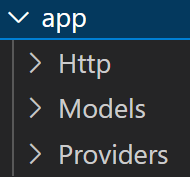
Which, as we discussed earlier, is used for a client to consume the application via HTTP; you will see that the controllers folder is just a small part of the Http folder; but we point out MVC as a part to understand the basic flow.
In Laravel, we have folders designated for a particular task; as we explained earlier; we, as developers, will spend most of our time in the so-called /app and /resources folders.
Laravel is a huge framework, with multiple tools it provides us to create true current, maintainable and scalable applications; in a Laravel project, apart from being able to develop in the framework itself, we can also develop in Node; therefore, we have two enormous worlds in the same project.
Even so, the paths we can follow to learn to program in Laravel and with this, take the first steps.
It all starts with MVC, which is the beginning of everything and is the heart of the framework; but, as with other frameworks, such as CodeIgniter or Django, there is one more layer in which we can carry out some tests, which in this case, would be that of the routes.
2.2. Routes and Controllers: The Flow of a Request
Routes are the entry point of any Laravel application and are mainly defined in the routes/web.php file. They link a URI to an action, which is usually a method within a controller. A "Hello World" in Laravel is as simple as defining a route that returns a view:
use Illuminate\Support\Facades\Route;
Route::get('/', function () {
    return view('welcome');
});
As the application grows, this logic moves to controllers for better organization. Learn to create your first routes and controllers in our "Hello World" guide in Laravel.
2.3. Form and Request Handling
Forms are the main way for user interaction. Laravel greatly simplifies form processing, including server-side data validation (a non-negotiable security step) and protection against CSRF attacks with the @csrf token. The typical flow involves showing a form with a GET request and processing the submitted data with a POST request, all orchestrated from a controller. We cover this fundamental process in our tutorial on form handling.
Chapter 3: Data Management with Databases and Eloquent
At the heart of almost every web application resides a database. Laravel, through its Eloquent ORM, provides one of the most elegant and powerful experiences for interacting with your data.
3.1. Database Connection
Laravel is configured to connect to a database through the .env file. Here, the driver (MySQL, PostgreSQL, SQLite), host, database name, user, and password are specified. Once configured, Laravel transparently manages the connection. The detailed configuration process for a MySQL database can be found in our database connection guide.
As well as understanding the migration system in Laravel.
3.2. Eloquent Relationships: The Power of Abstraction
Eloquent not only allows CRUD queries, but its true magic lies in defining relationships between models. Whether they are one-to-one, one-to-many, or many-to-many relationships, Eloquent handles them with a declarative and fluid syntax. For example, in a many-to-many relationship between Posts and Tags, you can get all the tags of a post with a simple $post->tags. However, it is crucial to understand how these relationships work to avoid performance issues. "Inverse many-to-many" relationships allow you to get all posts that have a specific tag, a concept we explore in our inverse relationships guide.
An even more advanced use case is polymorphic relationships, which allow a model to belong to more than one different type of model using a single pivot table. For example, both Posts and Videos could have Comments. Instead of having a comments table for each, a polymorphic relationship allows reusing the same table. Learn how to implement them in our tutorial on polymorphic relationships.
3.3. Optimizing Queries: Eager Loading and the N+1 Problem
A common mistake when working with relationships is falling into the "N+1 problem." This occurs when a query is made to get a list of models, and then, within a loop, an additional query is made for each model to get its relationships. If you have 100 posts, this results in 101 queries. The solution is Eager Loading, which allows preloading all necessary relationships in a single additional query. It is implemented with the with() method:
$posts = Post::with('author', 'tags')->get();Mastering this technique is absolutely essential for the performance of any Laravel application. We explain how to detect and solve this problem in our guide on Eager Loading vs. Lazy Loading.
3.4. Pagination and Transactions
When working with large datasets, displaying them all at once is unfeasible. Pagination is the process of dividing this data into smaller "pages." Laravel offers automatic pagination methods in Eloquent (->paginate(15)), but also allows creating manual paginators for collections or arrays, which is useful when data does not come directly from a database query. Learn how to do it in our manual pagination tutorial.
For critical operations involving multiple writes to the database (such as processing a purchase order), it is vital to use transactions. A transaction groups several operations into a single unit of work: if any of them fail, all previous operations are rolled back, ensuring data integrity. Laravel simplifies this with the DB::transaction() helper. We explore its importance in our guide on transactions.
Chapter 4: Advanced Tools and Patterns
Beyond the fundamentals of MVC and Eloquent, Laravel offers a rich ecosystem of tools and patterns for building more sophisticated and maintainable applications.
4.1. Authentication and Authorization
Authentication (verifying who the user is) and authorization (verifying what the user can do) are two distinct but related concepts. For authentication, Laravel offered "starter kit" packages like Laravel Breeze, which minimally and elegantly implements the entire login, registration, password reset, and email verification flow. You can install it with composer require laravel/breeze --dev. Although it is no longer the official ecosystem or selectable from the Laravel installer, we are leaving it out. If you want to generate an authentication system, you must use packages like Livewire or Inertia or go directly for a paid option.
For authorization, Laravel provides Gates and Policies. Gates are simple closures that define whether a user can perform an action, while Policies are classes that group authorization logic for a specific model. They are a much more granular and scalable way to manage permissions than simple roles. We cover how to implement them in our tutorial on Gates and Policies. For more complex role and permission systems, the package Spatie/laravel-permission is the industry standard.
To protect APIs Rest in Laravel Sanctum offers a lightweight token-based authentication system, ideal for SPAs and mobile applications. You can learn how to configure it in our introduction to Sanctum.
4.2. Queues and Jobs for Heavy Tasks
Slow operations like sending an email or processing an image should not run on the main web request thread, as they make the user wait unnecessarily. The solution is to delegate these tasks to a secondary process using Laravel's Queues and Jobs system. You create a Job class that contains the task's logic and then "dispatch" it to a queue. A "worker" process will listen on that queue and execute the jobs in the background. This dramatically improves your application's response time. We guide you through this process in our guide on Jobs and Queues.
4.3. The HTTP Client and Collections
Often, our applications need to communicate with external APIs. Laravel's HTTP Client, a wrapper over Guzzle, provides a fluent and simple API for making GET, POST, PUT, etc., requests and handling their responses. You can see practical examples in our HTTP Client tutorial.
When working with arrays or lists of data (either from the database or an API), Laravel's Collections are a blessing. They are "arrays with superpowers," offering dozens of chainable methods (map, filter, reduce, pluck, etc.) to manipulate data in an expressive and readable way. Learn to use them beyond Eloquent in our Collections guide.
4.4. Error Handling and Custom Exceptions
Good error handling is crucial. Laravel allows you to easily customize error pages (like 404 or 500) by simply creating views in resources/views/errors. Additionally, for specific errors in your business logic, you can create Custom Exceptions. This allows you to throw a semantic error (e.g., throw new InvalidOrderException();) and handle it centrally in App/Exceptions/Handler.php to return an appropriate view or JSON response. This is a sign of a professional application, and we show you how to do it in our article on custom exceptions.
4.5. Stop Overloading Your Controllers in Laravel
Are your controllers in Laravel becoming unmanageable?
As a project grows, it's easy to fall into the trap of 'Fat Controllers'. If you're struggling to separate business rules from the flow of HTTP requests, your code is accumulating technical debt that's difficult to manage.
Simplify your architecture by separating complex business logic using Action and Concerns patterns in Laravel. Keep your controllers lean, your code organized, and make long-term maintenance easier.
- Action Pattern: Encapsulate specific use cases under the Single Responsibility Principle (SRP).
- Concerns (Traits): Organize validations and reusable behaviors outside of main classes.
- Thin Controllers: Keep your controllers as clean orchestrators that delegate operational logic.
- Real Scalability: Radically improve the readability and testability of your critical functions.
It's time to take your code organization to the next level! Click the button above to see how to implement it step by step.
Chapter 5: Testing, Deployment, and Optimization
Writing code is only half the job. Ensuring it works correctly, deploying it to production, and optimizing its performance completes the development lifecycle.
5.1. Testing in Laravel with PHPUnit and Pest
Laravel is built with testing in mind. Writing automated tests gives you the confidence to refactor and add new features without breaking what already works. The framework integrates perfectly with PHPUnit and offers a very comfortable abstraction layer. More recently, Pest has gained enormous popularity for offering a cleaner and more expressive syntax over PHPUnit. Both are excellent options for implementing TDD (Test-Driven Development). We cover everything from configuring an in-memory test database to writing feature and API tests in our definitive guide to testing in Laravel.
5.2. Deployment to Production
Taking your application to a production server involves several steps. You must upload all project files (except node_modules), configure the .htaccess file to point to the public directory, and configure the production database connection. A crucial step before uploading the files is to optimize dependencies with composer install --no-dev --optimize-autoloader and generate front-end assets with npm run build. In addition, it is vital to clear configuration and route caches on the server. All these steps and recommendations, including why Hostinger is an excellent option for hosting Laravel, are detailed in our production deployment guide or directly with Docker, using Railway. It is also important to know how to check logs in storage/logs/laravel.log to diagnose production problems.
5.3. Performance Optimization and Technical SEO
Performance is a key factor for both user experience and SEO. In Laravel, this involves several areas:
- Caching: Laravel offers a unified caching system that can store query results, configurations, or complete responses. Using a fast driver like Redis for caching is a recommended practice. Learn to use it in our introduction to caching.
- Throttling (Request Limiting): To protect your application against abuse and brute-force attacks, you can limit the number of requests a user can make in a period of time using the throttle middleware. This is essential for APIs. We cover it in our guide on throttling.
- Technical SEO: Beyond content, technical SEO is vital. This includes having clean URLs, dynamic meta tags, a sitemap, robots.txt, and above all, excellent web performance (Core Web Vitals). Optimizing assets (JS, CSS), lazy loading images and iframes (especially YouTube ones), and a semantic HTML structure are crucial. You can find a complete case study of how I optimized my blog from 37 to 100 in PageSpeed in our advanced Laravel SEO guide.
5.4. Debugging with Laravel Debugbar
For local development, the Laravel Debugbar package is indispensable. It adds a bar at the bottom of your application that gives you real-time information about the current request: database queries (perfect for hunting N+1!), routes, views used, execution time, and much more. It is a transparent window into your application that will save you countless hours of debugging. More information in our Debugbar review.
5.5. Laravel + AI: Laravel Boost and SDK
Laravel already offers powerful tools we want to take advantage of. We'll focus especially on how AI integrates with the modern Laravel ecosystem. I'll try to be concise I don't want this section to be larger than the rest of the course.
If you're interested in the technical details of each tool (like OpenCode), I invite you to research on your own. I won't stop to explain every command from scratch because that would take us away from the main goal: programming better with Laravel.
5.6. Build applications with Laravel Agents SDK AI
Laravel AI SDK for creating Agents. This tool isn't for programming, but for making your application intelligent.
Laravel AI SDK. This tool is not meant to help you code, but to make your application intelligent.
If you want your user to be able to:
- Generate an image of a "space donut" from a form.
- Automatically translate a comment.
- Interact with a chatbot that uses local or external models.
Laravel Certifications
If you're looking to take the next step in your career, obtaining an official certification is the most effective strategy. For this, there's no better team than Certificates.dev.
The Definitive Guide to Laravel Livewire: Creating Reactive/SPA Interfaces with PHP
In the changing universe of Laravel, few tools have generated as much impact and productivity as Livewire. For developers who value the simplicity and power of the PHP ecosystem, Livewire has established itself as the preferred solution for building dynamic and reactive interfaces without the need to write a single line of complex JavaScript.
For me, Livewire is the best thing that exists in web development, period. Being able to create SPA applications without (obligatorily) defining a single line of JavaScript is unique in modern web development, and Livewire allows it. Creating Dashboards whose main characteristic is that they have links and functionalities everywhere to call from the client to the server, and we can do ALL of it through a Laravel controller and a wire:click attribute or similar, with Livewire taking care of EVERYTHING behind the scenes, is great… I still can't get over it…
Throughout this article, I will give you a step-by-step guide to get started with Livewire, just as we did before with base Laravel.
To create a project in Laravel Livewire, you can consult the first link in this publication at the beginning of the ENTIRE document. I am not putting it here again so that Google.sama does not bother me with SEO…
Chapter 1: Livewire Fundamentals: The Magic Behind Reactivity
To master Livewire, we must first understand its philosophy and the ingenious architecture that allows it to behave like an SPA (Single Page Application) without leaving the comfort of PHP and Blade. This is where its true brilliance lies.
1.1. What is a Livewire Component and How Does It Really Work?
When I started working with Livewire, the first thing that caught my attention was that it behaves like an SPA, but without writing JavaScript. As soon as you understand its architecture, it becomes evident: Livewire updates only what changes. Nothing more. A Livewire component is basically the combination of two pieces:
- A PHP class that manages the state (properties and methods).
- A Blade view that represents the UI of that component.
The "magic" is in the synchronization. Every time a property changes—either because the user clicks, types something, or the server executes some action—Livewire makes a single AJAX request to the backend, processes the change, and re-renders only that component. In one of my first tests, when changing a language select, I confirmed it by looking at the browser's Network tab: only one request appears. Nothing more. And the best part: the layout remained intact. That clearly shows you that you are not reloading the entire page, but only the active part. Exactly what an SPA does.
The flow is as follows:
- The user does something (click, submit, type, select).
- Livewire sends a snapshot of the component's current state to the server.
- The server executes the corresponding PHP class methods or updates the properties.
- Livewire re-renders the component's Blade view with the new state.
- The server returns only the HTML that changed.
- The DOM is intelligently updated (morphing), applying only the differences.
This use of an algorithm called DOM morphing, which compares the old and new HTML, is what gives it that characteristic efficiency, especially noticeable in forms, filter systems, user panels, and dashboards. For a more visual explanation, you can consult our original post "Understanding Laravel Livewire Components".
1.2. Component Creation: Your First Step in Livewire
Creating a component is straightforward thanks to Artisan. Laravel offers the command that will become your daily bread:
$ php artisan make:livewire User/ProfileThis simple command generates the two files that constitute the component:
app/Livewire/User/Profile.php(the component class)resources/views/livewire/user/profile.blade.php(the component view)
For quick prototypes or very simple components, you can also choose to create "inline" components, which combine the class and the view in a single file, although for maintainable projects, separation is preferable:
$ php artisan make:livewire user-profile --inline1.3. Public Properties and Binding with the View: wire:model
This is where Livewire truly shines. By simply declaring a public property in your component class, you can synchronize it with an input in your Blade view. Livewire offers several directives for this:
- wire:model: Synchronizes the input value with the component property. By default, the request to the server is sent when the input loses focus or when a form containing it is submitted. It is the ideal option for most form fields.
- wire:model.live: Synchronizes the value in real-time, sending a request to the server with each keystroke or change. This is extremely powerful but should be used with caution. It is perfect for elements like real-time searchers or selects that need to reload another part of the UI, but abusing it in normal text fields can overload your server with unnecessary requests.
- wire:model.blur: It is the default behavior, but explicit. It synchronizes only when the element loses focus.
- wire:model.debounce.500ms: An incredibly useful modifier. It delays synchronization until the user has stopped typing for a certain period of time (in this case, 500 milliseconds). It is the perfect solution for search fields, combining the real-time feel with the efficiency of not sending a request for each letter.
Among other great features we have in Laravel Livewire.
Chapter 2: The Life Cycle of a Livewire Component
To build robust applications, it is crucial to understand the life cycle of a component. Livewire offers a series of "hooks" or methods that are automatically executed at different moments in the life of a component, allowing us to control its behavior with impressive granularity, very similar to how Vue or React do it.
2.1. Main Life Cycle Methods
Of all the available methods, the ones you will use most in your daily life are mount and render.
- mount(): Executes only once, when the component is "mounted" or initialized for the first time. It is the perfect place to prepare the initial state of the component, such as finding a model in the database for an editing form or setting default values.
- render(): This method is responsible for rendering the component's Blade view. It executes on initial load and each time the component needs to be re-rendered after an update. If you follow naming conventions, you can omit it, and Livewire will find the view automatically. However, keeping it explicit is useful for passing additional data to the view or dynamically changing the layout.
- boot() and booted(): Execute when the component starts, before and after mount respectively. They are useful for general configuration tasks or for registering component-specific Service Providers.
2.2. Update Hooks: Reacting to Changes
These hooks are the heart of interactivity. They are triggered each time a property linked with wire:model changes.
- updating($name, $value): Executes just *before* a property ($name) is updated with its new value ($value).
- updated($name, $value): Executes just *after* the property has been updated.
Livewire also offers more specific magical hooks, such as updatingTitle($value) and updatedTitle($value), which are triggered only when the $title property changes. This allows for very clean and specific reaction logic without the need to use conditionals within the generic updating/updated hooks.
2.3. Hydrate and Dehydrate Hooks: The Data Journey
These are the most advanced and less common hooks, but understanding them reveals how Livewire manages state between the front-end and the back-end.
- hydrate(): Executes at the beginning of each subsequent request, when the component's state is "rehydrated" on the server from the data coming from the front-end.
- dehydrate(): Executes at the end of each request, just before the component is "dehydrated" (serialized to JSON) to be sent back to the front-end.
In practice, these hooks allow you to manipulate data before it is used on the server or just before it is sent to the client. For example, you could use dehydrate to remove sensitive data from a collection before it travels to the front-end. A deep discussion with examples of logs for each of these hooks can be found in the previous link.
Chapter 3: Building Real Applications with Livewire
With the fundamentals and life cycle clear, it's time to build real functionalities. Livewire not only manages state but provides an ecosystem for creating complex and reusable UI components.
3.1. Practical Example: A Language Switch Component
An excellent way to see Livewire in action is with a component that manages application localization. Let's consider a UserProfile component that allows the user to select their preferred language.
<?php
namespace App\Livewire\User;
use Livewire\Attributes\Layout;
use Livewire\Component;
use Illuminate\Support\Facades\App;
#[Layout('layouts.store')]
class UserProfile extends Component
{
    public $language;
    public function render()
    {
        if (!isset($this->language)) {
            // When loading the component, if the language is not selected
            $this->language = session('locale') ?? App::getLocale();
        } else {
            // Executed from the associated view by .live
            session(['locale' => $this->language]);
            App::setLocale($this->language);
        }

        return view('livewire.user.user-profile');
    }
}
The associated view could have a select like this:
<select wire:model.live="language">
    <option value="es">Spanish</option>
    <option value="en">English</option>
</select>
In this example, wire:model.live is crucial. Every time the user changes the selection, the render method executes again. The logic within render detects the change, updates the locale in the session and in the application (App::setLocale), and the component re-renders with the new translations. However, for the change to persist between requests and affect the entire application, a middleware that sets the locale in each request based on the session value is essential. All this process is detailed in our tutorial for selecting language with Livewire.
Before the previous link, I recommend you see how to use forms in Livewire.
3.2. Reusable UI Components: Modals and Notifications
Livewire, combined with Alpine.js (its default companion), is an unbeatable pair for creating reusable UI components.
Action Messages (Toasts)
Displaying a "Saved successfully" message that disappears automatically is a common requirement. We can create a Blade component that listens for a Livewire event and uses Alpine.js to show and hide itself. In Jetstream, for example, a pattern like this is used:
<div x-data="{ shown: false, timeout: null }"
     x-init="@this.on('saved', () => { clearTimeout(timeout); shown = true; timeout = setTimeout(() => { shown = false }, 2000); })"
     x-show.transition.out.opacity.duration.1500ms="shown"
     style="display: none;"
>
     Saved.
</div>
From any method of your Livewire component, you simply dispatch the event $this->dispatch('saved'); after a successful operation, and the message will appear.
Or the confirmation dialogs in Livewire.
3.3 Real-time Streaming for Chatbots
Today, the clearest example is AI like ChatGPT or Gemini. When you ask a question, the answer doesn't appear all at once after a 10-second wait (the traditional 0% to 100% scheme). Instead, we see the AI typing word by word in real time. That's streaming: consuming the result while the task is still being processed. For this, we use streaming, which is very easy to use in Livewire with wire:stream.
Chapter 4: The Philosophical Debate: Livewire's Place in the Ecosystem
Livewire is more than just a tool; it is a paradigm that has generated important discussions in the Laravel community about how we should build web applications. Analyzing these discussions gives us a deeper understanding of its strengths and weaknesses.
4.1. The Great Dilemma: Communication Between Components and the Need for a State Manager
Perhaps the weakest point of Livewire, and the one that generates the most friction as an application grows, is communication between nested components. When you have grandchild or great-grandchild components that need to communicate a change to the main layout, the process becomes cumbersome. You have to pass messages through events ($dispatch) upwards in the hierarchy, registering listeners (#[On('event')]) in each intermediate parent component. It is a propagation chain that can be difficult to follow and maintain.
At this point, technologies like Vue or Flutter resort to a global state manager (Pinia, Vuex, Provider, Redux). A state manager is a higher layer that centralizes the application's state. Any component can read or modify data in this central "store," and changes are automatically reflected in any other component that depends on that data, without the need to propagate events. In my opinion, this is the only thing Laravel Livewire lacks to be perfect. The lack of a native state manager is its Achilles' heel in large-scale applications.
Chapter 5: Advanced Project: Building an Online Store with Livewire
The best way to consolidate knowledge is to build a real and complex project. The announcements and syllabi of our training "Course and Book: Create your Online Store with Laravel Livewire" give us an excellent roadmap for a project of this caliber.
Conclusion: Livewire as a Strategic Tool
Livewire is much more than a simple library; it is a paradigm shift for the Laravel developer. It combines the simplicity of traditional monolithic development with the user experience of a modern front-end application. It allows teams to move at incredible speed, keeping all development within the PHP and Blade ecosystem they already know and love.
While it has its challenges, especially in large-scale state management, its advantages in productivity, simplicity, and performance for 90% of use cases are undeniable. In my experience, understanding how Livewire re-renders only what is necessary and when to use each wire:model directive makes a huge difference in the performance and quality of the final application. Mastering Livewire is not just learning a new tool; it is adopting a smarter and faster way to build for the web.
Islands in Laravel 13 Livewire 4
You have surely heard me say that Livewire can be somewhat abstract, and the Islands concept is the perfect example. It is a new and powerful feature, but its usefulness depends entirely on how you approach your development.
Islands are, basically, a way to load heavy parts of a component in an isolated or parallel manner.
If you have a very large component, you can divide it into small parts (like subcomponents within a component), and make those parts execute tasks independently.
Laravel Inertia.js Roadmap
Inertia.js has established itself in the Laravel ecosystem as an elegant solution for building modern Single Page Applications (SPAs) without the complexity of managing a complete REST API. It allows developers to use top-tier JavaScript frameworks like Vue.js or React, while maintaining server-side routing and controller logic within the familiar Laravel environment.
At DesarrolloLibre, we have explored Inertia from multiple angles, from its fundamental purpose to advanced testing techniques. This page serves as a roadmap and a central index for all our content on Inertia.js, allowing you to navigate and delve into the topics that interest you most.
Fundamental Concepts: What is Inertia and When to Use It?
Before implementing Inertia in a project, it is crucial to understand its philosophy. Unlike Livewire, which seeks reactivity without leaving PHP, Inertia acts as a "glue" that connects your Laravel backend with a JavaScript frontend. In essence, your Laravel controllers return Vue/React components instead of Blade views, but without the need for an API in between.
Key Features: An Inertia project has a particular structure. Understanding how it handles props, the HandleInertiaRequests middleware, and the organization of the Pages and Components folders is the first step to mastering it.
Learn its characteristics: Characteristics of a Laravel Inertia Project
A Philosophical Debate: Is an Inertia page a "component" in the same sense as in Livewire, or is it simply a more elaborate "view"? This discussion will help you better understand the underlying architecture and the conceptual differences between both approaches.
Delve into the debate: This is not a component, it's a view: Laravel Inertia vs. Livewire
Practical Implementation: UI Components
Once the theory is understood, the next step is to build the user interface. Although Inertia does not come with a default component library, it integrates perfectly with any Vue component system, such as Oruga UI or Shadcn UI components.
- Confirmation Dialogs: A common task is to request user confirmation before a destructive action. We have explored how to effectively implement confirmation modals. Learn to implement them: Dialogs in Laravel 13 Inertia 3 Vue
- Among other very interesting components such as the dialog or the progress bar or how to use Flash messages from Inertia and Vue.
- And the fundamental, how we can navigate in Inertia using Links.
Advanced Testing: The Key to Robust Applications
Perhaps one of the most powerful and least documented aspects of Inertia is its testing suite. Laravel provides an assertion layer (AssertableInertia) that allows for incredibly fluid and detailed integration testing, inspecting the components, props, and data that the backend sends to the frontend.
Complete Testing Guide: We have created an exhaustive guide that takes you from the basic concepts of testing in Laravel to Inertia-specific assertions. You will learn to use the assertInertia helper, inspect the $page object, and validate the structure and data of your components.
Master testing: Unit and Integration Tests in Laravel Inertia
- Analysis of the $page object: Learn about all the data available in the $page object in unit and integration tests.
Roadmap Conclusion
Inertia.js offers an exceptional intermediate path for building modern web applications without completely abandoning the monolithic Laravel architecture. We encourage you to use this roadmap as a starting point and to explore in depth each of the linked articles to consolidate your mastery of this powerful tool.
Laravel Inertia vs Livewire: real differences in day-to-day use
Architecture and way of thinking about each tool
I tried Livewire before using Inertia, and the comparison is inevitable.
Livewire keeps the frontend "on the Laravel side," while Inertia lets you use a real frontend framework (Vue) without abandoning your backend.
Comunicación cliente–servidor: lo que cambia con Inertia
This is where Inertia shines:
You don't use axios, fetch, or endpoints like /api/....
I mention this because when I made my first prototype, I was amazed that Inertia automatically managed communication and updated the interface without me writing a single line of code.
Cases where Inertia shines brightest
Based on real projects, Inertia is ideal when you need:
- Complex forms
- Administrative dashboards
- SPA flows without page reloads
- Full integration with the Laravel router
Courses and Books
Finally, if you want to learn Laravel from 0 to 100, I recommend my courses and books that are aimed at anyone who wants to start developing with Laravel, although it is not recommended for those who have not worked with other PHP frameworks. If that is your case, I advise you to first learn and practice with similar but simpler frameworks, such as CodeIgniter 4, for which I have many resources that can help you get started in this world of PHP frameworks. You will find more information on my website.
Laravel is an advanced framework, although in the book I do my best to keep development simple. Remember you can practice with similar frameworks, like CodeIgniter, for which I also have a book and a course; which is ideal for getting to know a framework to take the first steps with this type of technology, since Laravel tends to have a steeper learning curve due to having more components and more abstraction when using them.
For those who want to learn about the framework and who know other similar PHP frameworks, but do not have the necessary knowledge to venture into these because they do not know the bases that support them.
For those who want to learn something new, learn about a framework that, although it has a lot of documentation, most of it is in English, and since the framework is constantly evolving, it tends to become outdated.
For people who want to improve a skill in web development, who want to grow as a developer and who want to continue escalating their path with other superior frameworks; if you identify with at least one of the points mentioned above, this book or course is for you.
If you are interested in this premium content, you can consult the links to Courses and Books in the navbar of this site.
Structure and Key Modules of an Online Store
An e-commerce project with Livewire can be broken down into several main modules, each handled by one or more components:
- Product Catalog: A main component for the product listing, with public properties for filters (category, price range, search by name). Each change in these filters (using wire:model.live or wire:model.debounce) re-executes the query and updates the product list instantly.
- Shopping Cart: A component that could live in the main layout. Actions like addToCart($productId) would be called from the catalog. The state of the cart (a collection of products) would be managed in the session to persist between requests. A global event could force the cart to re-render from any other component.
- Checkout Process: A multi-step component that handles the shipping address, payment method selection, and final confirmation. The state would be managed through various properties, and validation logic would be executed at each step.
- Payment Gateways: Integration with Laravel with Stripe and PayPal would be encapsulated in services that are called from the checkout component. Livewire's logic would focus on handling the UI, while communication with payment APIs would be delegated to specialized service classes.
- Admin Panel (Dashboard): A series of CRUD components for managing products, categories, orders, and users. This is where Livewire's productivity really explodes, allowing you to create creation and editing forms, data tables with pagination and search, all with amazing development speed.
This modular architecture, where each piece of the UI is an autonomous Livewire component, is key to building large and maintainable applications. You can see a demo and the complete syllabus on the page of our training on how to create an online store.
The Origin and Fall of Lumen
I don't know if you remember or know about Lumen, the famous microframework created and maintained by the official Laravel team. A few years ago it stopped receiving support, so currently its use is no longer recommended for new projects.
If you analyze its history, you will see that it maintained a parallel evolution to that of Laravel: from version 5.0 to 5.8, then jumping to versions 6, 7, and finally to 11. The latter was published a couple of years ago and marked the final release that this microframework had.
In its beginnings, Lumen was conceived as a fast and hyper-lightweight alternative for building microservices and REST APIs. It retained several of Laravel's main features, but dispensed with other heavier layers to gain speed.
Why Did Lumen Stop Being Maintained?
The reasons behind its disuse and subsequent abandonment are diverse:
- Maintenance cost: Maintaining two technologies with a very similar codebase—while Laravel evolved at a rapid pace—required considerable effort on the part of the development team.
- Focus on Laravel performance: Starting with recent versions, the Laravel team began to focus much more on performance optimization of the main framework itself.
- Arrival of Laravel Octane: With the appearance of advanced speed solutions, the performance gap between both environments was drastically reduced, making a secondary project unnecessary.
The Impact of Laravel Octane
In case you are wondering, Laravel Octane is an official package designed to multiply the performance of applications built in Laravel. It achieves this by keeping the framework loaded directly in RAM between each HTTP request, instead of initializing it from scratch on every call.
However, to implement Octane it is necessary to meet certain specific requirements in the server infrastructure, such as the use of environments based on Swoole or FrankPHP.
With all these improvements integrated into the main ecosystem, the team decided to stop pushing Lumen and focus all their resources on making Laravel an increasingly efficient tool.
Conclusion
Mastering Laravel is a continuous journey. From the fundamentals of its MVC architecture to the complexities of testing, performance optimization, and deployment, each concept builds on the last to form a cohesive and powerful whole. This guide has attempted to unify that knowledge in one place, serving as a roadmap for your professional development.
The Laravel ecosystem is vast and constantly evolving. The key to success is not memorizing every function, but understanding the fundamental principles that underpin it: clean code, separation of concerns, and a pragmatic focus on productivity and elegance. We hope this guide serves as a valuable reference on your path to becoming an expert Laravel developer.
Remember that learning is good, but if you want to work in companies, it is recommended that you get a Laravel certification.