
The error “Class ‘ZipArchive’ not found” in PHP appears when you try to work with compressed files (ZIP) but the system does not recognize the ZipArchive class.
In my case, I encountered this error when trying to unzip files in a local project, and at first, it seemed more complex than it actually was.
The reality: PHP does not have the necessary extension enabled to work with ZIP.
The “Class ‘ZipArchive’ not found” error happens when we don't have the zip extension enabled or installed; let's see how we can resolve the problem.
Laragon
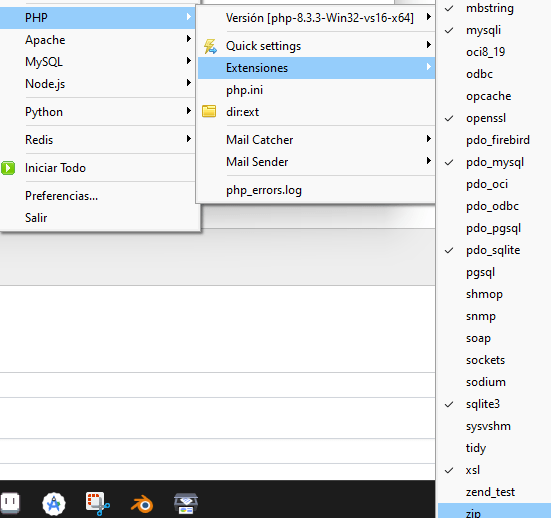
In Laragon on Windows, it is as simple as going to the extensions and enabling the zip one:
Other systems
On other systems, check if the zip extension is enabled:
Open the php.ini file in a text editor.
Search for the following line:
;extension=zipRemove the semicolon at the beginning of the line to enable the extension:
extension=zipSave the changes and restart your web server and/or PHP.
In Linux environments, you can run the following command in the terminal to install the zip extension:
sudo apt-get install php-zipRestart your web server and/or PHP.
How to fix the error in Linux
On Linux systems, the problem is usually that the php-zip extension is not installed.
Run:
sudo apt-get install php-zipThis automatically installs the necessary extension.
Restart services correctly
After installing, don't forget to restart:
sudo service apache2 restartor if you use PHP-FPM:
sudo service php8.x-fpm restartIf you don't restart, the error will continue to appear even if everything is properly installed.
How to check if ZipArchive is enabled
To make sure everything is working:
Option 1: phpinfo()
Create a file with:
<?php phpinfo(); ?>Search for “zip” on the page.
Option 2: Direct code
<?php
if (class_exists('ZipArchive')) {
  echo "ZipArchive is enabled";
} else {
  echo "ZipArchive is NOT available";
}
Why this error occurs (most common causes)
- Zip extension not installed
- PHP needs the zip extension to be able to use ZipArchive.
If it is not installed, the error will appear automatically.
- PHP needs the zip extension to be able to use ZipArchive.
- Zip extension disabled in php.ini
- This is the most common cause. Often the extension is installed but not activated.
- In fact, when it happened to me, I thought something more complex was missing… but it was simply a commented line in the php.ini.
- Environment issues (Laragon, XAMPP, Linux)
- Depending on the environment, the solution changes slightly:
- Laragon → graphical interface
- XAMPP → manual configuration
- Linux → terminal installation
- Depending on the environment, the solution changes slightly:
How to fix “ZipArchive not found” on Windows (Laragon, XAMPP)
Activate zip in Laragon
If you are using Laragon, the solution is practically immediate.
In my case, it was as simple as:
go to extensions and enable zip
Common errors and how to avoid them
- Forgetting to restart the server
- Editing the wrong php.ini
- Having multiple PHP versions
- Activating the extension in CLI but not in Apache
This last one happened to me once: everything worked in the terminal, but not in the browser. The problem was that PHP CLI and Apache were using different configurations.
FAQs about ZipArchive in PHP
- What is ZipArchive in PHP?
- It is a native class that allows you to create, open, extract, and modify ZIP files.
- Why is it not available by default?
- Because it depends on the zip extension, which may not be enabled in some PHP installations.
- Does it work in all PHP versions?
- Yes, but you need to have the corresponding extension installed and activated.
Conclusion
The error “Class ‘ZipArchive’ not found” is one of the most common in PHP, but also one of the easiest to fix.
In most cases, as you saw:
- You only need to activate an extension
- Or install a package in Linux
The key lies in quickly identifying your environment and applying the correct solution.