
Content Index
- What are unit tests and why use them in Laravel?
- Advantages of automated testing
- Types of tests in Laravel
- Importance of Automated Tests
- Why test?
- What to test?
- Testing with Pest/PHPUnit
- ⚙️ Setting Up the Testing Environment
- Database in Testing Mode
- Factories and Seeders
- Creating a Test
- Understanding Tests
- HTTP Requests
- Unit Tests with PHPUnit in Laravel
- Most Used Assertion Methods
- assertOk() — Verifies HTTP 200 responses.
- assertStatus(404) — Verifies specific status codes.
- assertSee('Text') — Confirms that a view contains certain text.
- assertViewHas('posts') — Checks that a view receives a parameter.
- ⚡ Migrating from PHPUnit to Pest Step by Step
- Key Differences
- API Testing with Token Authentication and Pest
- Running and Debugging Tests
- PHPUnit's setUp() Method for Common Code
- Enable DB_CONNECTION and DB_DATABASE in the phpunit.xml in Laravel
- Best Practices
- ⚖️ PHPUnit vs Pest: Quick Comparison
- Pest PHP: Parallel Testing and Coverage
- Code and Type Coverage
- Laravel Pint: Effortless Code Style
- ⌨️ Peck PHP: Goodbye to Spelling Errors
- PHPStan: The "TypeScript" for PHP
- What does PHPStan detect?
- ️ Rector PHP: Automated Refactoring
- Laravel Livewire Key aspects for Integration or Unit testing
- Pest
- The Testing Environment: Pest vs. PHPUnit
- Generating Tests with AI
- Configuration and Clean Database
- Getting Started with Testing in Laravel Livewire
- First test with Laravel Livewire 3
- Identifying the Route
- Difference Between Feature and Unit Tests
- Feature Tests vs. Unit Tests
- Base Testing in Laravel Livewire 4
- ✅ Assertion Methods and 200 Status Code
- Testing 200 Status
- Specific Assertions for Livewire
- Evaluating important parameters
- Laravel Inertia Key aspects for Integration or Unit testing
- Automated Testing with Laravel Boost
- 1. Inertia Tests vs. Traditional Tests
- Generating Tests with AI (Pest Framework)
- Workflow Example:
- Execution and Continuous Improvement
- Getting Started with PHPUnit (Creating Manual Tests)
- From Laravel to Inertia
- Assert Inertia
- has and where methods
- Conclusion
- ❓ Frequently Asked Questions
Unit tests in Laravel are one of the most powerful tools to ensure that your application works as expected. They not only validate your code's behavior but also help you keep it clean, secure, and scalable. In this guide, I will show you how to implement tests with PHPUnit and Pest, the two most popular options in the Laravel ecosystem, and how to migrate between them easily.
Now that errors like Eager loading and lazy loading in Laravel have been fixed, we move on to the next step, which is to have EVERYTHING tested through testing.
What are unit tests and why use them in Laravel?
Unit tests are small code snippets that verify that each component (model, controller, helper, etc.) works correctly in isolation. In Laravel, tests are natively integrated with powerful tools and an expressive syntax.
Advantages of automated testing
- Detects errors before they reach production.
- Allows for fearless refactoring.
- Improves code quality and team confidence.
- Facilitates applying TDD (Test Driven Development), a methodology that starts with writing the tests first and then the functional code.
Types of tests in Laravel
Laravel supports different types of tests:
- Unit: verify individual functions or methods.
- Integration: evaluate how different components interact.
- End-to-End: test the complete user flow, for example with Laravel Dusk.
TDD in action
In my experience, applying TDD in Laravel changes the way you program. When I started developing modules like the dashboard, I implemented the tests first, and that allowed me to establish clear rules about what each route or controller should do; with AI, you can ask it to first generate the tests based on a module, and then the modules from there, gaining consistency and setting limits on the development you want to carry out
Importance of Automated Tests
Tests are a crucial part of any application we are going to create. Regardless of the technology, it is always advisable to perform automatic tests to validate the system when new changes are implemented. This way, we save a lot of time, since it is not necessary to perform all tests manually, but simply to execute a command.
Tests consist of verifying components individually. In the case of the application we have built, they would be each of the API methods, along with any associated dependencies. When these automated tests are executed and the application passes them all, it means no errors were found; if it doesn't pass them, it means we must make changes both to the application and to the implemented tests.
Tests are a crucial part of any application we are going to create; regardless of the technology, it is always advisable to perform automatic tests to test the system when new changes are implemented; this way we save a lot of time since there is no need to perform many of the tests manually, but by executing a simple command.
Tests consist of testing the components individually; in the case of the application we have built, they would be each of the API methods, as well as any other dependency of these methods; this way, when these automated tests are executed, if the application passes all the tests, it means that no errors were found, but, if it does not pass the tests, it means that changes must be made at the application level or to the implemented tests.
Why test?
Tests help ensure that the application will function as expected. As the project grows in modules and complexity, it is possible to implement new tests and adapt existing ones.
It is important to mention that tests are not perfect. Even if the application passes all tests, it does not mean that it is bug-free, but it is a very good initial indicator of software quality. Furthermore, testable code is often a sign of good architecture.
Tests should be part of the project's development cycle to guarantee stable operation, running them constantly.
What to test?
Tests should focus on small units of code in isolation.
For example, in a Laravel app (or web in general):
- Controllers
- View responses
- Status codes
- Nominal conditions (GET, POST, etc.)
- Forms
- Individual helper functions
Laravel officially supports two testing tools: Pest and PHPUnit.
Testing with Pest/PHPUnit
PHPUnit is one of the testing frameworks for PHP and comes pre-installed by default in Laravel. It is the oldest within the ecosystem, so we will cover it first. To follow this section, you must have selected PHPUnit as your testing environment when creating your project.
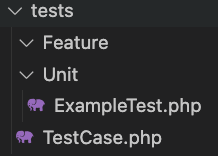
When creating a Laravel project, a tests folder is automatically generated, which evidences the importance of testing. Although they are not part of functional development, they are part of the software life cycle, and creating them is evidence of good practices.
In Laravel 11, although several folders disappeared to simplify the structure, tests/ is still present, reaffirming its relevance.
Inside this folder we find:
- tests/Unit
- tests/Feature
Unit tests verify specific modules, usually isolated code: facades, models, helpers, etc. These go in tests/Unit.
Integration or feature tests test larger components: controllers, database queries, helpers, facades, JSON responses, views, etc. These go in tests/Feature.
Laravel already includes basic examples, such as ExampleTest.php, which contains a "hello world".
By default, Laravel already comes with some tests and files ready to use; one of the example tests is ExampleTest.php, which includes the hello world for our application.
Regardless of whether you are using Pest or PHPUnit, the logic is the same, what changes is the syntax, and to run our tests we have the command:
$ vendor/bin/phpunitFor PHPUnit, or:
$ vendor/bin/pestFor Pest, or easier:
$ php artisan testFor any of the above.
Additionally, you can create a .env.testing file in the root of your project to manage configurations in the testing environment. This file will be used instead of the .env file when running Pest and PHPUnit tests or running Artisan commands with the --env=testing option.
⚙️ Setting Up the Testing Environment
Key Files and Folders
Laravel already includes a basic structure for testing inside the /tests folder. There you will find two main types:
- Feature: tests that cover the complete application.
- Unit: tests that validate specific functions.
Additionally, the phpunit.xml file defines the main PHPUnit configuration, while Pest uses tests/Pest.php to register global functions and configurations like traits or base classes.
Database in Testing Mode
Laravel makes it easy to handle temporary databases during tests. The `RefreshDatabase` trait ensures that each test starts with a clean database.
uses(TestCase::class, RefreshDatabase::class)->in('Feature');Factories and Seeders
You can quickly create data with factories:
Category::factory(10)->create();In my case, I use this to populate categories, users, or posts before running CRUD tests.
Creating a Test
To create a unit test:
$ php artisan make:test ClassTest --unitTo create a feature test:
$ php artisan make:test ClassTestUnderstanding Tests
To start with something simple, let's create a class with mathematical operations:
app\Utils\MathOperations.php
app/Utils/MathOperations.php
class MathOperations
{
   public function add($a, $b) { return $a + $b; }
   public function subtract($a, $b) { return $a - $b; }
   public function multiply($a, $b) { return $a * $b; }
   public function divide($a, $b) { return $a / $b; }
}
Then we generate a unit test:
$ php artisan make:test MathOperationsTest --unitAnd in tests/Unit/MathOperationsTest.php we add the methods to test each operation.
This will generate a file in:
tests/Unit/MathOperationsTest.php
In which, we create functions that allow us to test the previous methods for performing mathematical operations:
tests/Unit/MathOperationsTest.php
<?php
namespace Tests\Unit;
use PHPUnit\Framework\TestCase;
// use App\Utils\MathOperations;
class MathOperations
{
    public function add($a, $b)
    {
        return $a + $b;
    }
    public function subtract($a, $b)
    {
        return $a - $b;
    }
    public function multiply($a, $b)
    {
        return $a * $b;
    }
    public function divide($a, $b)
    {
        return $a / $b;
    }
}
class MathOperationsTest extends TestCase
{
    // public function test_example(): void
    // {
    //     $this->assertTrue(true);
    // }
 public function testAdd()
    {
        $mathOperations = new MathOperations();
        $result = $mathOperations->add(2, 3);
        $this->assertEquals(5, $result);
    }
    public function testSubtract()
    {
        $mathOperations = new MathOperations();
        $result = $mathOperations->subtract(5, 3);
        $this->assertEquals(2, $result);
    }
    public function testSubtraction()
    {
        $mathOperations = new MathOperations();
        $result = $mathOperations->multiply(5, 3);
        $this->assertEquals(15, $result);
    }
    public function testDivide()
    {
        $mathOperations = new MathOperations();
        $result = $mathOperations->divide(8, 2);
        $this->assertEquals(4, $result);
    }
}
To simplify the exercise, we copy the content of MathOperations inside the unit file.
In this example, we have four test methods, one for each method defined in the auxiliary class MathOperations that allows testing the addition, subtraction, multiplication, and division operations respectively, and with this we can appreciate the heart of the tests which is through assert methods or assertion type methods.
You can see the immense complete list at:
https://laravel.com/docs/master/http-tests#response-assertions
Although don't worry about having to learn them all, we usually only use a few of them.
Finally, to run the unit tests, we use the command:
$ vendor/bin/phpunitAnd we should see an output like the following:
Time: 00:00.850, Memory: 42.50 MB
OK (29 tests, 65 assertions)
If we cause an error in the auxiliary class, such as adding the same parameter twice, ignoring the other:
public function add($a, $b)
{
    return $a + $a;
}
And we run:
$ vendor/bin/phpunitWe will see an output like the following:
/MathOperationsTest.php:47
FAILURES!
Tests: 29, Assertions: 65, Failures: 1.
Which clearly indicates that an error occurred.
Unit tests are not infallible, since everything depends on the tests we execute. Keeping the same error we caused before, if the test were as follows:
public function testAdd()
{
    $mathOperations = new MathOperations();
    $result = $mathOperations->add(2, 2);
    $this->assertEquals(4, $result);
}
The tests would pass:
Time: 00:00.733, Memory: 42.50 MB
OK (29 tests, 65 assertions)
But, we clearly have a problem in the definition of the auxiliary class, therefore, tests are not infallible, they are only a means to verify that we did not find errors in the application but it does not mean that the application is error-free. With this, we can have a basic and necessary understanding of how unit tests work. With this example, we can now move on to really testing the modules that make up the application.
Tests rely on assert methods, such as:
- assertStatus: Verifies the status code in the response.
- assertOk: Verifies if the obtained response is type 200.
- assertJson: Verifies if the response is JSON type.
- assertRedirect: Verifies if the response is a redirection.
- assertSee: Verifies based on a provided string, if it is part of the response.
- assertDontSee: Verifies if the provided string is not part of the response.
- assertViewIs: Verifies if the view was returned by the route.
- assertValid: Verifies if there are no validation errors in the submitted form.
Assert methods are nothing more than advanced conditionals.
HTTP Requests
Our application is made up of controllers that are consumed through HTTP requests. This type of testing is performed using methods such as:
- get
- post
- put
- patch
- delete
And require inheriting from:
use Tests\TestCase;Unit Tests with PHPUnit in Laravel
PHPUnit is the most veteran testing framework in the PHP ecosystem. Laravel integrates it perfectly and offers a clear syntax for defining test classes.
Basic Structure
class PostTest extends TestCase
{
   use DatabaseMigrations;
   protected function setUp(): void
   {
       parent::setUp();
       User::factory(1)->create();
       $user = User::first();
       $this->actingAs($user);
   }
   public function test_index()
   {
       $response = $this->get(route('post.index'))
           ->assertOk()
           ->assertViewIs('dashboard.post.index')
           ->assertSee('Dashboard');
   }
}
Most Used Assertion Methods
assertOk() — Verifies HTTP 200 responses.
assertStatus(404) — Verifies specific status codes.
These are the first assertion methods we'll see and the most essential ones we must use when evaluating our tests. First, we have assertStatus() and assertOk(), the latter being equivalent to using assertStatus(200).
The 200 code corresponds to the HTTP status returned in a normal request, like the one we have here. If we load this page, we get 200 by default, since it is the code used to indicate that everything is "Ok."
assertSee('Text') — Confirms that a view contains certain text.
Another essential assertion method is assertSee, which tells us what the view is "seeing." We simply pass it a text, and that text must be present in the obtained response.
In this case, this would be a test for the detail view, and therefore we must ensure that the main elements appear correctly. This would be the beauty we have here: the post title, the category, and the content.
So, first, we get the post (which we generated with its dependencies). Then, we look for the post by its ID and verify that the view contains the title, the content, and, of course, the associated category.
That's what assertSee is for: to ensure that specific text elements are visible in the view returned by the application.
assertViewHas('posts') — Checks that a view receives a parameter.
Another essential assertion method that we must use when working with controllers that return a view is the assertViewHas() method. With this method, we can indicate the name of the parameter we expect to receive and also specify what that parameter should contain.
In this case, the parameter called posts (plural) must contain a pagination with only two levels. This is exactly what we can see here, as this is what the controller is returning. For this scenario, the assertViewHas() assertion method works perfectly.
assertDatabaseHas('posts', $data) — Validates records in the database.
⚡ Migrating from PHPUnit to Pest Step by Step
PestPHP is a modern, minimalist, and 100% compatible alternative to PHPUnit. Its main advantage is cleaner and more readable syntax.
Key Differences
- Pest doesn't use classes, but global functions (test() or it()).
- setUp() is replaced by beforeEach().
- Assertions are written the same, except for minor differences.
- assertStringContainsString() is replaced by assertMatchesRegularExpression()
- setUp() $\to$ beforeEach()
- Classes with `extends TestCase` $\to$ Functions test() or it()
- @test $\to$ test('...')
Practical Example
PHPUnit:
class CategoryTest extends TestCase { function test_all() { $this->get('/api/category/all') ->assertOk() ->assertJson([...]); } }Pest:
test('test all', function () { $this->get('/api/category/all') ->assertOk() ->assertJson([...]); });
In my case, when migrating the tests, I found that the logic was identical; only the way of writing it changed. The beforeEach() function was ideal for me to prepare users and roles:
beforeEach(function () {
   User::factory(1)->create();
   $this->user = User::first();
   $this->actingAs($this->user);
});
You can view the test code in PHPUnit and compare the changes yourself based on what was discussed earlier:
<?php
namespace Tests\Feature\dashboard;
use App\Models\Category;
use App\Models\Post;
use App\Models\User;
use Illuminate\Foundation\Testing\DatabaseMigrations;
use Illuminate\Pagination\LengthAwarePaginator;
use Illuminate\Support\Collection;
use Spatie\Permission\Models\Permission;
use Spatie\Permission\Models\Role;
use Tests\TestCase;
class PostTest extends TestCase
{
    use DatabaseMigrations;
    public User $user;
    protected function setUp(): void
    {
        parent::setUp();
        User::factory(1)->create();
        $this->user = User::first();
        $role = Role::firstOrCreate(['name' => 'Admin']);
        Permission::firstOrCreate(['name' => 'editor.post.index']);
        Permission::firstOrCreate(['name' => 'editor.post.create']);
        Permission::firstOrCreate(['name' => 'editor.post.update']);
        Permission::firstOrCreate(['name' => 'editor.post.destroy']);
        $role->syncPermissions([1, 2, 3, 4]);
        $this->user->assignRole($role);
        $this->actingAs($this->user);
    }
    function test_index()
    {
        User::factory(1)->create();
        $user = User::first();
        $this->actingAs($user);
        Category::factory(3)->create();
        User::factory(3)->create();
        Post::factory(20)->create();
        $response = $this->get(route('post.index'))
            ->assertOk()
            ->assertViewIs('dashboard.post.index')
            ->assertSee('Dashboard')
            ->assertSee('Create')
            ->assertSee('Show')
            ->assertSee('Delete')
            ->assertSee('Edit')
            ->assertSee('Id')
            ->assertSee('Title')
            // ->assertViewHas('posts', Post::paginate(10))
        ;
        $this->assertInstanceOf(LengthAwarePaginator::class, $response->viewData('posts'));
    }
    function test_create_get()
    {
        Category::factory(10)->create();
        $response = $this->get(route('post.create'))
            ->assertOk()
            ->assertSee('Dashboard')
            ->assertSee('Title')
            ->assertSee('Slug')
            ->assertSee('Content')
            ->assertSee('Category')
            ->assertSee('Description')
            ->assertSee('Posted')
            ->assertSee('Send')
            ->assertViewHas('categories', Category::pluck('id', 'title'))
            ->assertViewHas('post', new Post());
        $this->assertInstanceOf(Post::class, $response->viewData('post'));
        $this->assertInstanceOf(Collection::class, $response->viewData('categories'));
    }
    function test_create_post()
    {
        Category::factory(1)->create();
        $data = [
            'title' => 'Title',
            'slug' => 'title',
            'content' => 'Content',
            'description' => 'Content',
            'category_id' => 1,
            'posted' => 'yes',
            'user_id' => $this->user->id
        ];
        $this->post(route('post.store', $data))
            ->assertRedirect(route('post.index'));
        $this->assertDatabaseHas('posts', $data);
    }
    function test_create_post_invalid()
    {
        Category::factory(1)->create();
        $data = [
            'title' => '',
            'slug' => '',
            'content' => '',
            'description' => '',
            // 'category_id' => 1,
            'posted' => '',
        ];
        $this->post(route('post.store', $data))
            ->assertRedirect('/')
            ->assertSessionHasErrors([
                'title' => 'The title field is required.',
                'slug' => 'The slug field is required.',
                'content' => 'The content field is required.',
                'description' => 'The description field is required.',
                'posted' => 'The posted field is required.',
                'category_id' => 'The category id field is required.',
            ]);
    }
    function test_edit_get()
    {
        User::factory(3)->create();
        Category::factory(10)->create();
        Post::factory(1)->create();
        $post = Post::first();
        $response = $this->get(route('post.edit', $post))
            ->assertOk()
            ->assertSee('Dashboard')
            ->assertSee('Title')
            ->assertSee('Slug')
            ->assertSee('Content')
            ->assertSee('Category')
            ->assertSee('Description')
            ->assertSee('Posted')
            ->assertSee('Send')
            ->assertSee($post->title)
            ->assertSee($post->content)
            ->assertSee($post->description)
            ->assertSee($post->slug)
            ->assertViewHas('categories', Category::pluck('id', 'title'))
            ->assertViewHas('post', $post);
        $this->assertInstanceOf(Post::class, $response->viewData('post'));
        $this->assertInstanceOf(Collection::class, $response->viewData('categories'));
    }
    function test_edit_put()
    {
        User::factory(3)->create();
        Category::factory(10)->create();
        Post::factory(1)->create();
        $post = Post::first();
        $data = [
            'title' => 'Title',
            'slug' => 'title',
            'content' => 'Content',
            'description' => 'Content',
            'category_id' => 1,
            'posted' => 'yes'
        ];
        $this->put(route('post.update', $post), $data)
            ->assertRedirect(route('post.index'));
        $this->assertDatabaseHas('posts', $data);
        $this->assertDatabaseMissing('posts', $post->toArray());
    }
    function test_edit_put_invalid()
    {
        User::factory(3)->create();
        Category::factory(10)->create();
        Post::factory(1)->create();
        $post = Post::first();
        $this->get(route('post.edit', $post));
        $data = [
            'title' => 'a',
            'slug' => '',
            'content' => '',
            'description' => '',
            // 'category_id' => 1,
            'posted' => '',
        ];
        $this->put(route('post.update', $post), $data)
            ->assertRedirect(route('post.edit', $post))
            ->assertSessionHasErrors([
                'title' => 'The title field must be at least 5 characters.',
                'slug' => 'The slug field is required.',
                'content' => 'The content field is required.',
                'description' => 'The description field is required.',
                'posted' => 'The posted field is required.',
                'category_id' => 'The category id field is required.',
            ])
        ;
    }
    function test_edit_destroy()
    {
        User::factory(3)->create();
        Category::factory(10)->create();
        Post::factory(1)->create();
        $post = Post::first();
        $data = [
            'id' => $post->id
        ];
        $this->delete(route('post.destroy', $post))
            ->assertRedirect(route('post.index'));
        $this->assertDatabaseMissing('posts', $data);
    }
}
And with Pest:
<?php
use App\Models\User;
use App\Models\Post;
use App\Models\Category;
use Illuminate\Pagination\LengthAwarePaginator;
use Illuminate\Support\Collection;
use Spatie\Permission\Models\Permission;
use Spatie\Permission\Models\Role;
beforeEach(function () {
    User::factory(1)->create();
    $this->user = User::first();
    $role = Role::firstOrCreate(['name' => 'Admin']);
    Permission::firstOrCreate(['name' => 'editor.post.index']);
    Permission::firstOrCreate(['name' => 'editor.post.create']);
    Permission::firstOrCreate(['name' => 'editor.post.update']);
    Permission::firstOrCreate(['name' => 'editor.post.destroy']);
    $role->syncPermissions([1, 2, 3, 4]);
    $this->user->assignRole($role);
    $this->actingAs($this->user);
});
test('test index', function () {
    Category::factory(3)->create();
    User::factory(3)->create();
    Post::factory(20)->create();
    $response = $this->get(route('post.index'))
        ->assertOk()
        ->assertViewIs('dashboard.post.index')
        ->assertSee('Dashboard')
        ->assertSee('Create')
        ->assertSee('Show')
        ->assertSee('Delete')
        ->assertSee('Edit')
        ->assertSee('Id')
        ->assertSee('Title')
        // ->assertViewHas('posts', Post::paginate(10))
    ;
    $this->assertInstanceOf(LengthAwarePaginator::class, $response->viewData('posts'));
});
test('test create get', function () {
    Category::factory(10)->create();
    $response = $this->get(route('post.create'))
        ->assertOk()
        ->assertSee('Dashboard')
        ->assertSee('Title')
        ->assertSee('Slug')
        ->assertSee('Content')
        ->assertSee('Category')
        ->assertSee('Description')
        ->assertSee('Posted')
        ->assertSee('Send')
        ->assertViewHas('categories', Category::pluck('id', 'title'))
        ->assertViewHas('post', new Post());
    $this->assertInstanceOf(Post::class, $response->viewData('post'));
    $this->assertInstanceOf(Collection::class, $response->viewData('categories'));
});
test('test create post', function () {
    Category::factory(1)->create();
    $data = [
        'title' => 'Title',
        'slug' => 'title',
        'content' => 'Content',
        'description' => 'Content',
        'category_id' => 1,
        'posted' => 'yes',
        'user_id' => $this->user->id
    ];
    $this->post(route('post.store', $data))
        ->assertRedirect(route('post.index'));
    $this->assertDatabaseHas('posts', $data);
});
test('test create post invalid', function () {
    Category::factory(1)->create();
    $data = [
        'title' => '',
        'slug' => '',
        'content' => '',
        'description' => '',
        // 'category_id' => 1,
        'posted' => '',
    ];
    $this->post(route('post.store', $data))
        ->assertRedirect('/')
        ->assertSessionHasErrors([
            'title' => 'The title field is required.',
            'slug' => 'The slug field is required.',
            'content' => 'The content field is required.',
            'description' => 'The description field is required.',
            'posted' => 'The posted field is required.',
            'category_id' => 'The category id field is required.',
        ]);
});
test('test edit get', function () {
    User::factory(3)->create();
    Category::factory(10)->create();
    Post::factory(1)->create();
    $post = Post::first();
    $response = $this->get(route('post.edit', $post))
        ->assertOk()
        ->assertSee('Dashboard')
        ->assertSee('Title')
        ->assertSee('Slug')
        ->assertSee('Content')
        ->assertSee('Category')
        ->assertSee('Description')
        ->assertSee('Posted')
        ->assertSee('Send')
        ->assertSee($post->title)
        ->assertSee($post->content)
        ->assertSee($post->description)
        ->assertSee($post->slug)
        ->assertViewHas('categories', Category::pluck('id', 'title'))
        ->assertViewHas('post', $post);
    $this->assertInstanceOf(Post::class, $response->viewData('post'));
    $this->assertInstanceOf(Collection::class, $response->viewData('categories'));
});
test('test edit put', function () {
    User::factory(3)->create();
    Category::factory(10)->create();
    Post::factory(1)->create();
    $post = Post::first();
    $data = [
        'title' => 'Title',
        'slug' => 'title',
        'content' => 'Content',
        'description' => 'Content',
        'category_id' => 1,
        'posted' => 'yes'
    ];
    $this->put(route('post.update', $post), $data)
        ->assertRedirect(route('post.index'));
    $this->assertDatabaseHas('posts', $data);
    $this->assertDatabaseMissing('posts', $post->toArray());
});
test('test edit put invalid', function () {
    User::factory(3)->create();
    Category::factory(10)->create();
    Post::factory(1)->create();
    $post = Post::first();
    $this->get(route('post.edit', $post));
    $data = [
        'title' => 'a',
        'slug' => '',
        'content' => '',
        'description' => '',
        // 'category_id' => 1,
        'posted' => '',
    ];
    $this->put(route('post.update', $post), $data)
        ->assertRedirect(route('post.edit', $post))
        ->assertSessionHasErrors([
            'title' => 'The title field must be at least 5 characters.',
            'slug' => 'The slug field is required.',
            'content' => 'The content field is required.',
            'description' => 'The description field is required.',
            'posted' => 'The posted field is required.',
            'category_id' => 'The category id field is required.',
        ])
    ;
});
test('test destroy', function () {

    User::factory(3)->create();
    Category::factory(10)->create();
    Post::factory(1)->create();
    $post = Post::first();
    $data = [
        'id' => $post->id
    ];
    $this->delete(route('post.destroy', $post))
        ->assertRedirect(route('post.index'));
    $this->assertDatabaseMissing('posts', $data);
});
Remaining tests:
https://github.com/libredesarrollo/book-course-laravel-base-11
API Testing with Token Authentication and Pest
And for API authentication, I implemented a global helper:
function generateTokenAuth()
{
   User::factory()->create();
   return User::first()->createToken('myapptoken')->plainTextToken;
}
From this same method, we can use it anywhere without any problem.
For example, in our test, we can use it to test obtaining categories without pagination, just as we have it here: all categories are retrieved, and you can see that there is no change.
Similarly, we can use assertOk() to verify the HTTP code and assertJson() to check the response in JSON format.
For the rest, here we also use Factory to automatically generate test data.
test('test all', function () {
    Category::factory(10);
    $categories = Category::get()->toArray();
    $this->get(
        '/api/category/all',
        [
            'Authorization' => 'Bearer ' . generateTokenAuth()
        ]
    )->assertOk()->assertJson($categories);
});
Then, make the request, just as we do with PHPUnit:
$this->get(
        '/api/category/all',
        [
            'Authorization' => 'Bearer ' . generateTokenAuth()
        ]
In this case, we pass the token directly as a parameter. The only difference is that we no longer use the header to define it; instead, we pass it directly:
'Bearer ' . generateTokenAuth()Remember that if you have any questions, you can leave them in the comment block. I will not repeat the explanation because we have already done it several times. Again, the generation of test data and the assertion methods are exactly the same.
For creation or update tests, we also apply the same as before. The main difference is in this change:
Previously we used:
$this->assertStringContainsString("The title field is required.", $response->getContent());This method no longer exists, and instead we must use:
$this->assertMatchesRegularExpression("/The title field is required./", $response->getContent());Which indicates that we are evaluating the response based on a regular expression, working similarly to contains.
The rest of the code remains the same:
- Verifications are maintained with assertContent(), assertStatus(), assertOk(), as appropriate.
Tests for put methods or creation are very similar to each other.
In the end, I performed a small refactoring of the test file: I eliminated the intermediate response variable and placed all the codes directly in the test file. This keeps the test clearer and more organized, without affecting its operation.
Running and Debugging Tests
To run your tests in Laravel you can use any of the following commands:
$ php artisan testOr
vendor/bin/pestBoth show a clear summary of the tests executed. In my workflow, I always provoke an intentional error before confirming that everything works, to verify that the testing system responds correctly.
PHPUnit's setUp() Method for Common Code
In this example, we are using permissions with Spatie and we can have a common method to create roles and permissions, and then, in each test, this method runs BEFORE and populates the database with these records so that the tests can be implemented later.
tests/Feature/dashboard/PostTest.php
class PostTest extends TestCase
{
    use DatabaseMigrations;
    protected function setUp(): void
    {
        parent::setUp();
        User::factory(1)->create();
        $user = User::first();
        // dd($user);
        $role = Role::firstOrCreate(['name' => 'Admin']);
        Permission::firstOrCreate(['name' => 'editor.post.index']);
        Permission::firstOrCreate(['name' => 'editor.post.create']);
        Permission::firstOrCreate(['name' => 'editor.post.edit']);
        Permission::firstOrCreate(['name' => 'editor.post.delete']);
        $role->syncPermissions([1,2,3,4]);
        $user->assignRole($role);
        $this->actingAs($user);//->withSession(['role' => 'Admin']);
    }
}
In the previous code, we use the setUp() method which runs before each test. In this method, we can place common code to execute in each of the tests, in this example, creating the user and establishing an Admin role and permissions.
In addition, once the user is configured, we set up authentication using actingAs(), to which we can set session data if necessary.
Enable DB_CONNECTION and DB_DATABASE in the phpunit.xml in Laravel
I wanted to explain to you the importance of why we have to configure a database at the time of development or for the testing environment. By default, I have this data:
Usually unit tests must be carried out in a test database, other than the development one and much less the production one. For now, we have been using the database that we use in development, so all the operations performed Because the tests persist in the same and with this, we do not have a controlled environment to do the tests, to establish a parallel database to do the tests we must make a configuration from the following file:
phpunit.xml
***
    <php>
        <env name="APP_ENV" value="testing"/>
        <env name="APP_MAINTENANCE_DRIVER" value="file"/>
        <env name="BCRYPT_ROUNDS" value="4"/>
        <env name="CACHE_STORE" value="array"/>

        <!-- <env name="DB_CONNECTION" value="sqlite"/> -->
        <!-- <env name="DB_DATABASE" value=":memory:"/> -->
        <env name="MAIL_MAILER" value="array"/>
        <env name="PULSE_ENABLED" value="false"/>
        <env name="QUEUE_CONNECTION" value="sync"/>
        <env name="SESSION_DRIVER" value="array"/>
        <env name="TELESCOPE_ENABLED" value="false"/>
    </php>
***
Here you can customize the database to be used, in this example, SQLite (DB_DATABASE) and make it in-memory (DB_CONNECTION), which means that database operations will be performed in an in-memory database and not doing read/write operations on the database.
Note that it is using our development database here and what would happen if we run it again it will basically eliminate the ENTIRE development database. To avoid this, we must activate the database for testing and in memory so that the Operations are simulated in memory and not performed in the database and with this, they are faster:
***
    <php>
        <env name="APP_ENV" value="testing"/>
        <env name="APP_MAINTENANCE_DRIVER" value="file"/>
        <env name="BCRYPT_ROUNDS" value="4"/>
        <env name="CACHE_STORE" value="array"/>

        <env name="DB_CONNECTION" value="sqlite"/>
        <env name="DB_DATABASE" value=":memory:"/>
        <env name="MAIL_MAILER" value="array"/>
        <env name="PULSE_ENABLED" value="false"/>
        <env name="QUEUE_CONNECTION" value="sync"/>
        <env name="SESSION_DRIVER" value="array"/>
        <env name="TELESCOPE_ENABLED" value="false"/>
    </php>
***
Best Practices
- Name tests according to the behavior they validate.
- Avoid dependencies between tests.
- Keep data clean with RefreshDatabase.
- Integrate testing into your CI/CD pipeline (e.g., GitHub Actions).
⚖️ PHPUnit vs Pest: Quick Comparison
Aspect $\quad$ PHPUnit $\quad$ Pest
Syntax $\quad$ Traditional (classes and methods) $\quad$ Modern, minimalist
Learning Curve $\quad$ Slightly more technical $\quad$ Very friendly
Compatibility $\quad$ Full with Laravel $\quad$ Full (uses PHPUnit internally)
Focus $\quad$ Formal and structured $\quad$ Light and expressive
Ideal for $\quad$ Large teams with legacy projects $\quad$ New or fast development projects
In my experience, there is no single "best" universal option. If you already have an advanced project, PHPUnit is more stable. But if you are starting from scratch or prefer a fluent syntax, Pest is a pleasure to use.
Pest PHP: Parallel Testing and Coverage
If you have a test suite that takes 8 seconds because each test uses a sleep(2) timer, running pest --parallel reduces the execution time to just 2 seconds by utilizing all of your processor cores.
Code and Type Coverage
- Code Coverage: With --coverage, you get a visual report of which parts of your code are untested. You can define a minimum (e.g., 40%), and if someone uploads code that lowers that average, the test will fail.
- Type Coverage: With --type-coverage, Pest tells you what percentage of your code is untyped. Ideal for maintaining code quality!
Laravel Pint: Effortless Code Style
By default, Pint works "magically" without configuration. However, if we configure pint.json to interact with the underlying engine (PHPCS Fixer), we can achieve things like these:
- Strict types and final classes: We can instruct Pint to add declare(strict_types=1); at the beginning of each file and convert every class to final.
- Method ordering: You can configure private methods to always appear at the end of the class to prioritize the readability of public methods.
- Strict comparisons: Pint can automatically search for every weak comparison (==) and replace it with a strict one (===).
{
    "rules": {
        "declare_strict_types": true,
        "final_class": true,
        "strict_comparison": true
    }
}
⌨️ Peck PHP: Goodbye to Spelling Errors
If you have a property named naame (with a double 'e'), Pack will detect it. You run vendor/bin/pack in your terminal, and it will point out exactly in which file and line the error is located, even within annotations or comments. It is ideal for making your code look professional and consistent.
PHPStan: The "TypeScript" for PHP
PHPStan is the equivalent of TypeScript but for PHP. It performs static type checking and tells you what is wrong before you execute the code.
What does PHPStan detect?
Unreachable code: If you have a return after a dd() or a die().
Return type errors: If your method says it returns an int but actually returns a View.
Unimported classes: It detects if you forgot to add the use statement for a class.
An example:
public function index(): int{
  dd()
  return view(***);
}$/vendor/bin/phpstan️ Rector PHP: Automated Refactoring
If PHPStan tells you what is wrong, Rector PHP fixes it for you. It is perfect for modernizing old applications (from PHP 5.x to PHP 8.4) in seconds.
Refactoring Example
- Rector can automatically transform:
- Old array syntax array() to the modern [].
- switch statements to match expressions.
- Remove "dead code" (unnecessary variables or conditions).
- Add missing return types.
public function index(): int{
  $result = array()
}
public function user(User $user): User{
   if(true){
     $user = $user
   }

   return $user;
}
When running:
$/vendor/bin/phpstanWe get the cleaned code:
public function index(): int{
  $result = []
}
public function user(User $user): User{
   return $user;
}
Laravel Livewire Key aspects for Integration or Unit testing
In Livewire we can also create tests just like we do with Unit and Integration Tests in base Laravel; its structure is the same: a class with a test extension so that it's understood that it's a test that extends TestCase:
tests/Feature/Blog/IndexTest.php
namespace Tests\Feature\Blog;

// use Illuminate\Foundation\Testing\RefreshDatabase;
// use Illuminate\Foundation\Testing\WithFaker;
// use PHPUnit\Framework\TestCase;

use Livewire\Livewire;
use Tests\TestCase;

use App\Livewire\Blog\Index;
use App\Models\Post;

class IndexTest extends TestCase
{
   /**
    * A basic feature test example.
    */
   public function test_index(): void
   {
       $this
           ->get(route('web.index'))
           ->assertSeeLivewire(Index::class)
           ->assertStatus(200)
           ->assertSee("Post List")
           // ->assertViewHas('posts', Post::paginate(15))
           // ->assertViewIs('livewire.blog.index');
       ;
   }
}
It is essential that the TestCase class appears in our test files. This allows us to use the set of GET, POST, PUT, and DELETE methods to make requests to the routes in our application.
It's important to clarify that I'm not referring to Laravel Livewire's internal workings for synchronizing properties, but rather to testing our application's components. By default, whether you use Pest or PHPUnit, both have a class called TestCase. However, there's a crucial difference in the imports:
// use PHPUnit\Framework\TestCase;
use Tests\TestCase;
Laravel incorporates these methods through its own framework's class nesting. Thanks to this, we can evaluate components in multiple ways. For example, we can use assertions to determine if a component is being used internally or if we are correctly using form elements, such as the button component in Livewire.
Compared to Inertia, which is somewhat more closed because tests are usually done directly in Vue, Livewire offers richer options for server-side testing.
Livewire::test(Index::class)
  ->assertSee("Post List")
  ->assertViewHas('posts', Post::with('category')
Pest
If you have already taken my Laravel Base course, you will know the philosophy: tests are not just a facade. Their true value appears when the application grows, has 50,000 modules, and you need to guarantee that a change in point A does not break point B. Although the application in this course is finite, it is vital that you understand how to create and execute a "blessed test" before facing real-world projects.
The Testing Environment: Pest vs. PHPUnit
In this course we are using Pest, which is my personal recommendation for its clean and descriptive syntax. Although in previous versions or in my book I used PHPUnit, functionally they are equivalent; what changes is the way to write the methods (using it() or test()).
To execute your tests, simply run the command:
$ php artisan testGenerating Tests with AI
Today, AI is our best ally to generate the skeleton of the tests. However, as you have seen in the demonstration, you have to audit what it generates. Sometimes AI ignores best Pest practices or makes syntax errors.
What we must verify in a Livewire test:
- Rendering: Does the page load the correct component? (assertSee)
- Authentication: Is the component protected? (actingAs($user))
- Properties: Are values set correctly? (set('title', '...'))
- Validation: Does it fail when data is null or wrong? (assertHasErrors)
Unlike Laravel Base, where we test HTTP requests and routes, in Livewire we also test components; for this, we have the Livewire class for tests:
it('renders the blog show page with post', function () {
    $post = Post::factory()->create();
    Livewire::test('pages::blog.show', ['post' => $post])
        ->assertSee($post->title);
});
test('team invitations cannot be created by members', function () {
    $owner = User::factory()->create();
    $member = User::factory()->create();
    $team = Team::factory()->create();
    $team->members()->attach($owner, ['role' => TeamRole::Owner->value]);
    $team->members()->attach($member, ['role' => TeamRole::Member->value]);
    $this->actingAs($member);
    Livewire::test('pages::teams.invite-member-modal', ['team' => $team])
        ->set('inviteEmail', 'invited@example.com')
        ->set('inviteRole', TeamRole::Member->value)
        ->call('createInvitation')
        ->assertForbidden();
});
Configuration and Clean Database
In the Pest.php file we configure the RefreshDatabase trait. This guarantees that each test is executed on a clean database, preventing data from one test from "dirtying" or affecting the results of the next one. For this reason, we must always create our test records (factories) inside each test.
Finally, to generate at least some initial tests to start working, you can run something like:
$ php artisan pest:test pages/blog/indexTestTo generate the component and the test, or:
$ php artisan pest:test pages/blog/indexTest --featureTo generate only the test.
Tests are a safety net. In your professional day-to-day, their quantity and quality will depend on the rules of your company, but here you already have the basis to start.
Getting Started with Testing in Laravel Livewire
Let's begin by creating our test for the Blog module, specifically for the Index. The first and most important thing is to run the test command and verify that everything passes correctly:
$ php artisan testIf something goes wrong, we need to identify the problem before proceeding. For this exercise, I'll perform the minimum necessary tests. We could test different filters, but to keep things simple at the beginning, we'll just test access without any filters applied to verify that the list of posts and categories is displayed.
<?php
namespace Tests\Feature\Blog;
use Illuminate\Foundation\Testing\RefreshDatabase;
use Illuminate\Foundation\Testing\WithFaker;

// use PHPUnit\Framework\TestCase;

use Tests\TestCase;

class IndexTest extends TestCase
{
    public function test_example(): void
    {
        $response = $this->get('/');

        $response->assertStatus(200);
    }
}
First test with Laravel Livewire 3
In a routine test using basic Laravel, we would start by checking a 200 status code, the route name, and the data passed to the view. However, when using Livewire, the logic changes slightly.
Recommendation: Before starting, duplicate your current database (copy and paste the .sqlite file or create a backup) to avoid losing your current test data. We will configure a specific database for the testing environment later.
Identifying the Route
We need to clearly identify the route to test (in this case, /blog). If you try to access an invalid route, you'll get a 404 error; if you were expecting a 200 and receive a 404, you'll know the problem lies in the route definition.
Here's the initial test outline:
    public function test_example(): void
    {
        $this->get(route('web.index'))->assertStatus(200);
    }
Difference Between Feature and Unit Tests
It's vital to inherit from Tests\TestCase. If you accidentally inherit from PHPUnit's inner class, the $this->get() method won't exist, and the test will fail.
These are Feature tests, not Unit tests, because we're not testing an isolated module or a simple mathematical function; we're testing the entire blog module as a whole, including its components and its HTTP response.
$this->get(route('web.index'))->assertStatus(200);When performing tests, it's crucial to specify which HTTP method you'll use. In this example, we'll make a GET request. For this to work, the test class must inherit from Tests\TestCase.
Imports are often confusing because there are two classes with the same name. Note the difference:
- Incorrect: PHPUnit\Framework\TestCase (Comes from the PHPUnit core).
- Correct: Tests\TestCase (Laravel's own class).
// use PHPUnit\Framework\TestCase;


use Tests\TestCase;
If you mistakenly use PHPUnit's test case, the test will fail because it won't find the necessary methods to make requests. While Tests\TestCase inherits the basics from PHPUnit (or Pest, depending on what you're using), it also adds vital Laravel features, such as HTTP request handling.
Feature Tests vs. Unit Tests
Using these requests is essential for us, as our goal is to test the entire module. We're not evaluating isolated functions, but rather our component-based module and the application as a whole.
For this reason, these are Feature (functional) tests, not Unit tests. That's why they're organized in the Feature folder, since we're validating the application as a whole—specifically, in this case, the Blog module.
Base Testing in Laravel Livewire 4
A key aspect is that we can use named routes, taking advantage of all the benefits this offers (as we saw in the Laravel Basics course).
If we decide to change the blog URL to something like /block, we won't have to modify our tests, since they are referenced by their technical name, for example, web.index. By using the route() function, the test automatically adapts to the change.
public function test_index(): void {
  $this->get(route('web.index'))
}
If we did it statically, like $this->get('blog'), any change to the URL would break the test by returning a 404 error, forcing us to manually update the code in each test file.
public function test_index(): void {
  $this->get('blog')
}
✅ Assertion Methods and 200 Status Code
When testing whether a page was found correctly, the usual practice is to check the 200 (OK) status code. Although the documentation lists the methods alphabetically and not always categorized by function, Laravel offers powerful options for evaluating:
- Redirects.
- HTML content.
- Whether the user is authorized or authenticated.
The best part is that we don't have to manually navigate through the response to extract values; Laravel does this automatically using its assertion methods.
If we are using Laravel's TestCase class and want to specifically validate which view the component is loading, we can use the assertViewIs method:
public function test_index_view(): void {
   $response = $this->get(route('web.index'));

   // Validamos que la vista sea la correcta
   $response->assertViewIs('web.index');
}
This allows us to ensure that, beyond simply loading the page, the user is seeing the correct interface.
Testing 200 Status
To verify if the page was found correctly, Laravel offers several methods. Although they appear in alphabetical order in the documentation and are not always categorized by function, the most common is the one that validates the "OK" status, which is equivalent to status 200.
In addition to the basic statuses, there are variations for testing redirects or HTML content. These tools are essentially conditional, but they are not generic and only evaluate exact values. They can also apply complex logic, such as verifying if a user is authorized or authenticated. The best part is that Laravel does all this automatically and for free through its assertion methods, without us needing to manually navigate through the response to extract data.
Specific Assertions for Livewire
If we are using Laravel's TestCase class and want to validate which view is loading, we use the assertViewIs method. Here we can chain together multiple tests to verify the behavior of our component:
Livewire::test(Index::class)
    ->assertSee("Post List")
    ->assertViewHas('posts', Post::with('category')
        ->where('posted', 'yes')->paginate(15))
        ->assertViewIs('livewire.blog.index')
Sometimes, we need to see exactly what the response contains or what data is being delivered to the view. To do this, we can pass a callback to the assertViewHas method and perform a data dump using dd().
->assertViewHas('posts', function ($posts){
    dd(Post::paginate(15));
     dd($posts);
})
However, caution is advised: when using `dd()` on the entire page, the content is often so extensive that the console truncates it, which can make it difficult to read. Although the purpose of this class is to experiment and see what tools are available, this method is very useful for debugging to check if the data in the collection matches expectations.
Evaluating important parameters
We can also use Livewire::test() to evaluate a Laravel Livewire component:
***
use Livewire\Livewire;

class IndexTest extends TestCase {
  public function test_index(): void
   {
       $this
           ->get(route('web.index'))
           ***
       ;

        Livewire::test(Index::class);
   }
}
And from here, we can use the assertion methods that we couldn't use before:
tests/Feature/Blog/IndexTest.php
***
use Livewire\Livewire;

class IndexTest extends TestCase {
  public function test_index(): void
   {
       $this
           ->get(route('web.index'))
           ***
       ;

         Livewire::test(Index::class)
           ->assertSee("Post List")
           ->assertViewHas('posts', Post::with('category')
               ->where('posted', 'yes')->paginate(15))
               ->assertViewIs('livewire.blog.index')
       ;

   }
}
Laravel Inertia Key aspects for Integration or Unit testing
we are going to run tests for the project we created earlier, for each of the modules, we will create the tests not in the same order in which the modules were developed in the book, but rather, we will create the tests starting with the simplest modules such as the one for the blog.
Automated Testing with Laravel Boost
We have reached the final part of the course, and it is time to talk about an essential topic: the use of testing. This is where Artificial Intelligence truly shines, especially when working on an existing context. Unlike when you ask it to "invent" something, when generating tests for modules you have already written, it is very difficult for the AI to hallucinate; it simply analyzes your code and proposes how to evaluate it.
This has enormously reduced the duration of this section, which is much appreciated because let's be honest: doing tests manually can be a pain!
1. Inertia Tests vs. Traditional Tests
The big difference we are going to see here is the use of specific assertion methods for Vue components through Inertia, instead of simply evaluating plain text responses. In the official documentation, you will see three main methods that we must master:
- has(): Used to verify data structure. For example, if the component receives a prop called posts, we can use has to confirm it exists or to measure its size.
- where(): Used to evaluate absolute values. If we already know the prop exists thanks to has, we use where to confirm that the content is exactly what we expect (a specific ID, a particular title, etc.).
Generating Tests with AI (Pest Framework)
For this course, we have installed Pest, which is the recommended testing framework for its simplicity and elegance. The strategy we will follow will be to ask the AI to generate tests module by module.
Instead of asking it "make all the tests for me," it is better to be specific: "Generate the tests for the PostController module using Pest and Laravel best practices."
Workflow Example:
- Context: We pass the controller we want to test to the AI (e.g., PostController).
- Execution: The AI will generate a file in the tests/ folder following naming conventions (e.g., PostControllerTest.php).
- Verification: The AI will create cases for the index (checking pagination of 15 records), the show (success cases and 404 cases for non-existent records), and filters.
Prompt: Create the tests for the app/Http/Controllers/Blog/PostController.php module and use the Pest skill.
Execution and Continuous Improvement
Once the AI delivers the code, we simply run the command in the terminal:
$ php artisan test --compact tests/Feature/Blog/PostControllerTest.php If a test fails, don't worry; it's part of the process. You can iterate with the AI: "Look, the filtering test failed because the data structure is X, please adjust it".
Remember that, by development philosophy, no amount of testing guarantees that the software is bug-free, but it does give us the necessary security to keep evolving the code.
We will use the PHPUnit testing framework to create each of the tests, but you can use Pest if you prefer since there is almost a one-to-one relationship with the assertion methods between PHPUnit and Pest.
Getting Started with PHPUnit (Creating Manual Tests)
We will start by creating the tests for the blog module, that is, for the listing and for the detail page.
We will create the test for the blog:
$ php artisan make:test Blog/PostTestFrom Laravel to Inertia
We will define the following test for the listing, which will allow us to exemplify the changes between the Laravel or Inertia tests:
tests\Feature\BlogTest.php
<?php
namespace Tests\Unit\Blog;
// use PHPUnit\Framework\TestCase;
use Tests\TestCase;
class PostTest extends TestCase
{
    public function test_index(): void
    {
        $this->get(route('web.index'))
            ->assertViewIs('blog.show');
            ->assertStatus(200);
    }
}
The above test allows us to verify that the list of posts in the index returns a status code 200.
We execute:
$ php artisan testAnd we will see a result like:
Unable to locate file in Vite manifest: resources/js/Pages/Blog/Index.vue. (View: C:\Users\andre\Herd\inertiastore\resources\views\app.blade.php)
In which, it tells us that we must have the files generated by vite enabled, so, or enable development mode:
$ npm run devOr you can generate the files to production:
$ npm run prodIf you run the tests again, you will see that we now have an error like the following:
+++ Actual
@@ @@
-'blog.show'
+'app'
This is because the assertViewIs() method is used to verify blade views and not components in Vue, based on the previous error, you can see that inertia internally when using the inertia() method to return a component, it uses a view called app:
->assertViewIs('app')If you run it again, you will see that the previous error no longer occurs, but leaving an app view defined that we are not using, since we are using the components in Vue, does not make sense. This is where the assertions created specifically for Inertia come in, which we will see in the next section.
Assert Inertia
In Inertia, we have specific assertions to work with Vue components, to do this, we must import at the test file level:
tests\Unit\Blog\PostTest.php
// use PHPUnit\Framework\TestCase;
use Tests\TestCase;
use Inertia\Testing\AssertableInertia as Assert;
class YourTest extends TestCase
  public function test_test(): void
    {
        $this->get(route('web.index'))
            ->assertInertia(fn (Assert $page) => dd($page)));
    }
}
In the listing test, in whose controller we use the Assert component, we must configure it as follows at the test level:
tests\Unit\Blog\PostTest.php
<?php
namespace Tests\Unit\Blog;
// use PHPUnit\Framework\TestCase;
use Tests\TestCase;
use Inertia\Testing\AssertableInertia as Assert;
class PostTest extends TestCase
{
    public function test_index(): void
    {
        $this->get(route('web.index'))
            // ->assertViewIs('app')
            ->assertStatus(200);
        $this->get(route('web.index'))
            ->assertInertia(fn (Assert $page) => dd($page)
                ->component('Blog/Index')
                ->has('posts', fn (Assert $page) => $page
                )
            );
    }
}
And we will see that if we run the test, it passes; there are many verifications that can be performed at the level of Inertia assertions as you can see in the official documentation:
Although the syntax is a bit strange, let's go step by step to know exactly how it is structured, let's evaluate the object called $page to see what it provides:
->assertInertia(fn (Assert $page) => dd($page)When running the test, we will see output like the following:
Inertia\Testing\AssertableInertia {#2397
  -props: array:14 [
    "errors" => []
    "jetstream" => array:11 [
      "canCreateTeams" => false
      "canManageTwoFactorAuthentication" => true
      "canUpdatePassword" => true
      "canUpdateProfileInformation" => true
      "hasEmailVerification" => false
      "flash" => []
      "hasAccountDeletionFeatures" => true
      "hasApiFeatures" => true
      "hasTeamFeatures" => true
      "hasTermsAndPrivacyPolicyFeature" => true
      "managesProfilePhotos" => true
    ]
    "auth" => array:1 [
      "user" => null
    ]
    "errorBags" => []
    "flash" => array:1 [
      "message" => null
    ]
    "step" => 1
    "cart" => []
    "posts" => array:13 [
      "current_page" => 1
      "data" => array:15 [
        0 => array:13 [
          "id" => 2
          "title" => "Post 5111"
          "slug" => "post-4"
          "date" => "2024-08-22"
          "image" => "1729333215.png"
          "text" => "asasasasas"
          "description" => "asasasas"
          "posted" => "not"
          "type" => "course"
          "category_id" => 1
          "created_at" => "2024-08-18T09:54:24.000000Z"
          ***
          "category_id" => 2
          "created_at" => "2024-09-21T09:43:12.000000Z"
          "updated_at" => "2024-09-21T09:43:12.000000Z"
          "category" => array:7 [
            "id" => 2
            "title" => "Cate 2"
            "slug" => "cate-2"
            "image" => null
            "text" => null
            "created_at" => "2024-08-15T10:08:19.000000Z"
            "updated_at" => "2024-08-15T10:08:19.000000Z"
          ]
        ]
      ]
      "first_page_url" => "http://inertiastore.test/blog?page=1"
      "from" => 1
      "last_page" => 47
      "last_page_url" => "http://inertiastore.test/blog?page=47"
      "links" => array:15 [
        0 => array:3 [
          "url" => null
          "label" => "« Previous"
          "active" => false
       ***
          "active" => false
        ]
      ]
      "next_page_url" => "http://inertiastore.test/blog?page=2"
      "path" => "http://inertiastore.test/blog"
      "per_page" => 15
      "prev_page_url" => null
      "to" => 15
      "total" => 702
    ]
    "categories" => array:2 [
      0 => array:7 [
        "id" => 1
        "title" => "Cate 1"
        "slug" => "category-1"
        "image" => null
        "text" => null
        "created_at" => "2024-08-15T10:08:12.000000Z"
        "updated_at" => "2024-08-15T10:08:12.000000Z"
      ]
      1 => array:7 [
        "id" => 2
        "title" => "Cate 2"
        "slug" => "cate-2"
        "image" => null
        "text" => null
        "created_at" => "2024-08-15T10:08:19.000000Z"
        "updated_at" => "2024-08-15T10:08:19.000000Z"
      ]
    ]
    "prop_type" => null
    "prop_category_id" => null
    "prop_from" => null
    "prop_to" => null
    "prop_search" => null
  ]
  -path: null
  #interacted: []
  -component: "Blog/Index"
  -url: "/blog"
  -version: "b05311e78830e9fb34e382b9802ceab2"
The output above was recalled to avoid filling 4 pages with data that we are not going to evaluate in this guide, but the reader is encouraged to test it and evaluate the result.
We will see that the output above corresponds to the global object called $page which is the one we used previously to obtain data about the page, such as the Vue component used, props, shared data, user data, and more:
resources\js\Pages\Blog\Index.vue
{{ $page }}The data supplied depends on the resource we want to evaluate, since just like the tests in basic Laravel, everything depends on how the resource or controller to be evaluated is formed.
We can segment, for example, complex objects such as posts for pagination:
$this->get(route('web.index'))
    ->assertInertia(fn (Assert $page) => $page
        ->component('Blog/Index')
        ->has('posts', fn (Assert $page) => dd($page)
And the detail we will get will be only from the pagination:
"errors" => []
    "jetstream" => array:11 [
     ***
Inertia\Testing\AssertableInertia {#2305
  -props: array:13 [
    "current_page" => 1
    "data" => array:15 [
      ***
      14 => array:13 [
        "id" => 18
        "title" => "NSf"
        "slug" => "nsf"
        "date" => "2023-11-07 00:00:00"
        "image" => null
        "text" => "59nZkTBFh1v6Nt42Xz4Gsx1YbrujpKOykmXOkoIZ1uv5o4HVHKpvuciBQbqukXwUPrnGxirZkvspZPK1zQnHuODvpQL98CyoqM053CKmi2KKmIiBkKSzTgKt38jwGk5YUkKdOc06YwuyzwQ0AFmxxZp1fEnAvl1dpb1f038Fj6y3YeIk4gqB7cTcMkpaq5zyhQY2guGYL8vB8Et1lO605kqL8HvpHGymZRoOoabEKBbIjBsA687NZwNFWqEEoVQdkekOM2tv0xXfXC2HM5l4t5ystQMR7oflo8wuDFyDyraGI5H4sz0ZSIT8HIt7gDt26RMzhYARx9aaw1vY0U2cPiLPCU9MNf4aoIUvSsHcfLiU50xSVbbCxZHlo0eT5zJFq7K59IcStqipbDFV0HjuYZmorXkz3hJA9Nb6ZwmjdYOzhCgt66R6AFxq0QmguUvi6rertuPP"
        "description" => null
        "posted" => "yes"
        "type" => "movie"
        "category_id" => 2
        "created_at" => "2024-09-21T09:43:12.000000Z"
        "updated_at" => "2024-09-21T09:43:12.000000Z"
        "category" => array:7 [
          "id" => 2
          "title" => "Cate 2"
          "slug" => "cate-2"
          "image" => null
          "text" => null
          "created_at" => "2024-08-15T10:08:19.000000Z"
          "updated_at" => "2024-08-15T10:08:19.000000Z"
        ]
      ]
    ]
    "first_page_url" => "http://inertiastore.test/blog?page=1"
    "from" => 1
    "last_page" => 47
    "last_page_url" => "http://inertiastore.test/blog?page=47"
    "links" => array:15 [
      ***
      14 => array:3 [
        "url" => "http://inertiastore.test/blog?page=2"
        "label" => "Next »"
        "active" => false
      ]
    ]
    "next_page_url" => "http://inertiastore.test/blog?page=2"
    "path" => "http://inertiastore.test/blog"
    "per_page" => 15
    "prev_page_url" => null
    "to" => 15
    "total" => 702
  ]
  ***
As you can see, the returned detail is NOT the $page object, which has a lot of data, it is simply the object that is being observed, which in this example is the posts prop, therefore, we can give it a better name according to the response:
$this->get(route('web.index'))
    ->assertInertia(fn (Assert $page) => $page
        ->component('Blog/Index')
        ->has('posts', fn (Assert $posts) => dd($posts)
has and where methods
There are a couple of key methods that we must take into account when creating tests using Inertia's Assert, the has() and where() method that we exemplify in the following section.
From the listing component, we have several props that we can verify their integrity and if they are present, what data they should handle:
resources\js\Pages\Blog\Index.vue
props: {
    posts: Object,
    categories: Array,
    prop_category_id: String,
    prop_type: String,
    prop_from: String,
    prop_to: String,
    prop_search: String,
},
The paginated list of posts is somewhat complex, since it has the when type filters that we implemented before, but, when making the request from the test, we are not injecting values into the filter:
app\Http\Controllers\Blog\PostController.php
$posts = Post::
                when(***)
        })->with('category')
            ->paginate(15);
Therefore, when creating the query in the test, we can do without the filters, leaving the query with what is highlighted in bold in the previous code fragment.
Remember that in the controller, we expose the following variables/props to the Vue component:
$this->get(route('web.index'))
            ->assertInertia(fn (Assert $page) => $page
                ->component('Blog/Index')
                ->where('categories', Category::get())
                ->where('prop_from', null)
                ->where('posts', Post::with('category')->paginate(15))
            );
Using the where() method, we can check each prop for the value it should have.
Using the has() method, we can verify if the prop exists, passing only the key:
->has(<KEY>)
->has('prop_from')
Or if the length of it, passing the second parameter that corresponds to the length:
->has(<KEY>,<LENGTH>)
->has('posts',15)
For example:
$this->get(route('web.index'))
    ->assertInertia(fn (Assert $page) => $page
        ->component('Blog/Index')
        ->where('categories', Category::get())
        ->where('prop_from', null)
        ->where('posts', Post::with('category')->paginate(15))
        ->has('prop_from')
        ->has('posts', 15)
        ->has('posts', fn (Assert $page) => $page
            ->where('last_page', 47)
We can also use the has() method to navigate over the observed object and apply conditions, for example:
->has('categories', fn(Assert $page) => dd($page)Similarly, we can inspect or navigate the object:
->has('categories.0.title')
->where('categories.0.title', 'Cate 1')
Conclusion
Laravel puts testing within reach of all developers. Both PHPUnit and Pest allow you to create robust tests, but Pest simplifies the syntax without losing power.
Applying unit tests constantly saves you time, reduces errors, and increases confidence in your code.
If you can, integrate a TDD flow and automate your tests with CI/CD pipelines. Your application—and your team—will thank you.
Always run tests after every change.
Use dd() to inspect responses.
First check the status code (assertStatus(200)), because if the route fails, the rest of the tests are meaningless.
❓ Frequently Asked Questions
- What are unit tests in Laravel?
- They are code snippets that verify the correct functioning of small parts of your application.
- What is the difference between PHPUnit and Pest?
- Pest uses cleaner syntax, but internally relies on PHPUnit, so both offer the same capabilities.
- How is the Pest.php file configured?
- It includes the necessary traits and defines global functions, for example uses(TestCase::class, RefreshDatabase::class)->in('Feature');.
- How to implement authentication in tests?
- You can use $this->actingAs($user) or create a token with generateTokenAuth() if testing APIs.
- Is it worth applying TDD?
- Yes, because it forces you to write clearer and more verifiable code from the start.