
Content Index
- Install Additional Extensions in Laravel Herd
- Additional Extensions in Laravel Herd
- Installing Additional PHP Extensions
- Laravel Herd - Reparar errores 504 - 503 PHP y Nginx
- Reproducing the bug in development
- Detect the problem: operation + Error NO on screen/log
- Increase time and memory resources to PHP and nginx
- How do I access the php.ini file in Laravel Herd?
- Uploading time and memory resources to nginx
- Nginx logs
- Install and configure Redis
- Windows, MacOS with Dbngin and Laravel Herd
- Laragon on Windows
- Additional Configurations
- My Laravel Development Kit 2026 - Windows and macOS
- Recommended Alternative: Laravel Herd
- And the database?
- Laravel 2026 Development Kit
- Why do I prefer MySQL in real-world projects?
- Conclusion: My Ideal Environment
- Summary
The recommended alternative to Laragon for developing applications on macOS and Windows is Laravel Herd, which is the macOS and Windows equivalent of Laragon, with Laravel Herd we have available an environment in which to develop in Laravel and we can install several versions of dependencies such as a database or PHP; the official page is this:
Once installed, we will have a panel like the following:
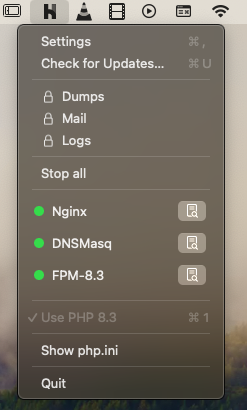
Now, we are going to install an additional module to manage the databases:
Once installed, we will have a window like the following:
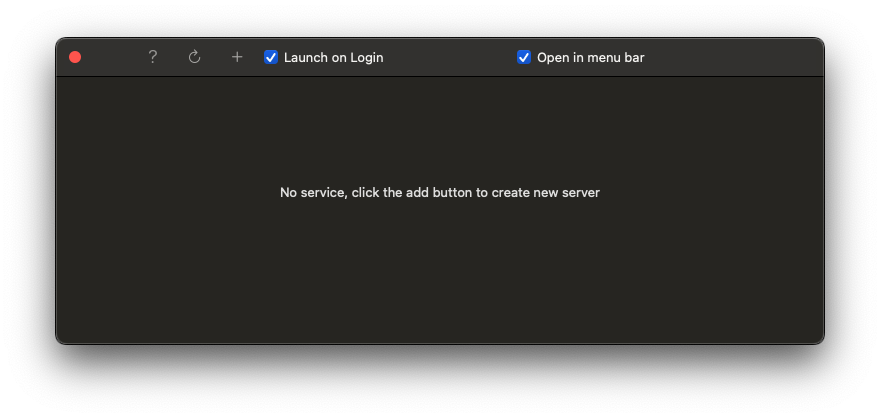
Also enabled to start when you log in and to be attached to the bar:
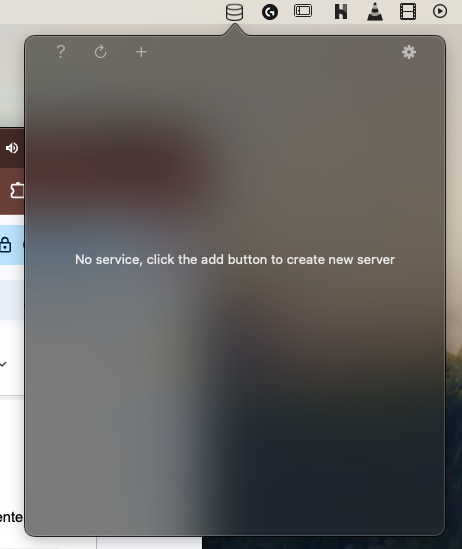
From the previous windows, we can click on the + icon and create a database:
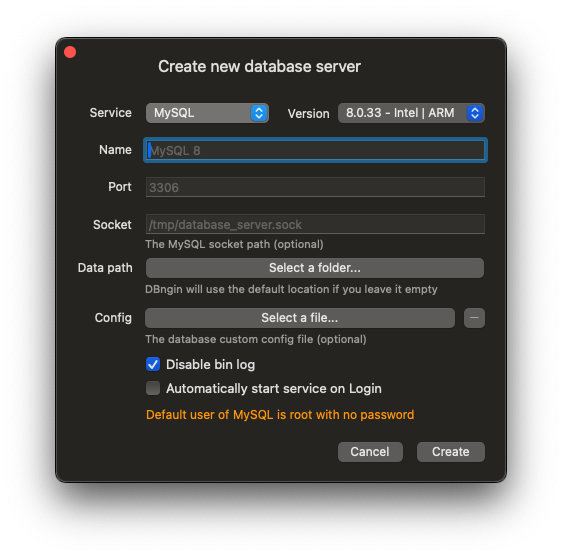
In which, we only have to enter the name of the database and the service you want to use, in this course, we will use MySQL.
Once the database is created, we have direct access to the manager that we have installed, in this example, Table Plus.
Install Additional Extensions in Laravel Herd
In this entry, we are going to learn how we can add additional extensions used by Laravel Herd, which is the new Laravel development environment starting with version 10 on MacOS and 11 of Laravel for Windows; It is an environment very similar to the one we have in Laragon with Windows, where we can install and manage Laravel dependencies such as PHP, Node, among others.
Additional Extensions in Laravel Herd
As is normal in software development, it is often necessary to install additional extensions with which to use certain functionalities or install certain packages, so let's get started.
Installing Additional PHP Extensions
Laravel Herd includes the PHP extensions necessary to develop in Laravel, but if we want to install additional dependencies, you have to follow the following steps:
Once you have downloaded the DLL of the page on which you want to install the extension, you simply have to copy the extension to the php dll folder in Windows.
On MacOS, we can use Homebrew:
$ brew install phpTo install an extension:
$ pecl install [extension-name]Then, in both cases, whether Windows or MacOS, you must activate the extension from php.ini:
Herd/config/php/<version>/php.ini
And this is everything you need to know to add extensions to your Herd; As you can see, the steps are similar to any other environment like Laragon
Laravel Herd - Reparar errores 504 - 503 PHP y Nginx
I was performing some operations on a Laravel application in production mode. As usual, errors are hidden in this environment, and any problems should be logged.
When performing a certain operation, an error always occurred. At first, it was a 503, and then it turned into a 504, which was strange because no associated log was generated.
And that's the first thing you should check: if a log isn't generated, the problem may not be with Laravel, but with another component, such as PHP or the web server (Apache or Nginx, depending on your stack).
In my case, I'm using Nginx. I already more or less knew where the problem was coming from: lack of resources. Below, I'll explain how I addressed it.
Reproducing the bug in development
I decided to replicate the operation in the development environment, where I have the advantage of seeing the errors directly on screen.
To my surprise, no log was generated in development either, which reinforced the hypothesis that the problem wasn't in Laravel, but rather on the server or PHP.
Detect the problem: operation + Error NO on screen/log
With that information, the next step was to analyze what operation was being executed.
In my case, I was generating a workbook (like the one you're seeing on screen). I generate all workbooks directly in production, where I have the data already sanitized.
Normally, these workbooks are between 400 and 500 pages long. But this one in particular is a monster at 813 pages, twice the usual size.
Nature of the problem: insufficient resources
This implies two things:
- The operation will take a long time.
- It's much more complicated than the others and requires more resources.
So, we now have a clearer idea of what the problem is: an intensive operation exceeding the default limits.
Increase time and memory resources to PHP and nginx
Since there were no logs generated by Laravel, but there was anomalous behavior (504 error), the next step was to check the limits configured in PHP.
In my case, I use Laravel Herd, which uses Nginx, so the approach was a little different than using Apache.
The first thing I did was increase the resources in the php.ini file. This is typically what you try when you have heavy operations:
C:\Users\<user>\.config\herd\bin\php8X
max_execution_time = 600
memory_limit = 1024M
post_max_size = 256M
upload_max_filesize = 256M
How do I access the php.ini file in Laravel Herd?
In Laravel Herd, it's very easy:
- Go to the PHP icon in the interface.
- Right-click on the active version.
- Select the option: "Open php.ini in directory."
Once opened, find the corresponding lines and modify them.
After making those changes... it didn't work.
Uploading time and memory resources to nginx
Since PHP didn't solve the problem, it was time to look deeper into the server.
I moved on to review the Nginx configuration file. In Laravel, this is located inside:
C:\Users\<user>\.config\herd\config\nginx\herd.conf
location / {
    rewrite ^ "C:/Program Files/Herd/resources/app.asar.unpacked/resources/valet/server.php" last;

    #MIAS
    proxy_read_timeout 3000;
    proxy_connect_timeout 3000;
    proxy_send_timeout 3000;

}
However, it didn't work either.
Nginx logs
Then I went to the Nginx server log, which is at:
C:\Users\<user>\.config\herd\Log
This is where I did find some useful information. When I checked the log, it clearly indicated a timeout, which wasn't showing up in the Laravel logs:
[error] 616#35124: *1 upstream timed out (10060: A connection attempt failed because the connected party did not properly respond after a period of time, or established connection failed because connected host has failed to respond) while reading response header from upstream, client: 127.0.0.1, server: , request: "POST /livewire/update HTTP/1.1", upstream: "fastcgi://127.0.0.1:9084", host: "xx.test", referrer: "http://xx.test/dashboard/books/edit/1"I copied the error message and passed it to ChatGPT (although you could also Google it).
This helped me confirm that the problem was a timeout, and that the parameters to be modified were not only those in php.ini, but also those in the Nginx configuration file.
Final configuration that solved the problem
I adjusted the following lines in Nginx:
C:\Users\<user>\.config\herd\config\nginx\herd.conf
location ~ [^/]\.php(/|$) {
    ***
    #MIAS
    fastcgi_read_timeout 600;
    fastcgi_send_timeout 600;
    send_timeout 600;
}
Install and configure Redis
We will see how to install Redis for development in Laravel, whether you want to use it for the cache system, the queue and job system, etc.
Windows, MacOS with Dbngin and Laravel Herd
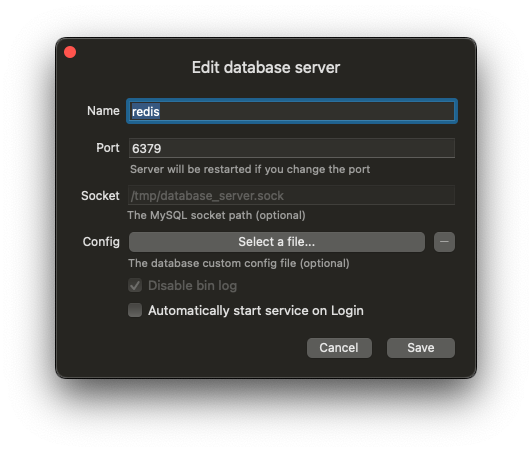
If you are using Laravel Dbngin on MacOS/Windows along with Laravel Herd, you can create a database while preserving the default configuration:
Laragon on Windows
If you use Laragon, you need to configure a DLL according to the version you are using; more information on the official Laragon forum:
https://dev.to/dendihandian/installing-php-redis-extension-on-laragon-2mp3
You must download the Windows DLL according to the version you are running, NTS or TS and your PHP version; in my case, it is NTS:

Download the DLL from:
https://pecl.php.net/package/redis
Then copy the DLL into the PHP version you are running in Laragon; for example:
- C:\laragon\bin\php\php-8.XX-nts-Win32-vs16-x64\ext
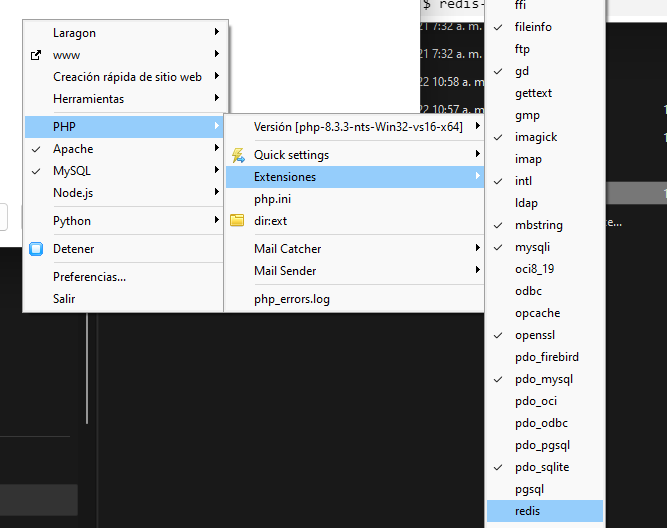
And activate the extension:
In Laragon, Redis comes installed by default. Previously, we configured the DLL or database connector to run the Redis database:
- C:\laragon\bin\redis\redis-x6XX\redis-server.exe
And you will see a window like the following:
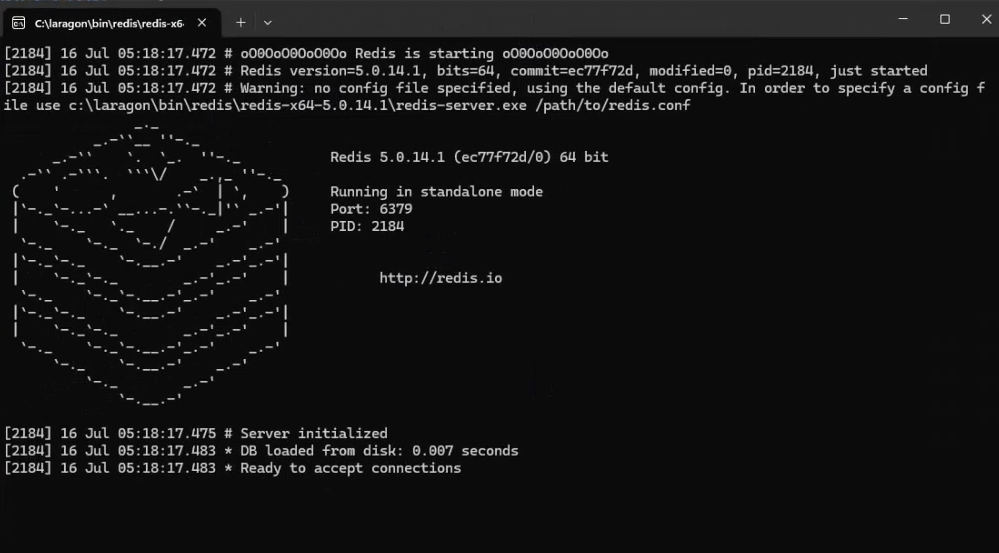
Which indicates that Redis is running and ready to use; likewise, you can test the status of redis by running:
$ redis-cliIf you see a message like the following:
Could not connect to Redis at 127.0.0.1:6379: A connection could not be established because the target machine expressly denied it.
not connected>
It means you have issues with the execution of the database engine.
You can also run:
$ redis-cli$ 127.0.0.1:6379> pingAnd you should see as output:
PONGOn Linux:
$ sudo apt-get install redis php8.3-redis
$ sudo systemctl restart php8.3-fpm.service
Additional Configurations
It might be necessary to install the Predis package to your Laravel project via Composer:
$ composer require predis/predisWhich is the client or connector so you can use Redis in Laravel. To use Redis for the database, it shouldn't be necessary, so only install it if needed.
In case you want to change any redis configuration parameter, you can specify it in the following way:
.env
REDIS_CLIENT=phpredis
REDIS_HOST=127.0.0.1
REDIS_PASSWORD=null
REDIS_PORT=6379
Indicate the connection options to Redis (just like with any other database):
config/database.php
'redis' => [
    'client' => env('REDIS_CLIENT', 'phpredis'),
    'default' => [
        'host' => env('REDIS_HOST', '127.0.0.1'),
        'password' => env('REDIS_PASSWORD'),
        'port' => env('REDIS_PORT', 6379),
        'database' => env('REDIS_DB', 0),
    ],
    'cache' => [
        'host' => env('REDIS_HOST', '127.0.0.1'),
        'password' => env('REDIS_PASSWORD'),
        'port' => env('REDIS_PORT', 6379),
        'database' => env('REDIS_CACHE_DB', 1),
    ],
];
config\cache.php
'redis' => [
    'driver' => 'redis',
    'connection' => env('REDIS_CACHE_CONNECTION', 'cache'),
    'lock_connection' => env('REDIS_CACHE_LOCK_CONNECTION', 'default'),
],
Finally, we configure the connector to be Redis either in the .env:
.env
CACHE_STORE=redisAnd/or configuration file:
config\cache.php
'default' => env('CACHE_STORE', 'redis')And that would be all; by changing the cache system, it is independent of the implementation we are going to perform.
My Laravel Development Kit 2026 - Windows and macOS

Since Laragon is no longer free, I no longer recommend using it for development. We have other tools you could use, such as Docker directly. Although, honestly, I've never really liked Docker for developing with Laravel, as it's a bit more laborious. However, it's completely usable.
If you're comfortable working with Docker, remember that you can use it alongside Laravel Sail, which works perfectly on both Windows and Mac (and I think also on Linux, since Docker is cross-platform). But as I said, I no longer recommend using Laragon under any circumstances, unless you want to pay or need a specific feature that's really worth it. Otherwise, to work with Laravel, you don't need it.
Recommended Alternative: Laravel Herd
The approach I recommend now is Laravel Herd. Remember that it's available for both Windows and Mac. It was even initially released for Mac and later for Windows. So you have support for both systems.
And the database?
That this the "Achilles' heel" with Herd, since Laravel automatically included MySQL or MariaDB. To overcome this, you can use DBngin, which is another tool that, if I remember correctly, was initially only available for Mac, but is now also available for Windows.
That's why I wanted to record this video: to show you the development kit I recommend for Laravel.
Laravel 2026 Development Kit
Whether you're using Mac or Windows, you can use both tools perfectly. Here you can see that they work perfectly for me: I have Laravel Herd with my projects and, on the other hand, DBngin running without any issues.
Note: We can also work with Laravel without a database like MySQL, since it comes with SQLite by default, which I think is excellent. In fact, it's the one I usually use in my courses.
Why do I prefer MySQL in real-world projects?
Personally, when I work on real-world projects that I know will grow in tables, migrations, and models, I prefer to use MySQL because it allows me to edit, customize, or change the database more easily.
With SQLite, changing a database can be a headache. It's happened to me in courses where, for example, I forgot a letter in a table and had to modify it or add a new column. Yes, that can be done with migrations, and in fact, that's the recommended approach with any modern framework.
But when I'm working on a real-world project and need to constantly modify or create migrations just to change a table, I prefer to do it manually.
The problem is that to reflect those changes with migrations, you often have to run a migrate:refresh, which deletes all the tables and recreates them. This isn't feasible in a production project.
Therefore, I prefer to apply the changes manually to the database and, if necessary, generate the corresponding SQL to run it directly in the production environment. Something that would be a bit more complicated with SQLite.
Conclusion: My Ideal Environment
So, the goal of this video was to show you my recommended development environment for Laravel:
- Laravel Herd
- DBngin
- (Optional) TablePlus as a visual database manager, which you can also install. Although you can use any other, DBngin already comes with direct access configured.
Summary
- Identify the operation causing the error.
- If there are no logs in Laravel, it could be a PHP or server issue.
- First, adjust the php.ini parameters: max_execution_time and memory_limit.
- If that doesn't work, move on to checking the Nginx configuration files.
- Use the server log for more clues.
- Adjust the timeouts in Nginx if necessary.
- Always comment out your changes and make backups before modifying critical files.
Now that the environment is ready, let's see how to create our applications in Laravel (including Livewire and Inertia).