The perspective property in CSS is what allows us to simulate depth in 3D transformations by defining the distance between the observer (the user) and the plane where the elements are rendered. In other words, it is responsible for 3D rotations or tilts not looking flat, but with a real sense of distance.
The simplest way to understand it is to imagine a person observing an object in the real world: if they move very close, the object looks large and the deformations are more evident; if they move away, the object looks smaller and flatter. That is exactly what perspective does in CSS.
Previously we saw how to mix content colors in HTML with mix-blend-mode in CSS.
The analogy of the observer and the 3D object
The HTML element is not the one that "has" the perspective directly. In reality, the container acts as the observer, and its child elements are the observed objects. This idea often clarifies many issues when someone says "perspective is not working."
The role of the Z-axis in visual depth
When working with 3D transformations, the Z-axis comes into play. Elements with $z > 0$ values appear to move closer to the user, while those with $z < 0$ move away. The perspective property defines how exaggerated or subtle this effect will be.
How perspective works in CSS
The perspective property does not transform the element itself, but creates a shared 3D space for all its transformed children. This detail is key and makes the difference compared to other ways of applying perspective.
When I started working with 3D effects, I made the typical mistake of applying perspective directly to the rotating element. It wasn't until I understood that it should be placed on the parent that everything started to make sense.
What small and large values mean
- Small values (for example, 200px): the observer is very close → intense 3D effect.
- Large values (for example, 1200px): the observer is far away → more subtle and realistic effect.
There is no "correct" value. Everything depends on the type of effect you want to achieve.
The perspective property adds a three-dimensional effect by affecting the distance between an observer and the figures on the plane through a variation on the Z-axis; in other words, it allows figures on the plane to move closer/further:

To understand this property, simply imagine a person viewing an object in the 3D world, now imagine that we can vary the distance between the person and the object—this is possible through the perspective property.
Why perspective is applied to the parent element
By defining perspective on a container, all its children share the same vanishing point. This is ideal for coherent 3D scenes, such as cubes, cards, or animated galleries.
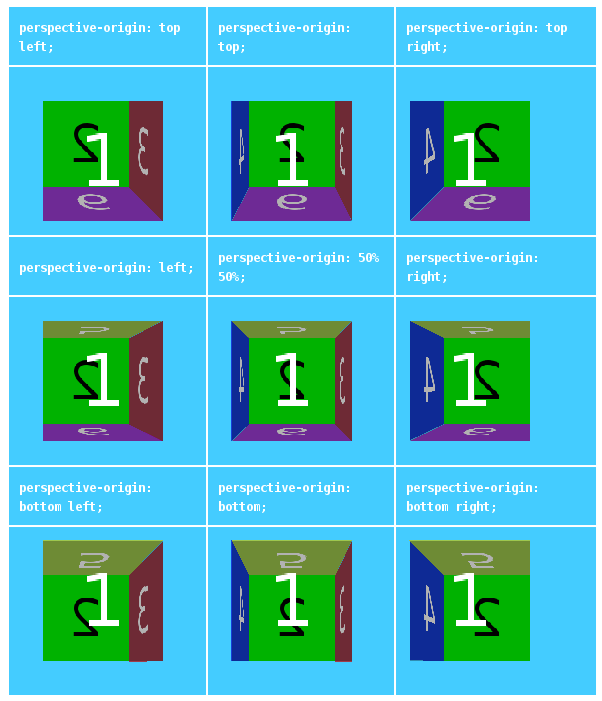
We will also see in the second part of this entry that we can vary the position of the observer (the one viewing the object) and thus the viewing angle through the perspective-origin property.
Let's continue talking about the perspective property in CSS, this property adds a depth factor (Z) to HTML elements; its value consists of measurements, for example pixels; according to the value of the measurement:
- The smaller the value, the further the object will be from the observer.
- The larger the value, the closer the object will be to the observer and therefore the object appears to be larger.
Syntax of the perspective property in CSS
Basic use in CSS:
perspective: 250px;We can also deactivate the perspective:
perspective: none; Syntax of the perspective property in JavaScript:
element.style.perspective = "800px"; element.style.perspectiveOrigin = "50% 50%"; Example of the perspective property in CSS
Let's look at the following example where we can see variations between the object's perspective giving the sensation that it progressively grows and shrinks; however, the only thing that varies is the perspective:
perspective vs transform: perspective()
This is one of the most common confusions.
Key differences that often cause confusion
- perspective (property): creates a shared 3D space for the children.
- transform: perspective() (function): applies perspective only to that element.
In practice, if you have several elements that must look consistent with each other, you will almost always want to use the property on the container.
When to use each one:
- Use perspective when working with complete 3D scenes.
- Use transform: perspective() for isolated and specific effects.
The perspective-origin property
As we mentioned at the beginning of this entry, perspective simulates as if an observer were looking at an object.
By default, the vanishing point is in the center of the container (50% 50%). However, we can move it.
In one of my projects, changing the vanishing point was what brought the effect to life: the same object seemed to tilt in a completely different way just by modifying this value.
What it is and why it changes the viewing angle
perspective-origin defines the point from which the observer looks at the scene. Changing it alters the viewing angle.
We can reposition the observer's viewing position, which can be changed with the perspective-origin property by defining its X and Y position:
.container { perspective: 600px; perspective-origin: left top; }Syntax of the perspective-origin property in CSS
perspective-origin: position-x; perspective-origin: position-x position-y;You can use:
- Percentages
- Units (px, rem, etc.)
- Keywords (top, center, bottom, left, right)
- position-x and position-y: Indicates the position on the X and Y coordinates respectively; they can have any of the following values:
- position-x supports keywords such as
left,centerandright. - position-y supports keywords such as
top,centerandbottom.
- position-x supports keywords such as
Practical examples of perspective in CSS
Example 1: Basic depth effect:
.container { perspective: 1000px; } .box { transform: rotateY(45deg); }Example 2: Modifying the vanishing point
.container { perspective: 800px; perspective-origin: right center; }Example 3: Interactive 3D card
.card {
perspective: 1000px;
}
.card-inner {
transform-style: preserve-3d;
transition: transform 0.6s;
}
.card:hover .card-inner {
transform: rotateY(180deg);
}
Example 4: perspective-origin on a cube
We will see how we progressively change the observer's viewing angle through the perspective-origin property:
Common mistakes when using perspective
- Extreme values
- Values that are too small generate exaggerated distortions that are difficult to control.
- Lack of 3D transformations
- Without rotateX, rotateY, or translateZ, perspective will have no visible effect.
- Not using preserve-3d
- If transform-style: preserve-3d is not defined, the children will not maintain depth.
Conclusion
The perspective property in CSS is fundamental for creating believable 3D effects. Understanding it as a relationship between observer and object, and not just a visual value, makes the difference between an amateur and a professional effect.
If you master perspective, perspective-origin, and their relationship with 3D transformations, you will have a solid foundation for creating modern, dynamic, and visually impactful interfaces.
Learn how a replaced element is resized to fit the dimensions of its container using object-fit in CSS