
Content Index
The next CRUD operation that we are going to see would be the one that allows us to delete a record from our database; which you can implement in the paginated listing in CodeIgniter 4, we can implement some modal function to this, but in this entry we are going to see a very simple example that would be to delete the record directly without a modal; for that, we are going to define the following function inside our controller that we created earlier:
    public function delete($id = NULL)
    {

        $movie = new MovieModel();

        if ($movie->find($id) == NULL) {
            throw PageNotFoundException::forPageNotFound();
        }

        $movie->delete($id);

        return redirect()->to('/movie')->with('message', 'Película eliminada con éxito.');
    }
Finally, to delete an element, we only need an identifier and the request of type DELETE; here the same thing happens with the case of PUT and PATCH requests, they are not supported by the HTML API, so instead of this:
$routes->delete('movie/(:num)','Movie::update/$1');We will use this:
$routes->post('movie/delete/(:num)','Movie::delete/$1');With this, we present the scheme of the different functions that we can use to define our routes for each of the most used types of requests; of course, we still need to know how routes are handled together with controllers, but we'll get to that later.
Resource type routes
As it is common to use CRUD processes for all, in CodeIgniter we have a type of function that allows us to unify these seven routes that we saw earlier in a single process and are known as resource type routes:
$routes->resource('movie');That route is exactly the same as we define the routes as follows:
//crear
$routes->get('pelicula/new','Pelicula::new');
$routes->post('pelicula/create','Pelicula::create');

// ver
$routes->get('pelicula','Pelicula::index');
$routes->get('pelicula/(:num)','Pelicula::show/$1');

// actualizar
$routes->get('pelicula/(:num)/edit','Pelicula::edit/$1');
$routes->put('pelicula/(:num)','Pelicula::update/$1');

// eliminar
$routes->delete('pelicula/(:num)','Pelicula::delete/$1');
With this, as you can see if you run a spark command:
$ php spark routes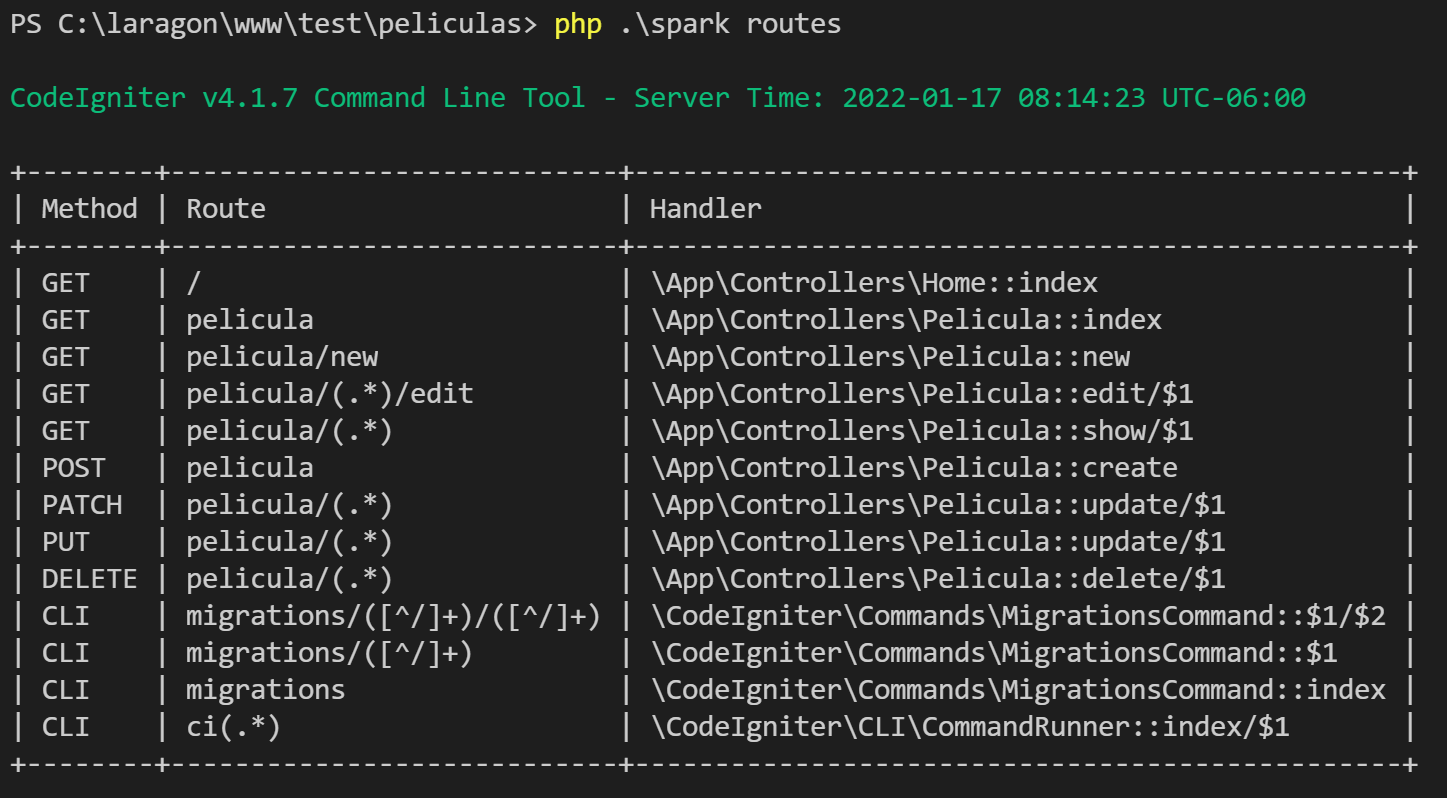
Although notice that the PUT, PATCH and DELETE type requests appear that we do not need or rather, that we cannot use; resource type routes are intended to work with a Rest Api, and not with forms; for the forms we use those of type presenter:
$routes->presenter('pelicula');If we show the routes now:
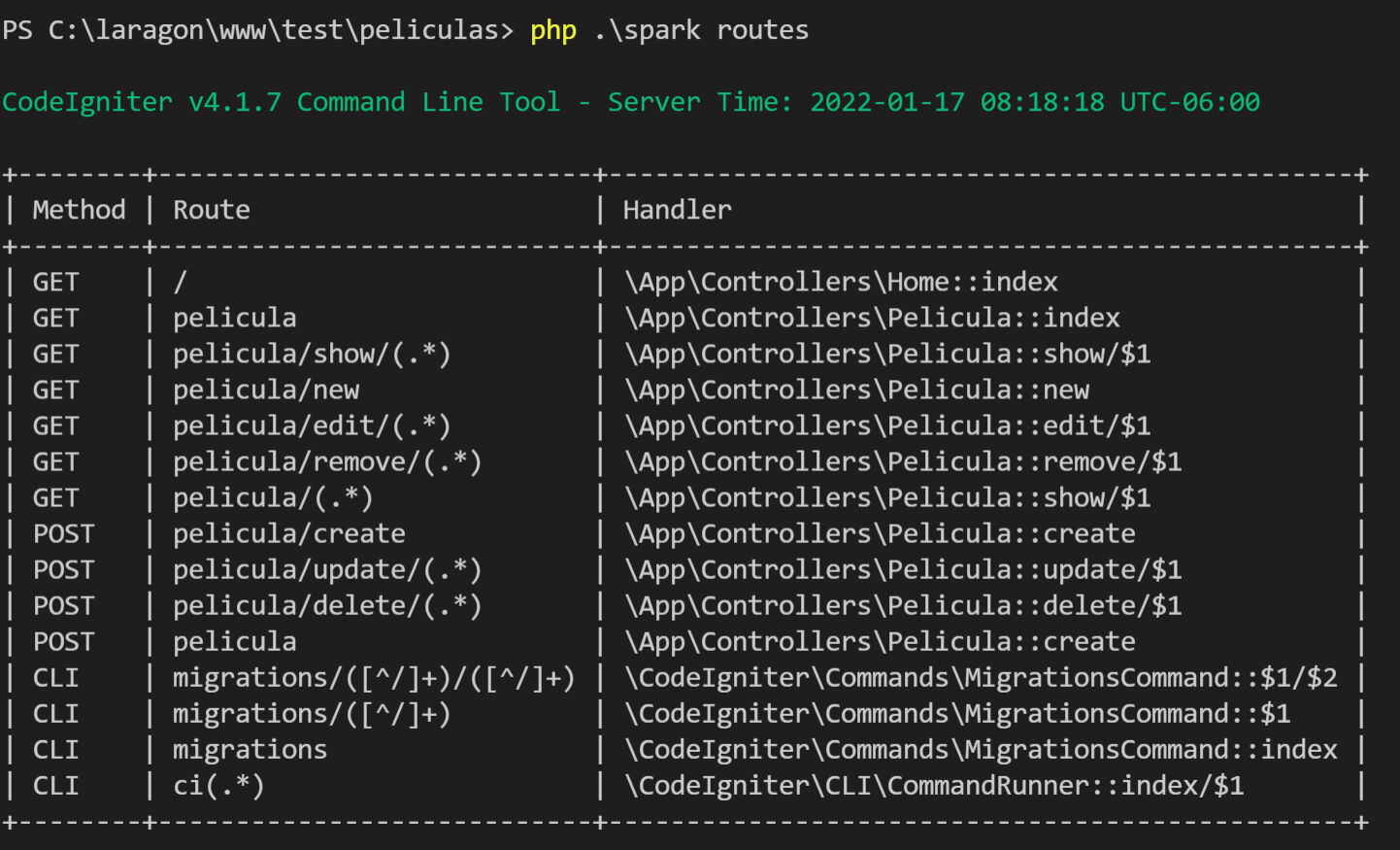
You'll see that they match perfectly with the structure we created earlier; in short, for CRUDs, instead of using:
// crear
$routes->get('pelicula/new','Pelicula::new');
$routes->post('pelicula/create','Pelicula::create');

// ver
$routes->get('pelicula','Pelicula::index');
$routes->get('pelicula/(:num)','Pelicula::show/$1');

// actualizar
$routes->get('pelicula/(:num)/edit','Pelicula::edit/$1');
$routes->post('pelicula/update/(:num)','Pelicula::update/$1');

// eliminar
$routes->post('pelicula/delete/(:num)','Pelicula::delete/$1');
We use:
$routes->presenter('pelicula');It is important to note that the 'movie' route in the presenter and resource routes is used in the name of the controller (Pelicula.php) and to create the route.
View
It is a very simple function, the important thing here is referential the elements that we want to eliminate, for that we do some previous validations to know if the record exists, and if it does not exist, return a 404 page to finally send to some other page, for example , the list, and for that we make a redirection to the corresponding view.
Then, to call it, we can create a link:
<a class="btn btn-danger btn-sm float-right" href="<?= route_to('store_movie_show', $m->id) ?>"><i class="fa fa-eye"></i> Ver</a>Next step, learn how to define your routes in CodeIgniter 4.