Animations are not a simple "aesthetic extra": they are the fundamental piece that makes an app feel alive, fluid, and truly professional.
In this comprehensive guide, I share a complete, modern, and highly practical journey for you to master the creation of custom components and complex animations in Flutter, taking your skills from an intermediate level to an advanced profile.
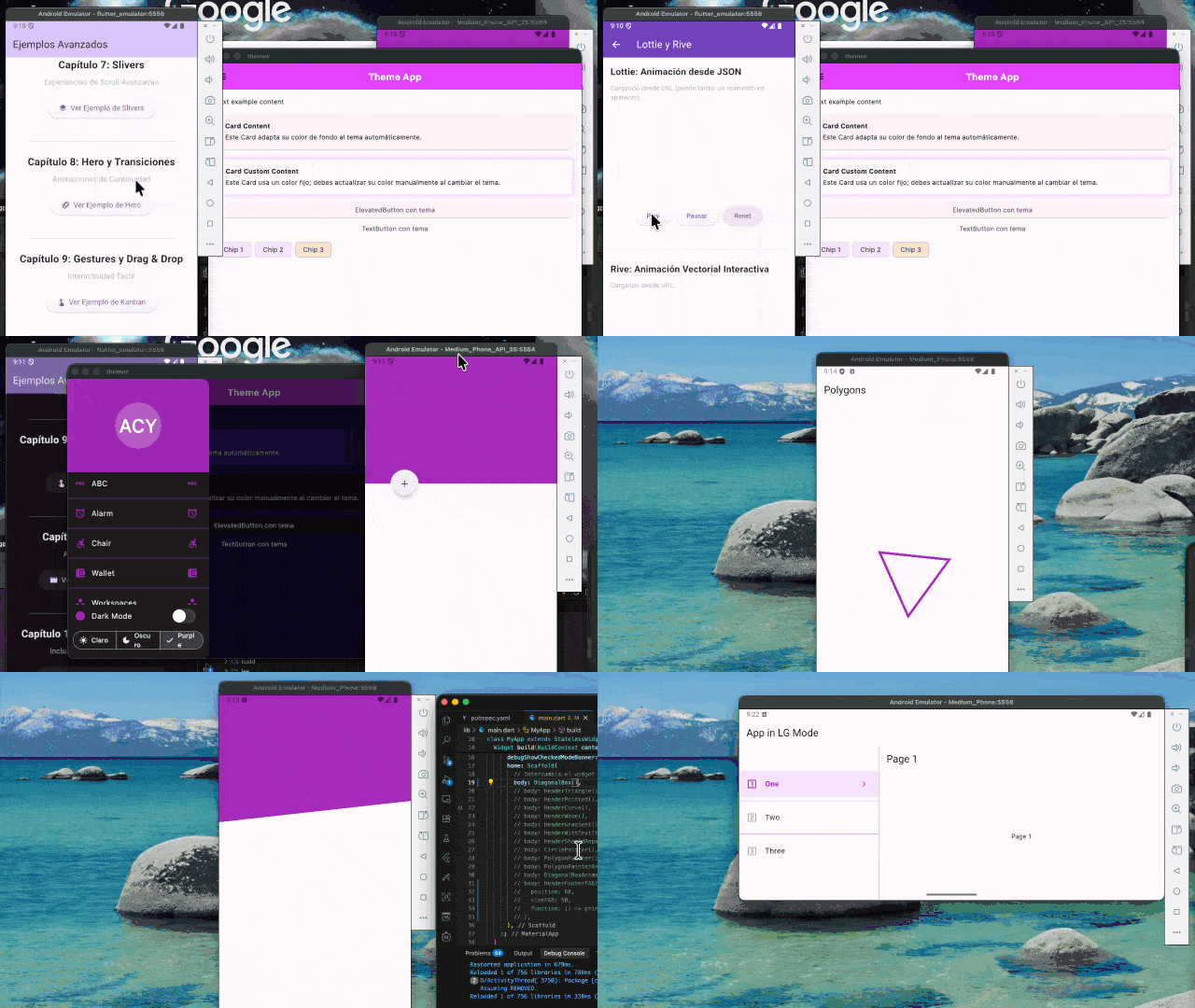
What you will master in this Advanced Flutter Guide
- Animation Engine: Distinguish and perfectly apply automatic Implicit Animations and Explicit Animations (`AnimationController`, `Tween`).
- Animations: The topic of animations must be present in modern developments. Therefore, we have a chapter focused on introducing how to use animations in Flutter, of which we have several ways. We will also apply them in the development of our components when necessary.
- CustomPainter and Canvas: Trace vectors, shadows, and complex geometry headers by drawing pixel by pixel on the native canvas.
- Development with Multiple Themes: For example, the creation of applications with dark theme and light theme.
- Custom Components: Program highly reusable interactive buttons, staggered grids, and nested side menus.
- Responsive Applications: Create applications that can be displayed correctly on multiple devices, depending on the window size, and not simply look stretched.
- Multi-theme Architecture: Support and dynamically switch between Dark Mode and Light Theme using the `ThemeData` object.
- Responsive Design: Develop smart interfaces that don't just stretch, but reorganize their content on tablets and desktop.
- Custom headers with complex shapes, using CustomPainter.
- Learn how to use and define our custom animations.
- Other nested components or widgets that you will surely find interesting.
- UX Microinteractions: Guide and inform the user through smooth transitions that radically elevate the perceived quality of the software.
Modern apps don't just compete on functionality; they compete on experience.
A smooth transition, an icon that responds with microinteractions, or a widget that visually adapts to a state change can make the difference between an "okay" app and a memorable app.
Why learn Animations and Components in Flutter today?
The vital role in modern user experience (UX)
Modern applications no longer compete solely on the amount of features they offer; they compete fiercely on experience. A smooth visual transition, a button that responds to touch, or a card that expands without sudden jumps can make the absolute difference between a "functional" app and a stellar product.
Personally, when I incorporated my first animated interfaces into production, I noticed that users who used to abandon forms or complex checkout flows started completing them. Animations guide, inform, smooth the wait, and, ultimately, sell.
What you achieve by abandoning generic widgets:
- Screens that communicate state changes without disorienting the user.
- Unique brand identity thanks to designs with `CustomPainter`.
- Clean and highly reusable code packaged into Components.
The Ecosystem: What do you need to master first?
| Tool / Concept | Learning Curve | Purpose in the Interface (UI) |
|---|---|---|
| Implicit Animations | Low | Ideal for quick automatic microinteractions (`AnimatedContainer`, `AnimatedOpacity`) delegating mathematical interpolation to Flutter. |
| Explicit Animations | Medium-High | Total manual control. Use `AnimationController` to pause, reverse, repeat, and use `Tween` to establish complex movement ranges. |
| CustomPainter | High | The low-level native canvas that allows drawing vectors, Bézier curves, and asymmetric polygons precise to the pixel. |
| LayoutBuilder (Responsive) | Medium | Understands and measures available physical space in real-time to restructure grids and columns depending on whether it's mobile or a monitor. |
Architecture Decision: Which type of animation to use?
| Visual Goal | Recommended Tool | Why? |
|---|---|---|
| Change a color, border, or size upon tapping a button | Implicit Animation | Does not require initializing controllers (`dispose`/`init`). By simply changing the variable within a `setState`, the transition occurs smoothly. |
| Continuous loading loop or chained sequences | Explicit Animation | Allows using methods like `repeat()`, `reverse()`, or `forward()`. Define the movement's personality through a nested `CurvedAnimation`. |
| Header with smooth corporate waves | CustomPainter | It is impossible to build perfect waves by combining basic rectangular containers. Requires vector painting commands. |
The "Pro Approach": Clean Code vs State Hacking
Developers who have just moved to the intermediate layer often try to animate interfaces by abusing asynchronous pauses (`Future.delayed`) and aggressively mutating `setState`. Let's see why this is inefficient compared to native animated widgets:
// BAD: Simulating animations by forcing asynchronous
// waits and overloading rebuilding.
onTap: () async {
  setState(() { width = 200.0; });
  await Future.delayed(Duration(milliseconds: 300));
  setState(() { color = Colors.red; });
}// GOOD: Delegating performance to 60 FPS
// using native SDK implicit tools.
AnimatedContainer(
duration: const Duration(milliseconds: 300),
curve: Curves.easeInOut,
width: isExpanded ? 200.0 : 100.0,
color: isExpanded ? Colors.red : Colors.blue,
child: const Text("Fluid Component"),
)In this book, you will learn to apply the Pro Approach to design scalable and fully reusable animation architectures.
Your Frontend Specialization Roadmap in Flutter
This theoretical and eminently practical training has been divided into structured phases to eliminate the "fear" of advanced interfaces:
Guaranteed Learning Phases:
- Phase 1: Immediate Transitions. Massive implementation of implicit animations to respond immediately to user gestures without complicating the widget tree.
- Phase 2: Explicit Choreographers. Absolute mastery of the `AnimationController`, configuring parallel `Tweens` to move, scale, and rotate at will.
- Phase 3: Geometry with CustomPainter. Building components "impossible" to create with conventional rows and columns, tracing mathematical vertices.
- Phase 4: Global Adaptability. Preparing nested components to support global injection of `ThemeData` (Dark Mode) and web restructuring (Responsive).
Free Resources to Get Started NOW
Access high-quality materials free of charge and discover the versatility of having a multi-app project:
Free Community Book
Discover my teaching style with the FREE version. Essential lessons to get you started on your journey today.
Project Repository
This book and its ecosystem are currently under development. Video classes and the central GitHub repository will be available very soon for you to clone, test, and inspect all the developed CustomPainters.
Framework Foreword: The Cross-Platform Horizon
Flutter is a fascinating framework where we can literally build anything. This is my fourth book focused on Google's technology, which demonstrates my conviction in its potential. We have seen how to compile mobile applications from their inception, jump to MacOS, Linux, and Windows desktops, and even create full video games with Flame.
But the soul of Flutter lies in the fact that it completely controls every pixel rendered on screen without relying on native bridges or slow webviews. This work is born out of the need to exploit that technical advantage to the maximum. Building custom components is not "reinventing the wheel," it's forging your own catalog of premium tools to elevate your products from standard to global level.
Value in the Mobile Frontend Industry
The mobile industry does not forgive lazy interfaces. Becoming an expert in UI/UX and animations within Flutter guarantees that you will stand out immediately in any technical process. Global companies immensely value developers capable of delivering interfaces millimetrically identical to Figma designs, with smooth transitions at a stable 60 FPS. By mastering the construction of widgets from their mathematical foundations, you stop being a mere "assembler" of third-party packages and become the undisputed Visual Architect of any development team.
Author's Practical Experience
“After publishing my fourth book focused exclusively on Flutter and scaling projects to massive production for years, I know firsthand where the intermediate-level developer gets frustrated. The technical barrier always lies in the leap from relying on generic widgets to creating your own native graphical tools. In this work, I have condensed rawly the architectures, CustomPainters, and animation techniques that I use daily to sculpt scalable interactive experiences with premium visual impact.”
Frequently Asked Questions
- Do I need to be a graphic designer to master animations and CustomPainters?
- Not at all. Artistic design and technical implementation are different areas. This guide will teach you the mathematics and logic behind interface building (spatial coordinates, Bézier curves, dynamic interpolations) so that you can program any UI/UX design handed to you with structural precision, without needing prior illustration skills.
- Does building my own components affect my mobile application's performance?
- Quite the opposite. Using dozens of generic third-party packages often overloads your app with heavy and inefficient dependencies. Designing your own optimized widgets (such as
CustomPainter), delegating graphic calculations to the Skia/Impeller engine, is the most professional way to guarantee a stable and silky-smooth flow of 60 FPS in production.
- Quite the opposite. Using dozens of generic third-party packages often overloads your app with heavy and inefficient dependencies. Designing your own optimized widgets (such as
- What prior level of Flutter do I need to understand this material?
- You should feel comfortable with basic Dart syntax and know the foundations of visual construction in Flutter (such as using
Row,Column,Container, and the difference betweenStatefulandStateless). This book is the direct bridge to stop being a beginner assembler and transform into an advanced UI/UX architect. - This is not an introductory manual for novices on how to install the SDK or how basic Dart works.
- You should feel comfortable with basic Dart syntax and know the foundations of visual construction in Flutter (such as using