
Content Index
- Why a bad structure takes its toll on you
- What Clean Code applied to FastAPI means
- Clean Code is not about writing more layers
- Principles that really matter in an API
- Clean Architecture as a natural consequence
- Separation of concerns in FastAPI
- Layers and dependencies: where code should point
- Tools: Google Antigravity (Gemini)
- Preparation and architectural concepts
- What are Clean Architecture and Clean Code?
- Clean Code vs. Clean Architecture
- The Prompt and Refactoring
- Executing the Plan
- The WebSockets Problem
- Result: The new structure
- Interface Adapters
- Use Cases
- Entities
- Frameworks & Drivers
- Dependencies and Repository pattern in FastAPI
- What is the Repository Pattern?
- Why is it useful?
- Beyond changing the database
- Basic structure of the Repository pattern
- 2. The implementation (the adapter)
- 3. The access layer using dependencies
- 4. Consumption from the endpoint
- Practical example of changing databases
- Real-world case: my own platform
- Relationship with the hexagonal architecture we implemented earlier
- Real Advantages of the Repository Pattern
- Real benefits of applying Clean Code in FastAPI
- Easier code to maintain and test
- Scaling without fear of breaking everything
- Common mistakes when applying Clean Architecture in FastAPI
- Copying architectures without understanding them
- Turning Clean Code into bureaucracy
- Conclusion: Clean Code to avoid starting from scratch ever again
- Frequently asked questions about Clean Code in FastAPI
We are going to conduct a small experiment. We will take our current project —which does not exactly follow the best organizational practices, as it was born as a quick test to implement WebSockets— and we are going to improve its structure following the principles we already explored in The lifecycle of an app in FastAPI with Lifespan events.
To do this, we will use well-established software architectures. I don't intend for this to be a deep course on advanced architectures, but rather a practical presentation to spark your curiosity. Later on, we can dedicate a full section or a specific course to it, but if you prefer, you can also research on your own. The timing is ideal: the application is small and manageable, making it the perfect candidate for this type of refactoring.
Projects start small, like almost all of them do. A couple of endpoints, some logic in the routes, a database connection… everything seemed reasonable. But as the code grew, maintaining a good structure stopped being optional. That was when I discovered Clean Code applied to FastAPI and understood a key lesson: why reinvent the wheel if the problem is already solved?
In this article, I explain how to apply Clean Code in FastAPI in a practical way, without dogmas or over-engineering, so that your API can grow without turning into chaos.
Why a bad structure takes its toll on you
FastAPI does not force you to structure anything. And that is an advantage… until it stops being one.
The typical symptoms of a project without a clear architecture are easy to recognize:
- giant
routerswith dozens of mixed endpoints - business logic duplicated across several endpoints
- tests impossible to write because everything is coupled
- fear of touching code "because it will surely break something"
In my case, project growth was the trigger. I wasn't writing bad code, but I was writing code that was not prepared to grow.
What Clean Code applied to FastAPI means
Clean Code is not about writing more layers
A common mistake is thinking that Clean Code means:
"More folders, more classes, and more abstractions."
No.
Clean Code in FastAPI means:
- clear responsibilities — each module does only one thing
- well-directed dependencies — the flow of dependencies points toward the domain, never outward
- code that is easy to read, test, and modify — without needing to navigate five files to understand what a function does
It is not about following an architecture just because it's trendy, but about solving real maintenance problems.
Principles that really matter in an API
When applying Clean Code in FastAPI, these are the principles that make a difference:
- Separation of concerns
HTTP is not business logic. An endpoint that validates, queries the database, and formats the response is doing too much. - Inward dependencies
Business logic does not depend on frameworks. If youruse caseimports directly fromfastapi, something is wrong. - Explicit code
Understanding what a module does without needing to read five files. - Ease of testing
Without spinning up FastAPI or a real database. If you cannot unit test your business logic, it is a sign that it is too tightly coupled to the framework.
When I understood this, Clean Architecture stopped seeming like something "academic" and became a natural consequence of good design.
Clean Architecture as a natural consequence
Separation of concerns in FastAPI
A well-structured API is divided into conceptual layers with well-defined responsibilities:
- API / Presentation → FastAPI, routes,
request/response. It is the outermost layer and the only one that "knows" the HTTP protocol. - Application → use cases. Orchestrates logic regardless of how the request arrived.
- Domain → pure business rules, without external dependencies.
- Infrastructure → database, external services, ORM. Everything that can change.
The key: FastAPI lives in the outermost layer. Neither the use cases nor the entities know that FastAPI exists.
Layers and dependencies: where code should point
The golden rule:
The inner layers do not know that FastAPI exists.
This allows you to:
- swap FastAPI for another framework without touching the business logic,
- change the database without breaking use cases,
- test the logic directly, without HTTP or real infrastructure.
And this is where many projects break down: if there isn't a clear structure from the beginning, every change turns into a high-risk operation.
Tools: Google Antigravity (Gemini)
For this work, I will use Google Antigravity, the editor you see on screen. If you're not familiar with it, it is a VS Code-based development environment that integrates Gemini AI agents directly into your workspace, similar in concept to Windsurf or Cursor, but with a differentiated value proposition.
One of its most interesting features is the Planning mode. Unlike other VS Code extensions, this tool generates a "roadmap" before applying any changes to the code. This is extremely useful because it allows you to review and adjust the plan before the agent modifies your files, avoiding surprises and reducing errors in large refactorings.
Preparation and architectural concepts
Before asking the AI for global changes, it is essential to synchronize your project with GitHub. Things can go wrong —especially in a refactoring of this scale— and having a backup will save you a lot of time if you need to revert changes.
What are Clean Architecture and Clean Code?
You have probably heard about Clean Architecture and Clean Code. Let's see what each one is and, above all, how they differ.
Clean Code vs. Clean Architecture
It is important to clarify something before continuing:
- Clean Code is not an architecture; it is a philosophy. It focuses on writing simple, modular, readable, and maintainable code.
- Clean Architecture is the practical and structural application of those principles.
It is like the difference between API and REST API: one is the general concept and the other is its concrete implementation.
In essence, Clean Code represents ways of organizing code based on good principles. We have already applied some of this by separating schemas and models, but in an incomplete way. The advantage of adopting an existing architecture is avoiding reinventing the wheel: instead of inventing names for our folders, we use proven structures that make code readable, maintainable, and scalable.
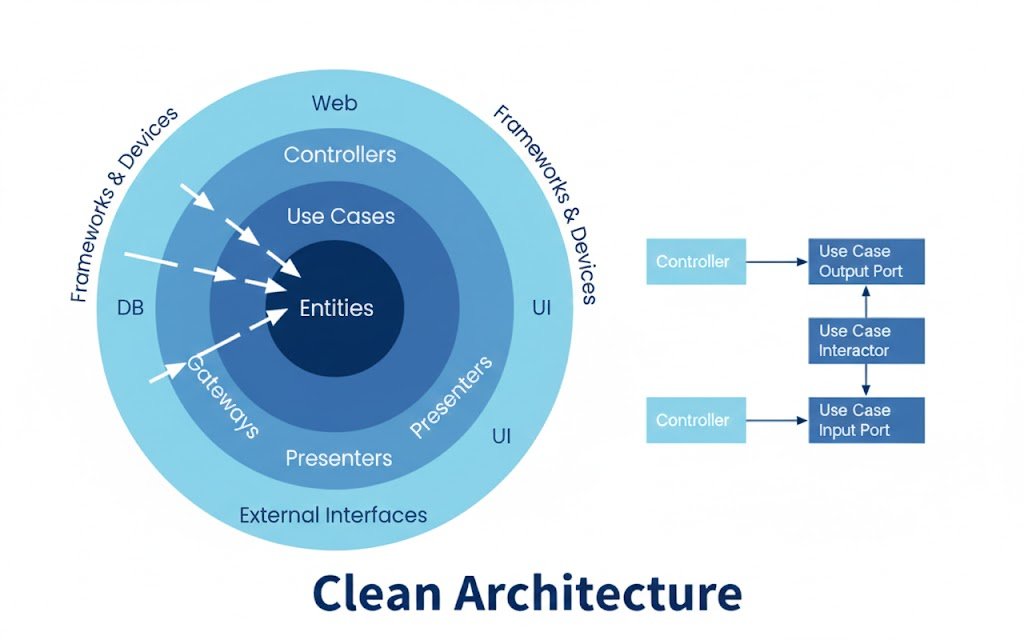
The structure we aim to generate is divided into the following layers:
- Entities: The purest business logic, without dependencies on any framework.
- Use Cases: Specific business actions (creating a user, logging in). It is the core of the application's logic. This defines what happens when a user logs in, regardless of whether the request comes via a
REST API,WebSocket, or any other protocol.- In the login example, the use case handles:
- Verifying that the user exists.
- Validating the password.
- Generating and returning the token.
- Previously, this logic lived inside the endpoint. Now it is decoupled, which prevents it from depending on response types or FastAPI, allowing it to be reused from any presentation layer.
- In the login example, the use case handles:
- Interface Adapters: Controllers and repositories that act as translators between the outside world and use cases. This is where controllers handling
HTTP,WebSocket,JSON, orXMLrequests reside, alongside repositories that abstract data access. - Frameworks & Drivers: External tools such as the database or the web framework (
FastAPI). This is where "code that isn't ours" lives: FastAPI configuration, database connection withSQLAlchemy, or any ORM. If tomorrow we want to replace FastAPI with Flask or Django, we should only need to touch this layer.
The Prompt and Refactoring
For the AI agent to be effective, we need a good prompt. The result was the following:
"Act as a software architecture expert. Refactor my FastAPI application following Clean Code principles. Separate code into
Entities,Use Cases,Interfaces, andAdapterslayers. Implement the Repository pattern for data access, ensuring dependencies point inward. Generate the new folder structure and corresponding files."
Executing the Plan
When activating Planning mode, the agent shows exactly which files it will create and which folders it will move. In this case, it creates a src/ folder with subfolders for entities, use cases (like login_use_case.py), and repositories. Reviewing this plan before executing it prevents surprises and allows adjusting the scope of the refactoring.
The WebSockets Problem
During refactoring, a minor issue arose with WebSockets due to confusion between project versions. The agent initially generated a very basic socket that only returned plain text. I had to ask for a specific correction:
"Adapt the WebSockets endpoint named
websocket_endpointto the clean architecture, integrating theConnectionManagerwe previously had."
This is completely normal when working with AI agents on large refactorings: the first attempt is rarely perfect, and part of the process involves guiding the agent with specific corrections and additional context.
Result: The new structure
Let's look at the most important files to understand how the architecture was organized.
The application entry point was kept to a bare minimum, delegating all logic to the controllers:
main.py
"""Application entry point."""
from src.frameworks_drivers.http.app import app
src/frameworks_drivers/http/app.py
from src.interface_adapters.controllers import (
    auth_controller,
    alerts_controller,
    rooms_controller,
    websocket_controller
)
***
# Include routers with /api prefix
app.include_router(auth_controller.router, prefix="/api")
app.include_router(alerts_controller.router, prefix="/api")
app.include_router(rooms_controller.router, prefix="/api")
Interface Adapters
Here reside the controllers: the entry door to our app. Although it is true that 100% adherence to Clean Code principles is nearly impossible (ideally, this layer wouldn't contain FastAPI code), in practice, FastAPI controllers act as the intermediate layer connecting presentation to use cases, following an MVC-like scheme:
src/interface_adapters/controllers/alerts_controller.py
@router.get("/alerts", response_model=List[Alert])
def get_alerts(
    room_id: Optional[int] = None,
    user: User = Depends(get_current_user),
    alert_repo=Depends(get_alert_repository)
):
    """Get alerts endpoint with optional room filtering."""
    use_case = GetAlertsUseCase(alert_repo)
    alerts = use_case.execute(room_id=room_id)

    # Convert entities to ORM-compatible format for Pydantic
    return [
        {
            "id": alert.id,
            "content": alert.content,
            "created_at": alert.created_at,
            "user_id": alert.user_id
        }
        for alert in alerts
    ]
In this controller, the database is injected as a dependency via Depends(), since it could be anything: MariaDB, PostgreSQL, JSON, Firebase, a flat file… Following Clean Code principles, this is managed so that it remains loosely coupled, meaning we can change the data source without breaking controllers or other layers.
Furthermore, controllers delegate business logic directly to use cases.
Use Cases
src/use_cases/auth/login.py
"""Login Use Case - Handles user authentication."""
from typing import Optional
import bcrypt
from src.entities.user import User
from src.entities.token import Token
from src.interface_adapters.repositories.repository_interfaces import (
    UserRepositoryInterface,
    TokenRepositoryInterface
)


class LoginUseCase:
    """Use case for user login."""

    def __init__(
        self,
        user_repository: UserRepositoryInterface,
        token_repository: TokenRepositoryInterface
    ):
        self.user_repository = user_repository
        self.token_repository = token_repository

    def execute(self, username: str, password: str) -> Optional[str]:
        """
        Execute login use case.

        Args:
            username: User's username
            password: User's plain password

        Returns:
            Token key if successful, None otherwise
        """
        # Get user by username
        user = self.user_repository.get_by_username(username)
        if not user:
            return None

        # Verify password
        if not self._verify_password(password, user.password):
            return None

        # Get or create token
        token = self.token_repository.get_by_user_id(user.id)
        if not token:
            import secrets
            token = Token(
                key=secrets.token_hex(20),
                user_id=user.id
            )
            token = self.token_repository.create(token)

        return token.key

    @staticmethod
    def _verify_password(plain_password: str, hashed_password: str) -> bool:
        """Verify password against hash."""
        password_byte_enc = plain_password.encode('utf-8')
        hashed_password_enc = hashed_password.encode('utf-8')
        return bcrypt.checkpw(password_byte_enc, hashed_password_enc)
This module holds the business logic. It doesn't care where data comes from or what the expected response format is. This layer works with generic entities —neither Pydantic models nor the ORM— because as pure business logic, it must remain entirely decoupled from the framework.
For comparison, here is how it looked previously in the traditional approach:
rest_api.py
@router.post("/login")
def login(request: schemas.LoginRequest, db: Session = Depends(get_db)):
    user = db.query(models.User).filter(models.User.username == request.username).first()

    if not user:
        return JSONResponse("User invalid", status_code=status.HTTP_401_UNAUTHORIZED)

    if not verify_password(request.password, user.password):
        return JSONResponse("Password invalid", status_code=status.HTTP_401_UNAUTHORIZED)

    # Get or Create Token
    token = db.query(models.Token).filter(models.Token.user_id == user.id).first()
    if not token:
        token = models.Token(user_id=user.id)
        db.add(token)
        db.commit()
        db.refresh(token)

    return {"token": f"Token_{token.key}"}
All authentication logic was mixed with database session management (db: Session) and HTTP response formatting. With the new architecture, each responsibility lives in its corresponding layer: higher abstraction, no framework coupling, and no dependency on a specific return type. This allows the use case to be reused from a REST API, a Jinja2 template, a CLI, or any other entry point.
Entities
In the project, we have three types of entities. Two of them were tightly coupled to technology:
src/frameworks_drivers/db/orm_models.py — ORM models with SQLAlchemy
src/interface_adapters/presenters/schemas.py — Pydantic schemas for FastAPI
Both are tied to external code: the database through SQLAlchemy, and validation schemas through Pydantic. And then we have pure domain entities defined as dataclass —equivalent to Kotlin's data classes— whose sole purpose is representing business data without any external dependency:
src/entities/
"""Alert entity - Core business model."""
from dataclasses import dataclass
from datetime import datetime
from typing import Optional

@dataclass
class Alert:
    """Alert entity representing a message in a room."""
    id: Optional[int]
    content: str
    user_id: int
    room_id: int
    created_at: Optional[datetime] = None
Following Clean Code principles, applications should maintain loose coupling. This means we can swap frameworks (from FastAPI to Django or Flask, which do not use Pydantic models) without altering use cases. Something that would be impossible if we directly used Pydantic classes inside the domain.
Frameworks & Drivers
This folder contains the implementation most tightly bound to external technologies: FastAPI and the database via SQLAlchemy. Everything residing here can change at any time without impacting inner layers. If tomorrow we migrate to another framework or ORM, changes will be localized here.
Dependencies and Repository pattern in FastAPI
Besides layered architecture, one of the factors that makes FastAPI stand out against other Python frameworks is its performance: depending on implementation, it can be 5, 7, or even 10 times faster than alternatives like Django or Flask. But that performance is only fully leveraged when architecture is well-designed.
The Repository Pattern is the key piece that helps us understand why dependencies are so crucial in this context.
The sample project includes:
- An API to manage rooms (
rooms). - An alert resource (
alerts), which are essentially messages. - Models to store data.
- Authenticated user management.
- A REST API with defined endpoints.
- A WebSocket endpoint.
It is a small exercise, but very representative of how AI can implement the Repository Pattern within hexagonal architecture and separate modules correctly.
What is the Repository Pattern?
The Repository Pattern is an abstraction mechanism that decouples business logic from how and where data is stored.
In traditional development, we are often "tied" to a specific database using an ORM (like SQLAlchemy). While frameworks like Django or Flask allow switching database engines (from MySQL to PostgreSQL, for example) with relative ease, the Repository Pattern goes one step further: it allows us to change the entire data source without touching business logic.
Why is it useful?
Imagine your project grows and, due to client requirements, you can no longer use a relational database. Now you need to consume an external API (like Firebase or Supabase), a JSON file, or even Excel. Without this pattern, you would have to rewrite almost the entire application. With it, you only change the concrete repository implementation.
Beyond changing the database
With Repository, you can not only swap the database engine. You can also completely replace the data source with any of these options:
- An external API.
- Firebase.
- Supabase.
- A JSON file.
- An Excel sheet.
- Any other source.
And you can do so without breaking your application.
If you do it the traditional way, directly referencing ORM models everywhere (classic MVC style without an abstraction layer), when you change the data source, everything breaks. With Repository, it doesn't.
Basic structure of the Repository pattern
1. The interface (the contract)
In Python, we define an interface using abstract classes (ABC). Its purpose is defining a "contract": which methods must exist (get, create, delete…), but not how they work internally.
This interface defines the signatures that any implementation must respect:
- Get all.
- Get by ID.
- Delete.
- Search.
- etc.
There is no database connection here. Just method definitions.
from abc import ABC, abstractmethod
from typing import List, Optional
from .models import Task

class TaskRepository(ABC):
    @abstractmethod
    def get_all(self) -> List[Task]:
        pass

    @abstractmethod
    def get_by_id(self, id: int) -> Optional[Task]:
        pass
2. The implementation (the adapter)
Next, we have the concrete class that implements that interface. This is where we connect with reality: we can have a SQLAlchemyRepository or a FirebaseRepository. Both must fulfill the interface contract. It is like a flash drive: regardless of what files are inside, the USB connector (the interface) is always the same.
For example:
SQLAlchemyRepositoryFirebaseRepositoryMongoRepository
This class does contain the specific logic to access data.
from sqlalchemy.orm import Session
from .domain import TaskRepository

class SQLAlchemyTaskRepository(TaskRepository):
    def __init__(self, db: Session):
        self.db = db  # We inject the DB session here

    def get_all(self) -> List[Task]:
        return self.db.query(Task).all()

    def get_by_id(self, id: int) -> Optional[Task]:
        return self.db.query(Task).filter(Task.id == id).first()
3. The access layer using dependencies
This is where FastAPI enters with its dependency injection system.
We create a function that returns an instance of the repository. That function is our "gateway" and we register it with Depends():
from typing import Annotated
from fastapi import Depends
from sqlalchemy.orm import Session
from .database import get_database_session # Your function with yield
from .infrastructure import SQLAlchemyTaskRepository
from .domain import TaskRepository

# Function that builds the repository by injecting the session
def get_task_repository(db: Session = Depends(get_database_session)) -> TaskRepository:
    return SQLAlchemyTaskRepository(db)

# We create an Annotated type to keep the endpoint readable
TaskRepo = Annotated[TaskRepository, Depends(get_task_repository)]
Then we use Depends() to inject it into every endpoint.
Why use annotations with Annotated?
If we are going to use that dependency many times (get by ID, get all, delete, filter by user…), we don't want to repeat the same Depends() declaration in every endpoint.
The solution is creating an alias with Annotated: that way, if tomorrow we change the data source, we only modify that alias in a single place, and all endpoints using it update automatically.
4. Consumption from the endpoint
Finally, we arrive at the endpoint. Something important happens here: the endpoint doesn't know whether data comes from SQLite, PostgreSQL, Firebase, or a JSON file. It only knows that it calls a repository method. That is real decoupling:
@router.get("/tasks", response_model=List[TaskSchema])
def list_tasks(repo: TaskRepo):
    # Here 'repo' is an instance of SQLAlchemyTaskRepository,
    # but the endpoint only knows that it is a 'TaskRepository'
    return repo.get_all()
Practical example of changing databases
Suppose your boss says:
"I don't want to use SQLAlchemy, that's old. Now we use MongoDB."
If you have the Repository Pattern properly implemented, you only change the concrete implementation: you create a MongoTaskRepository that implements the same interface, and update the dependency injection function.
You don't touch:
- The business logic.
- The endpoints.
- The use cases.
That is the elegance of this pattern.
FastAPI's dependency injection system, combined with Depends() and type annotations, is what makes this level of decoupling possible in a clean, Pythonic way.
Real-world case: my own platform
On my academy platform, something similar happened to me. Initially, I had a structure for courses. Then I added books. Later, generic payments (payment).
Further down the line, I realized the structure wasn't ideal and I wanted to reorganize it. If I had implemented a more decoupled pattern from the start, those changes would have been much easier to make.
I also want to split the database because it is growing quite a bit. With a repository-based structure, that type of migration would be much more manageable.
Relationship with the hexagonal architecture we implemented earlier
In the previous example with hexagonal architecture, the AI generated a structure with interface, implementation, dependencies, use cases, and endpoints. However, the implementation wasn't perfect. In some areas, the agent broke decoupling by making direct database connections inside the controllers:
@router.get("/rooms", response_model=List[Room])
def get_rooms(
    room_repo=Depends(get_room_repository),
    db: Session = Depends(get_db)
):
    """Get all rooms endpoint."""
    # Use ORM directly for this endpoint to maintain relationship loading
    # This is a pragmatic choice to avoid complex entity->schema mapping
    return db.query(RoomORM).all()
And look at how in another endpoint it is applied correctly:
@router.get("/alerts", response_model=List[Alert])
def get_alerts(
    room_id: Optional[int] = None,
    user: User = Depends(get_current_user),
    alert_repo=Depends(get_alert_repository)
):
    """Get alerts endpoint with optional room filtering."""
    use_case = GetAlertsUseCase(alert_repo)
    alerts = use_case.execute(room_id=room_id)

    # Convert entities to ORM-compatible format for Pydantic
    return [
        {
            "id": alert.id,
            "content": alert.content,
            "created_at": alert.created_at,
            "user_id": alert.user_id
        }
        for alert in alerts
    ]
The /alerts endpoint correctly uses the repository without accessing the database directly. In contrast, /rooms injects both the repository and the database session (db: Session), breaking the decoupling: the controller is taking on a responsibility that should belong to the repository. Furthermore, it doesn't use type annotations to simplify repository access.
This demonstrates something important:
- Patterns aren't followed to the letter on the first try.
- They are adapted depending on the context.
- And they improve over time.
Real Advantages of the Repository Pattern
This approach isn't just theory; it has immediate practical applications that become noticeable as the project grows:
- Scalability: You can have a "Free" repository (slower, using local SQL) and a "Pro" one (faster, using Redis or an external service) and swap between them based on the user's plan, without touching the endpoints.
- Painless migrations: If you decide to migrate to MongoDB out of necessity or for performance, you only create a new
MongoRepository, change the dependency injection, and your application logic remains intact. - Real maintainability: As happened to me on my own course platform, sometimes you need to change how payments or lesson notes are managed. If you have separate repositories, you can evolve one part of the system without breaking the rest.
Real benefits of applying Clean Code in FastAPI
Easier code to maintain and test
One of the most immediate benefits of this architecture is testability. Now you can write unit tests for your business logic without running FastAPI or a real database, using in-memory repositories:
async def test_create_user():
   repo = InMemoryUserRepository()
   use_case = CreateUser(repo)
   user = await use_case.execute(data)
   assert user.email == "test@test.com"
No FastAPI. No database. Pure logic.
Scaling without fear of breaking everything
When the project grows, a clean architecture allows you to:
- add new features without touching existing routes
- change infrastructure without impacting business logic
- keep the code readable for any developer joining the project
And that's when you realize that Clean Code is not a luxury; it's an investment that pays off quickly.
Common mistakes when applying Clean Architecture in FastAPI
Copying architectures without understanding them
The biggest mistake is copying massive folder structures from GitHub repositories without understanding their purpose.
Clean Code isn't about "copying folders"; it's about understanding responsibilities and applying them where they make sense.
Turning Clean Code into bureaucracy
If every small change requires creating 5 new files, something is wrong.
Architecture should help you, not slow you down. A good indicator is this: if your Clean Architecture complicates things more than it simplifies them, you are likely over-engineering for the current size of the project.
The principles that should be present from the beginning, regardless of size:
- each file has a single responsibility
- the business logic is independent of the framework
- FastAPI doesn't control your architecture, you do
- you can change DB, framework, or structure without rewriting everything
Conclusion: Clean Code to avoid starting from scratch ever again
Clean Code appeared on my radar when the project started growing and the initial structure was no longer enough. It wasn't a theoretical decision, it was practical: a point came where adding a new feature became risky.
That was when I understood it made no sense to reinvent the wheel when principles designed specifically to solve that exact problem already existed.
FastAPI lets you move fast.
Clean Code lets you keep moving forward without breaking everything.
The combination of both is what takes an API from "it works" to "it is sustainable and scalable."
FastAPI is powerful because it encourages you to think in type signatures and explicit dependencies. This structure may seem complex at first, but it is precisely what allows code to be testable, maintainable, and extremely efficient. At the end of the day, your endpoint doesn't care how you retrieve the data; it only cares about returning it correctly.
Frequently asked questions about Clean Code in FastAPI
- Is Clean Architecture too much for a FastAPI project?
- No, if applied with good judgment and progressively. You can start by separating just the use cases and scale the architecture as the project requires.
- When should I start applying it?
- When the project starts to grow or when you know from the beginning that it will. Don't wait for chaos to be the trigger.
- Is this exact structure mandatory?
- No. What matters is the concept, not the exact shape. Adapt the principles to the needs of your project.
- Is it worth it for small projects?
- Perhaps not entirely, but the core principles—separation of concerns and well-directed dependencies—always add value.
Next step: FastAPI WebSockets: Guía Completa con Autenticación, REST API y Vue.js
Source code:
https://github.com/libredesarrollo/curso-libro-django-vue-channels
https://github.com/libredesarrollo/fastapi-websockets