
Content Index
Laravel Livewire continues to evolve with small but powerful improvements that simplify common tasks in modern applications. One such feature is wire:confirm, a quick and elegant way to add confirmation dialogs directly from your components, without writing any additional JavaScript.
In this article, we'll explore how to implement confirmations in Livewire using different approaches: from the simplicity of a single line of wire:confirm, to advanced prompt-based confirmations that require user validation, to using custom modals with Flux for a more professional experience. We'll also see how to use traditional JavaScript confirmations when you need more control.
If you work with critical actions like deleting records, mastering these techniques not only improves the user experience but also prevents common errors and makes your applications much more robust and secure.
We left off with the fact that we know how to implement Flash messages and redirects in Laravel Livewire.
Alert Dialog /Modal for Deletion: Confirmation Component
This section is an expansion of the alert component that we showed earlier in another chapter:
The reason for this expansion is that we want to adapt the CRUD module we created for categories so that it integrates visually as well as possible; in Flux, we have a Modal component:
<flux:modal name="NAME"> * CONTENT * </flux:modal>In the content, you can place anything, in our case, it will be a message like the following:
resources/views/livewire/dashboard/category/save.blade.php
<flux:modal name="delete-category">
   <div class="m-1">
       <flux:heading>{{ __('Delete Category') }}</flux:heading>
       <flux:text class="mt-2">{{ __('Are you sure you want to delete this category?') }}</flux:text>
       <div class="flex flex-row-reverse">
       <flux:button class="mt-4" variant='danger' icon="trash">
           {{ __('Delete') }}
       </flux:button>
       </div>
   </div>
</flux:modal>
And the name must be unique, as it is an identifier that we will use to trigger the modal; to trigger it, we have several ways, among the main ones, through a trigger component, which is what we will implement:
resources/views/livewire/dashboard/category/save.blade.php
<a href="{{ route('d-category-edit', $c) }}">Edit</a>
<flux:modal.trigger name="delete-category">
   <flux:button class="ml-3" variant='danger' size="xs">{{ __('Delete') }}</flux:button>
</flux:modal.trigger>
Notice that we use the name defined for the modal; for the button design, you can customize it as desired.
We can also activate it from the component class:
<button x-on:click="$flux.modal('confirm').show()">
   Open modal
</button>
<button x-on:click="$flux.modal('confirm').close()">
   Close modal
</button>
<button x-on:click="$flux.modals().close()">
   Close all modals
</button>
***
// Control "confirm" modals anywhere on the page...
Flux.modal('confirm').show()
Flux.modal('confirm').close()
// Closes all modals on the page...
Flux.modals().close()
Via JS:
// Control "confirm" modals anywhere on the page...
Flux::modal('confirm')->show();
Flux::modal('confirm')->close();
// Control "confirm" modals within this Livewire component...
$this->modal('confirm')->show();
$this->modal('confirm')->close();
// Closes all modals on the page...
Flux::modals()->close();
Or the wire object that we will learn about later:
<flux:button x-on:click="$wire.showConfirmModal = true">Delete post</flux:button>Let's make the following adaptation:
resources/views/livewire/dashboard/category/index.blade.php
***
<flux:modal name="delete-category">
   ***
       <flux:button class="mt-4" variant='danger' icon="trash" wire:click="delete()">
           {{ __('Delete') }}
       </flux:button>
       </div>
   </div>
</flux:modal>
Explanation of the previous code
The option to delete a category which was migrated to the actions section, for when we press a delete button; although it has an important change, since, now we are not passing the category we want to delete by reference, we establish this beforehand, from the action links section in the category table:
<flux:modal.trigger wire:click="selectCategodyToDelete({{ $c }})" name="delete-category">
   <flux:button class="ml-3" variant='danger' size="xs">{{ __('Delete') }}</flux:button>
</flux:modal.trigger>
One-Line Confirmation Dialog in Laravel Livewire: Wire:Confirm
Here I want to introduce you to a little wonder that I'm always reading in the course documentation, which I'm sort of doing on the fly, so as to always have the latest, and it turns out to be precisely this:
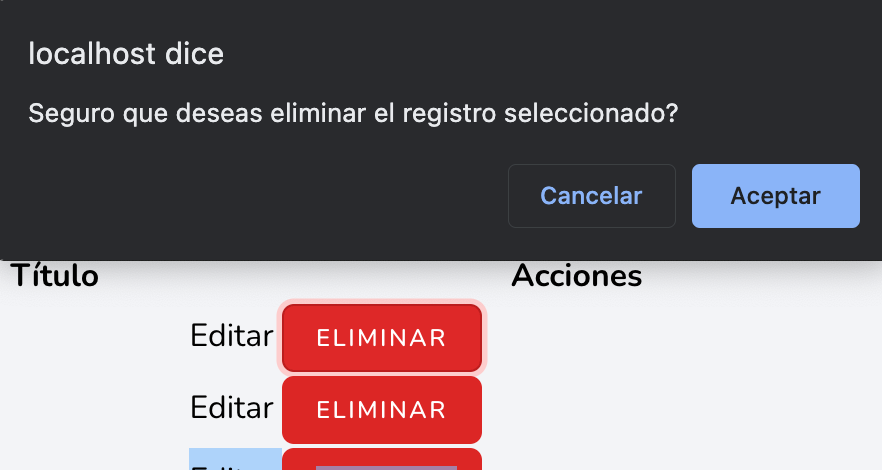
wire:confirmI think this tells us enough, and we could even leave it there because it's obviously pretty obvious, but we're going to do a little demonstration anyway. We're simply going to modify the button that, by default, calls a method called delete, so that now, by defining the previous parameter, a confirmation dialog box appears, and when pressed, the script defined in wire:click is executed:
<flux:button class="ml-3" variant='danger' size="xs" wire:click="delete({{ $c }})" wire:confirm="Are you sure you want to delete this category?">
     {{ __('Delete') }}
</flux:button>
Confirmation with “Prompt”
Another very interesting variant is specifying a prompt. According to the official documentation, this forces the user to type a specific word or phrase before performing the action.
This behavior is similar to GitHub's when you want to delete a repository and the system asks you to type the name of the repository to confirm.
To implement it, we follow this scheme:
- We indicate the main message of the question.
- We add the
.promptmodifier to the attribute. - We pass the instruction message followed by the keyword separated by a pipe (for example: "Type DELETE to continue|DELETE").
<flux:button size="sm" variant="danger" wire:confirm.prompt="{{ __('Are you sure?') }}\n\nType DELETE to confirm|DELETE" wire:click='delete({{ $category }})'>{{ __('Delete') }}</flux:button>You can use text interpolation to make the keyword dynamic (such as the category slug), but for this exercise, we will keep it as fixed text.
Prompt Testing:
- If you click delete and type anything else, the system will not perform any action.
- If you do not correctly configure the keyword after the pipe, Livewire will display a warning indicating that the configuration is invalid.
- Only when you type exactly the defined word (in this case, "DELETE"), the system will execute the delete method.
Delete confirmation dialog: Confirmation component
Flux also has a modal component; let's look at an implementation when deleting:
<flux:modal name="NAME">
   *** CONTENT ***
</flux:modal>
In the content, you can place anything; in our case, it will be a message like the following:
resources/views/livewire/dashboard/category/save.blade.php
resources\views\pages\dashboard\category\⚡save.blade.php
<flux:modal name="delete-category">
   <div class="m-1">
       <flux:heading>{{ __('Delete Category') }}</flux:heading>
       <flux:text class="mt-2">{{ __('Are you sure you want to delete this category?') }}</flux:text>
       <div class="flex flex-row-reverse">
       <flux:button class="mt-4" variant='danger' icon="trash">
           {{ __('Delete') }}
       </flux:button>
       </div>
   </div>
</flux:modal>
The name must be unique, since it is an identifier we will use to trigger the modal; to trigger it, there are several ways — the main ones include a trigger component, which is what we will implement:
resources/views/livewire/dashboard/category/save.blade.php
resources\views\pages\dashboard\category\⚡save.blade.php
<a href="{{ route('d-category-edit', $c) }}">Edit</a>
<flux:modal.trigger name="delete-category">
   <flux:button class="ml-3" variant='danger' size="xs">{{ __('Delete') }}</flux:button>
</flux:modal.trigger>
Notice that we use the name defined for the modal; for the button design, you can customize it as you like.
We can also trigger it from the component class:
// Control "confirm" modals anywhere on the page...
Flux::modal('confirm')->show();
Flux::modal('confirm')->close();
// Control "confirm" modals within this Livewire component...
$this->modal('confirm')->show();
$this->modal('confirm')->close();
// Closes all modals on the page...
Flux::modals()->close();
Via JavaScript:
<button x-on:click="$flux.modal('confirm').show()">
   Open modal
</button>
<button x-on:click="$flux.modal('confirm').close()">
   Close modal
</button>
<button x-on:click="$flux.modals().close()">
   Close all modals
</button>
***
// Control "confirm" modals anywhere on the page...
Flux.modal('confirm').show()
Flux.modal('confirm').close()
// Closes all modals on the page...
Flux.modals().close()
Or the wire object we will learn about later:
<flux:button x-on:click="$wire.showConfirmModal = true">Delete post</flux:button>Let's make the following adaptation:
resources/views/livewire/dashboard/category/index.blade.php
resources\views\pages\dashboard\category\⚡index.blade.php
***
<flux:modal name="delete-category">
   ***
       <flux:button class="mt-4" variant='danger' icon="trash" wire:click="delete()">
           {{ __('Delete') }}
       </flux:button>
       </div>
   </div>
</flux:modal>
Explanation of the previous code
The option to delete a category has been moved to the actions section, so that when we press a delete button; although it has an important change — we are no longer passing the category reference directly, this is set earlier, from the action links section in the categories table:
<flux:modal.trigger wire:click="selectCategodyToDelete({{ $c }})" name="delete-category">
   <flux:button class="ml-3" variant='danger' size="xs">{{ __('Delete') }}</flux:button>
</flux:modal.trigger>
This intermediate process exists because we cannot pass the category reference directly, since in the listing we have N categories and only one modal; therefore, when we press delete on a category, what we do is save the reference to the category we want to delete in a property in the component class:
public function selectCategodyToDelete(Category $category) {
 $this->categoryToDelete = $category;
}
The definition of the selectCategodyToDelete() method is found in the component class:
app/Http/Livewire/Dashboard/Category/Index.php
resources\views\pages\dashboard\category\⚡index.blade.php
class Index extends Component
{
   use WithPagination;
   public $categoryToDelete;
   public function seletedCategoryToDelete(Category $category)
   {
       $this->categoryToDelete = $category;
   }
   public function delete()
   {
       $this->dispatch("deleted");
       $this->categoryToDelete->delete();
   }
}
Explanation of the previous code
As mentioned before, with the intermediate method we select the category and store it in a property, which is then used when the click event is triggered from the delete button in the modal.
Finally, to hide the modal:
function delete(){
   $this->dispatch("deleted");
   Flux::modal("delete-category")->close();
   $this->categoryToDelete->delete();
}
With confirm() on JavaScript
A confirmation dialog is nothing more than a dialog box that is displayed in the browser to confirm an action to be performed in a web application. For example, if a user clicks a button that deletes a record in a table, a confirmation dialog can be displayed asking the user if he is sure that he wants to delete the record. Let's see how to implement one in Livewire.
Laravel Livewire is great, performing operations that require both sides, that is, the client and the server are always heavy since we have to create rest apis, and connect both entities, or from vanilla JavaScript, send fetch requests, return json, evaluate answer, make changes to the html... a real mess and a lot of work to make updates; Livewire abstracts us from all this using events and functions, as well as a base structure to be able to communicate between the client and the server in a very direct way.
The problem is that this facility sometimes makes us inflexible, and performing simple operations such as deleting, are too simple and direct with livewire; usually we have in Livewire something like:
<flux:button wire:click="delete({{ $p }})" href="#">
      Delete
In practice, if we click on the HTML element that has said attribute defined, it DELETES THE ELEMENT FROM ONE, which you probably won't want because our user may mistakenly click on that option; for deletions it is good practice to place a confirmation dialog; so, to avoid deleting records with a single click, on the same element that contains the wire:click, you can place a JavaScript onclick with said confirmation dialog:
<flux:button onclick="confirm('¿Seguro que quieres eliminar?') || event.stopImmediatePropagation()"  wire:click="delete({{ $p }})" href="#">
      Delete
</flux:button>
The key here is the stopImmediatePropagation which stops the scheduling of the event; livewire at its core uses events on the client to call events on the server, JavaScript events that we can also stop.
Next step, learn how to use Streaming in Laravel Livewire with wire:stream