
Content Index
- What is a state?
- State Managers
- Widget Tree and State Managers
- Provider
- Why use a State Manager?
- Provider: Installation and First Steps
- Provider: Initial Configuration
- Create Provider
- Register the Provider
- Listening to Changes
- Infinite Loops when using Providers or other state managers in Flutter - BE CAREFUL
- An anecdote with Providers in Flutter
- The Provider Structure
- The Danger of Infinite Loops
- The “Invisible” Error
- Why does this happen?
One problem we currently have in the application is that when creating or editing sites and returning to the list, we do not see these changes reflected in said list; to see them, we must restart the application or simply close and reopen it. This is a problem that can scale in many other scenarios where large applications are built with many windows, and the solution is the same as if it were a small application like this one.
And this is something that comes in very handy for having a scalable app with MVVM in Flutter.
What is a state?
Before diving into application creation and state management in Flutter, it is necessary to understand what a state actually is and how it affects our application.
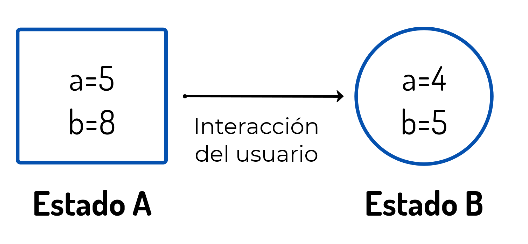
The state of an application is nothing more than a condition; a condition of how the application is at a given moment.
For example, your application displays two variables, a and b, with values 5 and 8 respectively; if there is a user interaction—which could be anything: an internet connection, the user clicking a button... ultimately, the values of variables a and b change to another value, say 4 and 5—that would be a different state of the application, State B.
State Managers
State managers are nothing more than a mechanism through which we can perform the management of the application's state.
Managing the application state allows for tracking every change within it and provides the possibility to notify changes throughout the entire application; ultimately, it allows:
- Responding to user interactions.
- Notifying changes in state across the different screens of the application.
Widget Tree and State Managers
The widget tree in Flutter is a node-level representation of how widgets relate to each other, which we introduced in the first chapters of this book; it is important to keep it in mind to understand the advantages that state managers offer us in Flutter.
For a simple application like the one we have, which can be simplified as:
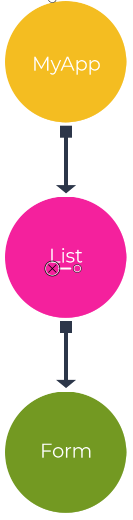
The numbering of the nodes is simply an identification and has nothing to do with priority.
We must notify node 3, which is the form for creating/editing sites, to node 2. Although node 2 is the parent of node 3, and a communication mechanism could be implemented between them—as was done previously when working on the selection of an image provided by the user:
  _ImageField(
    key: Key(_keyImageField),
    onSelectedImage: _selectedImage,
    imageDefault: _routeImage,
To pass the edited or created site through a function or similar; but what happens if the communication is not only to the direct node, but to other nodes that are part of other branches or are higher up (or lower) than the node in charge of applying said change.
Carrying out direct communications between widgets is something that must be handled with care; the previous solution is ideal for functionality that we know will be limited (selecting an image, placing it in a container, and notifying its parent about the file path). However, when it comes to managing global elements such as a counter, authenticated user data, a list (of sites, as in our case), and essentially any theme handled globally across the application—like posts, images, videos, records, etc.—the best thing to use are state managers. This is because the application might not function as expected when it has new screens or behaviors; besides:
- The screens forming your application would have additional implementations that are not part of the functionality of that window, but rather to communicate with other screens (parents or children).
- This results in the application being less maintainable and scalable.
- More time is required to develop the application than necessary.
Ultimately, I hope you are convinced that it is necessary in many cases to implement a state manager like Provider.
Provider
The Provider state manager for Flutter is very simple to use, configure, and extend; therefore, it is easier to understand how other state managers like BLoC or Redux work starting from Provider. This does not mean you cannot use Provider in a real application; each state manager has its strengths and weaknesses; therefore, it is necessary to know several of them to determine which will work best in our application.
Why use a State Manager?
Without a state manager, you would have to manually pass data from child to parent, and from that parent to another child, creating an extremely complex and difficult-to-maintain communication flow.
State managers greatly facilitate this process:
- Strategic location: You can place the data "provider" at any level of the tree.
- Mass notification: Usually, we place it at the highest part (in the main) so that the entire application can "listen" to the changes.
- Flexibility: Although it is normal to put it at the root so it covers the whole app, you could also place a specific Provider only for a small section if you prefer.
Its official website is:
https://pub.dev/packages/provider
Provider: Installation and First Steps
To install Provider, we do it through the following package:
pubspec.yaml
dependencies:
  flutter:
    sdk: flutter
  // ***
  provider:
Provider: Initial Configuration
Using Provider is very simple; it is enough to indicate as many classes as entities you want to manage. For example:
If you had an authenticated user whose data can change throughout the application and whose data is used on all or several screens, you can create a provider class to manage the authenticated user's data.
If you had a list of elements (sites, for example), we would have a provider class to manage that list.
If you had a counter or another global object, another provider class for it.
Therefore, in an existing application, if you have another entity for which you want to manage state, you create another provider class and register it in the application.
Create Provider
In the case of the application we are building, it is enough to define a single provider for the entity we are managing, which would be sites—in other words, a list of sites.
We create that class:
lib\providers\PlacesProvider.dart
import 'package:flutter/material.dart';
import 'package:place/helpers/db_helper.dart';
import 'package:place/models/place.dart';
class PlacesProvider with ChangeNotifier {
  List<Place> _places = [];
  List<Place> get places {
    return [..._places];
  }
  Future<void> getAndPlaces() async {
    _places = await DBHelper.places();
    notifyListeners();
  }
}
Explanation of the previous code
The class extends ChangeNotifier, which allows us to use the notifyListeners() method that is part of the Flutter API and according to the official documentation:
Call this method whenever the object changes, to notify any clients the object may have changed...
With this method, every time we make changes to the entity we want to manage the state of (sites in this case), we notify the listeners, which would obviously be our screens.
In the previous class, we defined a get method for the entity whose state we are managing. It is important to note that the entity is private; therefore, it can only be accessed from within the class. To make it public, it is done in a controlled way:
- To obtain the data (which is done by creating another property with the same name but public, in which the data is cloned using the spread operator—this is important because it prevents the widget from changing the data of the state-managed entity directly).
- As well as to initialize the state-managed entity (_places). With this, we gain an extra point: we separate part of the logic we implement to handle the data from the presentation of the data. When making a change at the _places level, we notify the changes through the notifyListeners() function to notify the listeners (the site list screen in this case).
Register the Provider
All providers we want to use must be registered at the highest point of the application where they will be used. In most cases, you can register it in the parent widget of the application, which would be in MyApp. This ensures you can use it throughout the entire application, although it is important to note that you can place it in widgets internal to it, for example, a screen, and therefore you could only use the providers in the widget where you register it (e.g., the screen) and its children.
Finally, if you want to use a single provider, you can use the following implementation:
lib\screens\add_place_screen.dart
import 'package:flutter/material.dart';
import 'package:place/providers/PlacesProvider.dart';
import 'package:provider/provider.dart';
void main() => runApp(ChangeNotifierProvider.value(
      value: PlacesProvider(),
      child: const MyApp(),
    ));
// ***
Or if you want to use several:
import 'package:flutter/material.dart';
import 'package:place/providers/PlacesProvider.dart';
import 'package:provider/provider.dart';
void main() => runApp(MultiProvider(
      providers: [
        ChangeNotifierProvider(
          create: (_) => PlacesProvider(),
        ),
      ],
      child: const MyApp(),
    ));
// ***
For the application we are building, you can use whichever you prefer.
Listening to Changes
We have already completed two fundamental steps:
- Creating the provider.
- Registering the provider.
The next step is to use it. For this, there are multiple variants, such as using methods to initialize, create, edit, update, and consume. Let's start with the method that allows us to initialize the list of sites:
lib\screens\index_place_screen.dart
// ***
  @override
  void initState() {
    _init();
    super.initState();
  }
  _init() async {
    //places = await DBHelper.places();
    await Provider.of<PlacesProvider>(context, listen: false).getAndPlaces();
    setState(() {});
  }
// ***
With the previous class, we are indicating that we are going to use a provider:
Provider.of
Of type PlacesProvider (the only one we have):
Provider.of<PlacesProvider>And listen must be used when we define the provider and do not want to rebuild a widget; if you do not set listen to false, you would get an exception like the following:
Tried to listen to a value exposed with provider, from outside of the widget tree.
This is likely caused by an event handler (like a button's onPressed) that called
Provider.of without passing `listen: false`.
And we indicate which resource we want to obtain, whether functions or (public) properties:
Provider.of<PlacesProvider>(context, listen: false).getAndPlaces();Now, with the list initialized, the next thing we are going to do is build the list. For that, we consume the cloned list from _places:
lib\screens\index_place_screen.dart
// ***
  @override
  Widget build(BuildContext context) {
    places = Provider.of<PlacesProvider>(context).places;
// ***
In this case, we do not use listen as false, as we are interested in obtaining the response to redraw the widget.
In short:
- If the provider's response is not going to be used directly to redraw a widget, set listen to false.
- If the provider's response is going to be used to redraw a widget, the listen option is not used.
Infinite Loops when using Providers or other state managers in Flutter - BE CAREFUL
An anecdote with Providers in Flutter
In this section, I wanted to tell you a very interesting anecdote (if it can be called that) I had with Providers. It is what I am using, for example, to define the application theme. Look at how I have the code structured:
class MyApp extends StatelessWidget {
@override
Widget build(BuildContext context) {
  final appModel = Provider.of<AppModel>(context, listen: false);
  _initData(context);
  return MaterialApp(
    // ...
    theme: appTheme.currentTheme,
    // ...
  );
}
_initData(BuildContext context) async {
   final appTheme = Provider.of<ThemeSwitch>(context, listen: false);
}
The Provider Structure
This is for those who already handle a bit of Flutter, but I'll explain it quickly anyway. Above, I have the Main with the initialization of several things. I have a couple of Providers: one for the theme and another for the data model (AppModel). Although there are many ways to define them, I place them nested at the highest part of the application, right in the runApp, so they are available globally.
The theme Provider is responsible for managing dark mode and light mode. In practice, this is controlled through a switcher in the drawer. We place it at the highest level so that when a theme is selected, the change propagates downwards throughout the entire application, applying my brand colors (like that purple I always use).
The Danger of Infinite Loops
Being a Provider, the system is responsible for listening for changes:
class MyApp extends StatelessWidget {
@override
Widget build(BuildContext context) {
  final appModel = Provider.of<AppModel>(context, listen: false);
  _initData(context);
  // …
This is where the problem arose. I wanted to do a kind of "synchronization." Since the Academy application is also available on the web, if I switch to light mode and have the same authenticated user, the mobile app should react and synchronize according to what is set in the database.
The “Invisible” Error
If I remove the conditional and reload the application, something curious happens. At first, it seems to work, but if you analyze it well, you realize something is wrong. Communication with the server is not full-duplex; so how does it synchronize "automatically"?
To find out what was happening, I placed a print in the function:
Dart
_initData(BuildContext context) async {
   print("test");
   final appTheme = Provider.of<ThemeSwitch>(context, listen: false);
}
Checking the console, I saw that the message "test" appeared non-stop. It was being called in cycles, sending multiple requests per second to our server. If a thousand users connect like this, you collapse the server at some point and, additionally, you consume all the client's data.
Why does this happen?
Even with the listen: false parameter, the problem is that everything occurs within the same widget (MyApp). When updating the Provider inside _initData, a change is notified that forces the application to redraw, which re-executes the build, which in turn calls _initData again, creating an infinite loop.
class MyApp extends StatelessWidget {
 _initData(BuildContext context) async {
   final appTheme = Provider.of<ThemeSwitch>(context, listen: false);
   // This triggers the app redraw
   appTheme.darkTheme = userPreference.themeDarkMode = darkMode;
}
This is a very common error and difficult to detect at first glance. Your application can crash for no apparent reason, become slow, or collapse trying to load thousands of records or images in a loop.
The message I want to give you is this: be very careful with initialization logic. Always ensure that these infinite loops do not exist, because they can completely ruin the user experience and the stability of your server.
Learn now how to use the Redux state manager in Flutter.