
Content Index
- What is a Flutter Package?
- Case Study: An Artificial Intelligence Integration Package
- Dependency Management: Private Repositories and Overrides
- Using dependency_overrides in Local Development
- Privacy and Element Exposure
- How does Dart know that this file is the one in charge?
- Using the package in your app
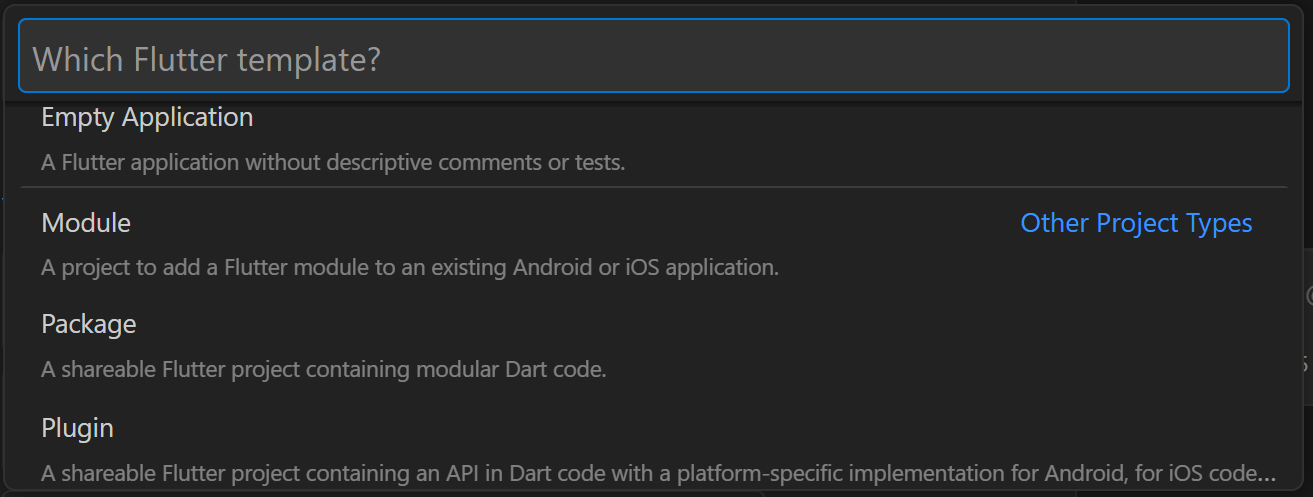
As a Flutter application grows, the need arises to modularize code and reuse functionalities across multiple projects. The Flutter ecosystem offers different mechanisms to package code. When creating a new project in environments like Visual Studio Code using the Flutter: New Project command, the interface displays several options that are worth distinguishing:
- Flutter Application / Empty Application: This is the standard option to build a final application. The Empty version generates a blank canvas without the default counter code.
- Flutter Module: Designed for integrating Flutter into existing native applications (Android or iOS). It allows adding Flutter screens or components on top of a root native architecture without altering its codebase.
- Flutter Plugin: A structure that allows creating a specialized library, but with the unique requirement of including native code (Kotlin/Java on Android or Swift/Objective-C on iOS) to communicate with hardware or operating system APIs.
- Flutter Package: This is the appropriate option for building libraries written exclusively in Dart. It allows encapsulating business logic, utilities, or custom visual components (widgets) to easily share them among multiple Flutter applications.
We left off with knowing how to update an existing project or application in Flutter.
What is a Flutter Package?
A Flutter package is a pre-designed collection of code that adds functionalities and features to your Flutter application. They act as building blocks, saving you time and effort by allowing you to reuse existing code instead of writing everything from scratch. These packages can include widgets, libraries, utilities, assets, and more, enabling developers to easily integrate them into their Flutter projects.
There is also a distinction in Flutter between "packages" and "plugins". Packages generally refer to a collection of pure Dart code, while plugins refer to packages with native code inside them. Keep in mind that the word "package" in this series encompasses both packages and plugins, unless specifically stated otherwise.
A package can be added to an application through the pubspec.yaml file (which will be discussed later) via the dependencies section:
dependencies:

   stream_chat_flutter:
Case Study: An Artificial Intelligence Integration Package
To illustrate the usefulness of a package, we will analyze a practical case: a generic connector for Large Language Model (LLM) providers like Gemini or Perplexity. In a mobile application designed for language learning (such as English practice), the software must connect to these APIs using specific prompts and map the responses into strict data structures.
Since the connection logic, URL handling, API Key validation, and model parameter configuration (such as the system prompt) are generic functionalities, encapsulating them into an independent Package allows reusing this artificial intelligence engine in other projects (for example, a notes application that needs to summarize text), without duplicating the source code.
The encapsulated service exposes abstract and concrete methods to interact with the endpoints, completely abstracting the main application from the complexity of the HTTP request or the AI SDK.
lib\src\services\ia_api_service.dart
import 'dart:convert';
import 'package:http/http.dart' as http;

import '../models/ai_provider.dart';
import '../models/ai_request_config.dart';

//region API Constants
const String _geminiApiUrl =
    "https://generativelanguage.googleapis.com/v1beta/models/gemini-2.5-flash:generateContent";
const String _perplexityApiUrl = "https://api.perplexity.ai/chat/completions";
const String _openAiApiUrl = "https://api.openai.com/v1/chat/completions";
const String _grokApiUrl = "https://api.x.ai/v1/chat/completions";

const String _perplexityModel = "sonar-pro";
const String _openAiModel = "gpt-4o-mini";
const String _grokModel = "grok-3-mini";
Future<List<T>> executeRequest<T>(
  AiRequestConfig<T> config,
  String apiKey,
) async {
  final rawItems = await callAi(
    provider: config.provider,
    apiKey: apiKey,
    userPrompt: config.buildPrompt(),
    outputSchema: config.outputSchema,
    systemContent: config.systemContent,
  );
  return rawItems.map(config.parseItem).toList();
}
However, you can also implement widgets:
lib\src\widgets\api_key_dialog.dart
  const ApiKeyDialog({
    super.key,
    this.apiKey,
    required this.onSave,
    this.titleAdd = 'Add API Key',
    this.titleEdit = 'Edit API Key',
    this.labelApiType = 'API Type',
    this.labelApiKey = 'API Key',
    this.labelCancel = 'Cancel',
    this.labelSave = 'Save',
    this.labelWait = 'Validating key...',
    this.errorEmptyKey = 'Please enter a key',
  });

  @override
  State<ApiKeyDialog> createState() => _ApiKeyDialogState();
}

class _ApiKeyDialogState extends State<ApiKeyDialog> {
  final _formKey = GlobalKey<FormState>();
  final _keyController = TextEditingController();
  AiProvider _selectedProvider = AiProvider.gemini;
  bool _isValidating = false;
Dependency Management: Private Repositories and Overrides
A package does not necessarily need to be published openly on the official pub.dev repository. For commercial or private developments, it is common to host the code in a private GitHub repository. To consume this package in your applications, you must declare it in the pubspec.yaml file pointing directly to the Git path:
# Consuming a private package from a Git repository
dependencies:
  ia_service:
    git:
      url: git@github.com:tu-usuario/ia_service.git
      ref: main
Using dependency_overrides in Local Development
Working directly with remote repositories during the development phase is inefficient, as it would force you to do a git push and a flutter pub get for every modification introduced to the package. To solve this, Flutter allows temporarily rewriting the dependency path to a local location on your development machine using dependency_overrides:
# Configuration in the main application during local development
dependencies:
  ia_service:
    git:
      url: git@github.com:tu-usuario/ia_service.git
      ref: main

dependency_overrides:
  ia_service:
    path: ../ia_service
By placing the package folder at the same level as the application project (side by side), you can simultaneously modify the package and the app. Changes will be reflected immediately in the local environment without altering the remote version control.
Privacy and Element Exposure
A key difference in the structure of a package compared to a traditional application is how the visibility of its classes, functions, and widgets is managed. The golden rule in Dart determines that the only file publicly exposed to the outside is the one located at the root of the lib/ folder.
By convention, the rest of the logic (concrete services, internal models, dialog interfaces) is stored inside subfolders (for example, lib/src/, lib/models/, etc.). These folders are considered strictly private to the consuming application.
ai_service/
└── lib/
    ├── ai_service.dart       <-- PUBLIC! Here you configure the exports with Dart code.
    └── src/                  <-- PRIVATE! No one from the outside can touch this directly.
        ├── models/
        ├── services/
        └── widgets/
To selectively expose components to the outside, the root file of the lib/ folder (for example, lib/ia_service.dart) acts as a "barrel" file, using the library keyword and export directives:
// Root file: lib/ia_service.dart
library ia_service;

// Expose public elements for consuming applications
export 'models/provider_model.dart';
export 'services/ai_connector_base.dart';
export 'widgets/api_key_dialog.dart';
This way, the application consuming the package will only need to make a single import (import 'package:ia_service/ia_service.dart';) to access all authorized classes and widgets, protecting auxiliary or internal-use components of the package.
How does Dart know that this file is the one in charge?
By the library declaration you put on the first line of your file:
library ai_service;
Using the package in your app
Once the package is registered, using it is as simple as if it were a local class or resource in the project:
import 'package:ai_service/ai_service.dart';

    void _showApiKeyDialog({ApiKey? apiKey}) {
    showDialog(
      context: context,
      builder: (context) => ApiKeyDialog(
        apiKey: apiKey,
        titleAdd: 'add_api_key'.tr(),
        titleEdit: 'edit_api_key'.tr(),
Next step, how to create a native Android widget from Flutter using home_widget.