
Content Index
Being able to configure some test data is ideal when our entities grow in size and we already have our Hello World in FastAPI; we already have the foundation to take the next step and generate test data; with this, we gain a few seconds each time we perform tests in the API through automatic documentation.
From parameters like the body, but you can also apply it to those you can see:
- Path()
- Query()
- Header()
- Cookie()
- Body()
- Form()
- File()
Example data in models
To create test data using a model, we have the following structure:
models.py
class Task(MyBaseModel):
    ***
    model_config = {
        "json_schema_extra": {
            "examples": [
                {
                "id" : 123,
                "name": "Salvar al mundo",
                "description": "Hola Mundo Desc",
                "status": StatusType.PENDING,
                "tag":["tag 1", "tag 2"],
            ]
        }
    }
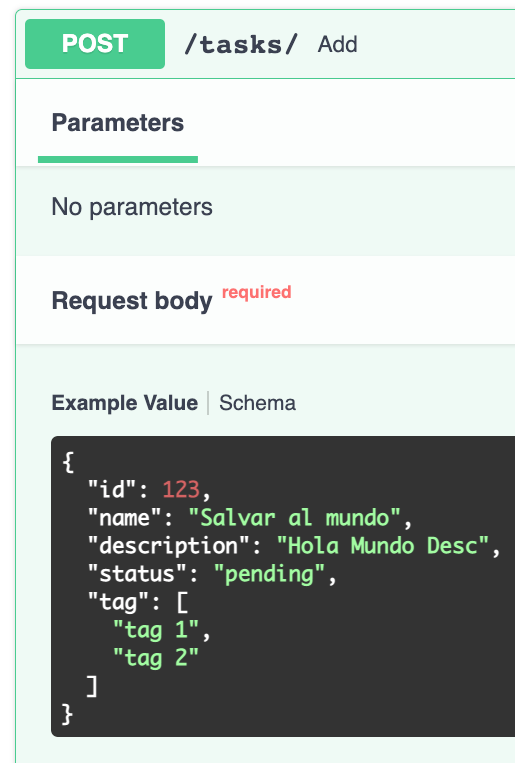
With this, we will see the previously defined format in the documentation at the time of creation (or similar processes):
Nested relationships
If there are relationships in the entity, as in our case with the tasks relationship, it is enough to specify them as you can see in the following example:
models.py
class Task(MyBaseModel):
    ***
    model_config = {
        "json_schema_extra": {
            "examples": [
                {
                "id" : 123,
                "name": "Salvar al mundo",
                "description": "Hola Mundo Desc",
                "status": StatusType.PENDING,
                "tag":["tag 1", "tag 2"],
                "category": {
                    "id":1234,
                    "name":"Cate 1"
                },
                "user": {
                    "id":12,
                    "name":"Andres",
                    "email":"admin@admin.com",
                    "surname":"Cruz",
                    "website":"http://desarrollolibre.net",
                }
                }
            ]
        }
    }
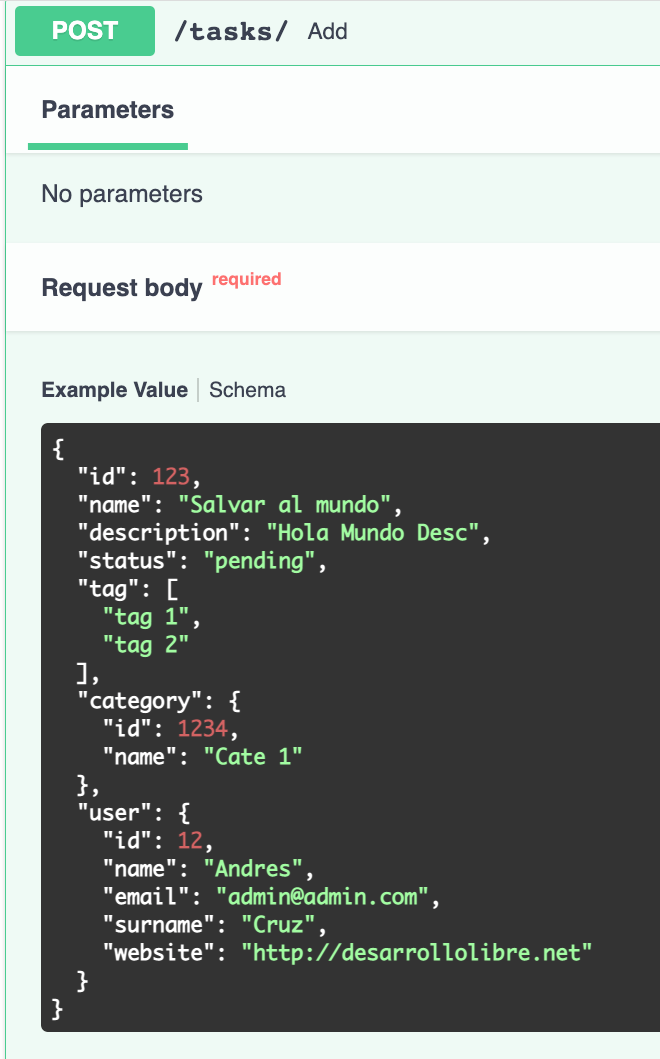
And we will have:
Example data from the argument
We can also define example data; in this video, we are going to see it using 'examples' and in the next one using 'openapi_examples'. For that, the structure is very similar to what we already have. It is also important to note that if we define it at the model level and then define it at the argument level, these override the ones defined at the model level:
@task_router.put("/",status_code=status.HTTP_200_OK)
def update(index: int, task: Task = Body(
    examples=[
                {
                   "id" : 123,
                    "name": "Salvar al mundo",
                    "description": "Hola Mundo Desc",
                    "status": 'PENDING',
                    "tag":["tag 1", "tag 2"],
                },
                {
                    "name": "Bar",
                },
                {
                    "name": "Baz",
                },
            ],
)):
    ***
Or define a single value in the class:
class Task(MyBaseModel):
    name: str #= Field(examples=['MyUserAdmin'])
    description: Optional[str] = Field("No description",min_length=5, examples=['Descrip'])
Example data from the argument
In this section, we will see how to add example data directly from the API function arguments.
Simple example
We can also declare test data for Body(), Path(), and Query(); for example:
@app.get("/ep_phone/{phone}") # +34 111 12-34-56
def phone(phone: str = Path(pattern=r"^(\(?\+[\d]{1,3}\)?)\s?([\d]{1,5})\s?([\d][\s\.-]?){6,7}$", example="+34 111 12-34-56")):
    return {"phone": phone}
Or
@app.get("/e_phone/") # +34 111 12-34-56
def phone(phone: str = Query(pattern=r"^(\(?\+[\d]{1,3}\)?)\s?([\d]{1,5})\s?([\d][\s\.-]?){6,7}$", example="+34 111 12-34-56")):
    return {"phone": phone}
List of example data: OpenAPI
If we want to offer a list of example options in our documentation, we can use the OpenAPI Examples functionality. To do this, we must vary the traditional structure slightly and organize the information within the examples parameter of Body.
Each example within the dictionary must contain:
- Key: A unique identifier (e.g., "example1").
- Summary: The text that will serve as the label in the dropdown menu (Select).
- Description (Optional): A more detailed explanation of the use case.
- Value: The dictionary with the actual data that will be sent in the request.
@task_router.put("/", status_code=status.HTTP_200_OK)
def update(index: int, task: Task = Body(
    # examples=[
    #     {
    #         "id": 1234,
    #         "name": "Salvar al mundo",
    #         "description": "Hola Mundo Desc 2",
    #         "tag":["tag 1", "tag 2"],
    #     }
    # ]
    openapi_examples={
        "example1": {
            "summary": '1 Example',
            "value": {
                "id": 123,
                "name": "Salvar al mundo",
                "description": "Hola Mundo",
                "tag": ["tag 1", "tag 4"],
            }
        },
        "example2": {
            "summary": '2 Example',
            "value": {
                "id": 1234,
                "name": "Salvar al mundo",
                "description": "Hola Mundo Desc 2",
                "tag": ["tag 1", "tag 2"],
            }
        }
    }
)):
Another example:
task.py
@task_router.put("/", status_code=status.HTTP_200_OK)
def update(index: int, task: Task = Body(
   openapi_examples={
       "Ejemplo 1": {
           "summary": "Primer ejemplo",
           "description": "Carga una tarea con todos los campos completos.",
           "value": {
               "id": 123,
               "name": "Salvar al mundo",
               "description": "Descripción de prueba",
               "status": "PENDING",
               "tag": ["tag 1", "tag 2"],
           },
       },
       "Ejemplo 2": {
           "summary": "Segundo ejemplo (Simplificado)",
           "value": {
               "name": "Sacar la basura",
               "tag": ["etiqueta 4"],
           },
       },
   }
)):
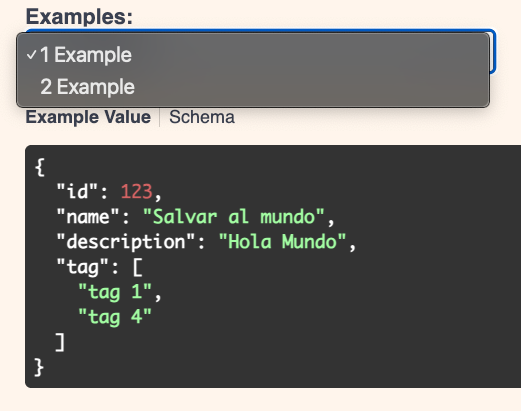
Where summary corresponds to the name of the select label:
Interface Verification (Swagger)
By commenting out the example we previously defined at the model level and using openapi_examples within Body, the FastAPI documentation updates automatically.
Instead of showing a single static JSON, a selector (Select) will now appear. When you expand it, you will see the names we defined in the summary fields. Depending on the option you choose, the request body (Value) will change dynamically, making it easier to test different data scenarios.
The next step is to learn how to execute code on startup or shutdown using the Lifespan event in FastAPI